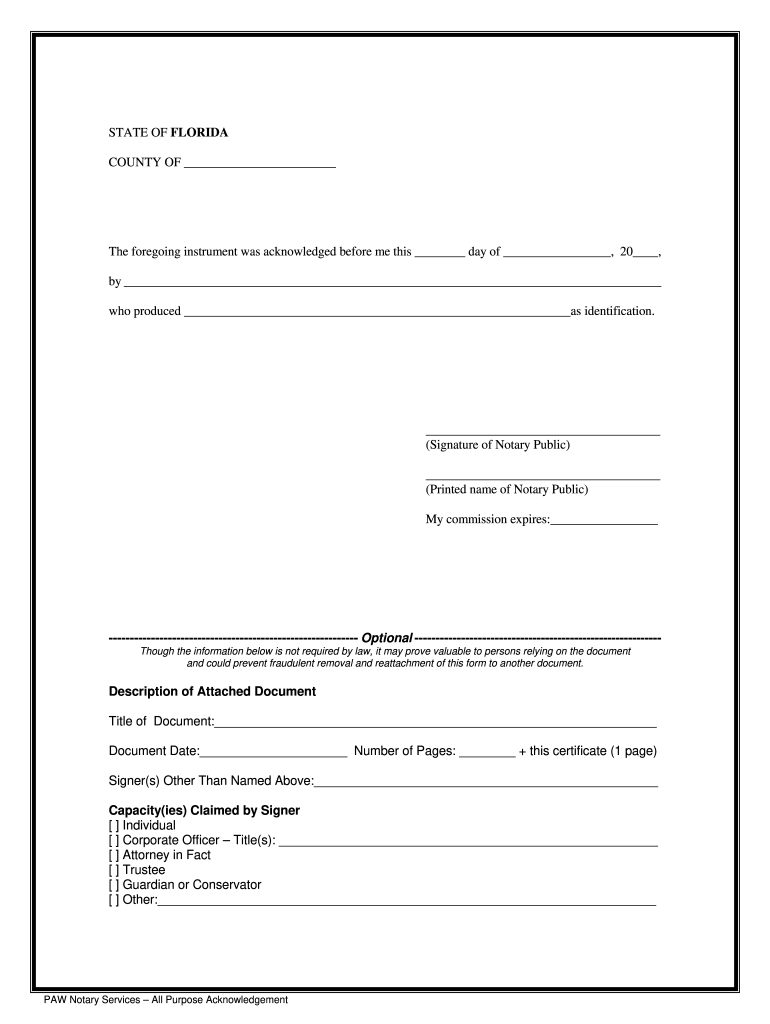
Who produced as identification. (Signature of Notary Public) (Printed name of Notary Public) My commission expires: ----------------------------------------------------------- Optional ----------------------------------------------------------Though the information below is not required by law, it.
Loading

Open form follow the instructions

Easily sign the form with your finger

Send filled & signed form or save
How to fill out the FL PAW Notary Services online
Filling out the FL PAW Notary Services form online can simplify the process of notarization. This guide provides clear, step-by-step instructions to help you complete the form accurately and efficiently.
Follow the steps to successfully complete the FL PAW Notary Services form.
- Click the ‘Get Form’ button to obtain the FL PAW Notary Services document and open it for editing.
- In the designated space, enter the date of acknowledgment — the day you are filling out the form.
- In the next section, provide the full name of the person acknowledging the document.
- Specify the type of identification the individual presented by filling in the relevant details.
- The notary public must sign in the signature line provided and print their name beneath the signature.
- Input the expiration date of the notary's commission in the space provided.
- Optionally, fill in the description of the attached document, including the title and document date.
- Indicate the number of pages of the attached document along with this certificate, ensuring clarity.
- List any signers other than the named individual regarding the document, if applicable.
- Check the relevant capacity or roles of the signer by marking the appropriate box.
- Once all fields are filled, review the document for accuracy. You can then save changes, download, print, or share the completed form.
Start completing your FL PAW Notary Services form online today!
Experience a faster way to fill out and sign forms on the web. Access the most extensive library of templates available.
Related content
For states that do not have their own forms, you will be brought to a "general" parental...
Since all Notary signing agents are also Notary public by default, you can also offer your...
Get answers to your most pressing questions about US Legal Forms API.
What is the proper way to perform an acknowledgement?
The proper way to perform an acknowledgement involves ensuring that the signer is present and has willingly signed the document. After confirming the signer’s identity, complete the acknowledgement form with relevant details. Affix your notary seal and signature, ensuring everything is done neatly. Utilizing FL PAW Notary Services can enhance your understanding and execution of this essential task.
How do I fill out a Florida notary acknowledgement?
To fill out a Florida notary acknowledgement, start with a pre-printed acknowledgement form or create your own. Input the date, the signer’s name, and include a declaration that the signer appeared before you. Don't forget to affix your notary seal and sign the acknowledgement. FL PAW Notary Services provides templates that simplify this process.
How to fill out a notary journal in Florida?
Filling out a notary journal in Florida requires you to record details about each notarization. Include the date, type of document, names of the signers, and your notary fees if applicable. It is essential to keep accurate records as this reinforces the credibility of your notarial acts. Consider using FL PAW Notary Services for tips on managing your journal effectively.
What is an example of signed acknowledgement?
An example of a signed acknowledgement includes a document where the signer declares, 'I, Signer’s Name, hereby acknowledge that I signed this document willingly.' Following this statement, you would place your notary information. FL PAW Notary Services can assist you in crafting such acknowledgements, ensuring they meet Florida’s legal requirements.
What is the wording to notarize a document in Florida?
The typical wording to notarize a document in Florida includes a statement like, 'State of Florida, County of County Name, Before me, Name of Notary, personally appeared Name of Signer, who is identification type, and acknowledged that he/she executed the foregoing document.' Include your notary seal and signature to finalize the notarization. Using FL PAW Notary Services makes it easy to access proper templates.
What is the most common mistake made by a notary?
The most common mistake made by a notary includes failing to properly complete an acknowledgement. This often occurs when notaries neglect to fill in their details, sign, or affix their seal to a document. To avoid such errors, using FL PAW Notary Services can provide guidance and ensure each step is correctly performed. Always double-check your work for accuracy.
What are the key words for an acknowledgement notary?
Key words for an acknowledgement notary include signature, acknowledge, notary public, sworn, and seal. These terms emphasize the essential components required during the notarization process. Utilizing these keywords effectively can enhance your understanding and the smooth delivery of FL PAW Notary Services. Always remember to double-check these elements to ensure accuracy.
How to fill out a notary acknowledgement in Florida?
To fill out a notary acknowledgement in Florida, start by providing the name of the person whose signature you are notarizing. Next, include the date of the signature and a statement declaring that the individual appeared before you. Ensure you also affix your official notary seal and sign the document in the appropriate space. Utilizing FL PAW Notary Services can help streamline this process.
Can you edit a document after it's been notarized?
It is not advisable to edit a document after it has been notarized, as any changes can invalidate the notarization. Once a document is signed and sealed, its integrity must remain intact. For any necessary adjustments, it is often best to create a new document and notarize it anew, ensuring compliance with FL PAW Notary Services.
What is the most common mistake made by a notary public?
One common mistake made by notaries is failing to correctly complete the notary certificate. This might include missing signatures, incorrect dates, or not having the notary seal present. Avoiding these errors is essential for maintaining the integrity of FL PAW Notary Services.
Use professional pre-built templates to fill in and sign documents online faster. Get access to thousands of forms.
If you believe that this page should be taken down, please follow our DMCA take down process here.