Loading
Form preview
  • US Legal Forms
  • Other Templates
  • Legal Forms
  • South Carolina Legal Forms
  • Sc Scca 410 2009

Get Sc Scca 410 2009-2026

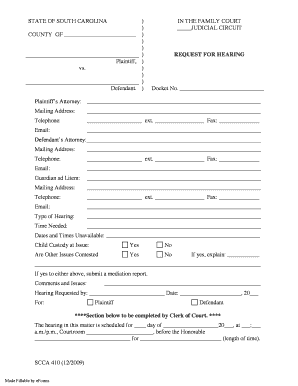
Plaintiff s Attorney: Mailing Address: Email: Telephone: ext. Fax: Defendant s Attorney: Mailing Address: Email:.

How it works

  1. Open form

    Open form follow the instructions

  2. Easily sign form

    Easily sign the form with your finger

  3. Share form

    Send filled & signed form or save

How to fill out the SC SCCA 410 online

The SC SCCA 410 is an essential form used in the family court to request a hearing. This guide will provide you with a clear, step-by-step approach to completing the form online effectively.

Follow the steps to complete the SC SCCA 410 form seamlessly.

  1. Click the ‘Get Form’ button to access the document and open it in the online editor.
  2. Begin by filling out the county where the case is filed, followed by the names of the plaintiff and defendant in the designated areas.
  3. Next, indicate the judicial circuit by filling in the respective area on the form.
  4. Complete the 'Request for Hearing' section by entering the docket number associated with your case.
  5. Provide the contact details of the plaintiff’s attorney, including the mailing address, email, telephone number, and fax number.
  6. If applicable, fill out the details for the defendant's attorney with the same information required for the plaintiff’s attorney.
  7. Include the details for the Guardian ad Litem, if one is involved, ensuring all fields are properly filled out.
  8. Specify the type of hearing requested and the estimated time needed for the hearing.
  9. List any dates and times when you are unavailable for the hearing.
  10. Indicate whether child custody or any other contested issues are involved by checking the appropriate boxes.
  11. If there are contested issues, provide an explanation in the space provided and be sure to include a mediation report if necessary.
  12. Lastly, sign the form by indicating who is requesting the hearing and include the date of the request.
  13. After completing the form, review all information for accuracy and completeness.
  14. Save your changes, and then you have the option to download, print, or share the completed form as needed.

Start filling out your SC SCCA 410 form online today to ensure a smooth request process.

Get form

Experience a faster way to fill out and sign forms on the web. Access the most extensive library of templates available.
Get form

Related content

Family Court Rosters
New form SCCA 410A, related to the amended version of Rule 21, is available here. E-mail...
Learn more
South Carolina Forms Index: SC Courts
Nov 8, 2024 — This program allows you to quickly and easily complete the child support...
Learn more
Broadcasting Sep 3
Sep 3, 1990 — Conway, SC (BPH880229N1)-- Granted app. of. Conway Broadcasting Co. for...
Learn more

Related links form

Portability Intake Form Emergency Medical Authorization And Student Information ENGRAVED PHENOLIC PLASTIC NAMEPLATES Business Casual Dress Code

Questions & Answers

Get answers to your most pressing questions about US Legal Forms API.

Contact support

You may stop paying child support when you receive a signed order from a family court judge ending your responsibility to pay child support. You can request to stop your child support payments because your child is emancipated (e.g., your child has turned 18, is married, becomes self-supporting, etc.).

The ruling is challenged in the South Carolina Court of Appeals. The parent filing the appeal has 30 days to do it. It can be filed on the merits of the case, although temporary orders are not able to be appealed. The appeals court will review the decisions based on child custody.

A person who is convicted of or pleads guilty to criminal contempt is guilty of a felony and, upon conviction, must be fined within the discretion of the court or imprisoned for not more than five years, or both.

Contempt of court is an act of disrespect or disobedience toward a court or interference with its orderly process. Examples include disrupting court proceedings, interfering with attempts to obtain evidence, destroying evidence, disobeying a court order, and intimidating witnesses.

A contempt action, otherwise known as a Rule to Cause, occurs when someone is alleged to have violated an order such as failing to pay child support. Every case typically ends with a Final Order. Even while the cases are going on, sometimes Temporary Orders are issued.

The legal action taken in South Carolina Family Court to enforce an Order is called a “Rule to Show Cause.” The complaining party must file a Complaint of Contempt and must show to the Family Court that some violation of a past order is occurring.

A contempt action, otherwise known as a Rule to Cause, occurs when someone is alleged to have violated an order such as failing to pay child support. Every case typically ends with a Final Order. Even while the cases are going on, sometimes Temporary Orders are issued.

The enforcement powers of the Family Court are known as the “Contempt Powers,” and are outlined by the South Carolina Code of Laws as follows: (1) up to one year in prison, (2) a fine up to $1,500, and/or (c) up to 300 hours of community service.

Get This Form Now!

Use professional pre-built templates to fill in and sign documents online faster. Get access to thousands of forms.
Get form
If you believe that this page should be taken down, please follow our DMCA take down processhere.
Get SC SCCA 410
Get form
  • Adoption
  • Bankruptcy
  • Contractors
  • Divorce
  • Home Sales
  • Employment
  • Identity Theft
  • Incorporation
  • Landlord Tenant
  • Living Trust
  • Name Change
  • Personal Planning
  • Small Business
  • Wills & Estates
  • Packages A-Z
  • Affidavits
  • Bankruptcy
  • Bill of Sale
  • Corporate - LLC
  • Divorce
  • Employment
  • Identity Theft
  • Internet Technology
  • Landlord Tenant
  • Living Wills
  • Name Change
  • Power of Attorney
  • Real Estate
  • Small Estates
  • Wills
  • All Forms
  • Forms A-Z
  • Other Templates
  • Legal Hub
  • About Us
  • Help Portal
  • Legal Resources
  • Blog
  • Affiliates
  • Contact Us
  • Delete My Account
  • Site Map
  • Industries
  • Forms in Spanish
  • Localized Forms
  • State-specific Forms
  • Forms Kit
  • Real Estate Handbook
  • All Guides
  • Notarize
  • Incorporation services
  • For Consumers
  • For Small Business
  • For Attorneys
  • USLegal
  • FormsPass
  • pdfFiller
  • signNow
  • altaFlow
  • DocHub
  • Instapage
Form Packages
  • Adoption
  • Bankruptcy
  • Contractors
  • Divorce
  • Home Sales
  • Employment
  • Identity Theft
  • Incorporation
  • Landlord Tenant
  • Living Trust
  • Name Change
  • Personal Planning
  • Small Business
  • Wills & Estates
  • Packages A-Z
Form Categories
  • Affidavits
  • Bankruptcy
  • Bill of Sale
  • Corporate - LLC
  • Divorce
  • Employment
  • Identity Theft
  • Internet Technology
  • Landlord Tenant
  • Living Wills
  • Name Change
  • Power of Attorney
  • Real Estate
  • Small Estates
  • Wills
  • All Forms
  • Forms A-Z
  • Other Templates
Customer Service
  • Legal Hub
  • About Us
  • Help Portal
  • Legal Resources
  • Blog
  • Affiliates
  • Contact Us
  • Delete My Account
  • Site Map
  • Industries
  • Forms in Spanish
  • Localized Forms
  • State-specific Forms
  • Forms Kit
Legal Guides
  • Real Estate Handbook
  • All Guides
Prepared for you
  • Notarize
  • Incorporation services
Our Customers
  • For Consumers
  • For Small Business
  • For Attorneys
Our Sites
  • USLegal
  • FormsPass
  • pdfFiller
  • signNow
  • altaFlow
  • DocHub
  • Instapage
Social Media
Call us now toll free:
+1 833 426 79 33
As seen in:
© Copyright 1999-2026 airSlate Legal Forms, Inc. 17 Station Street, Ste. 203, Brookline, MA 02445
  • Your Privacy Choices
  • Terms of Service
  • Privacy Notice
  • Content Takedown Policy
  • Bug Bounty Program