Loading
Get Ct Jd-cv-95 2008-2026
How it works
-

Open form follow the instructions
-

Easily sign the form with your finger
-

Send filled & signed form or save
How to fill out the CT JD-CV-95 online
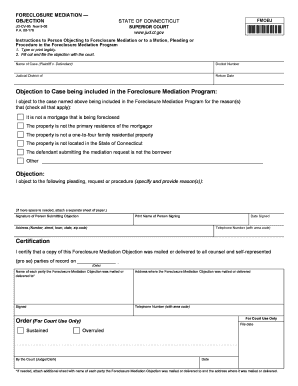
The CT JD-CV-95 form is used to object to a foreclosure mediation. This guide provides clear, step-by-step instructions for filling out the form online, ensuring that users of all backgrounds can navigate the process with confidence.
Follow the steps to expertly complete your objection form.
- Press the ‘Get Form’ button to access the CT JD-CV-95 form and open it in your editor of choice.
- Provide the name of the case at the top of the form, listing the plaintiff and defendant clearly.
- Enter the docket number associated with the case. This number is essential for identifying your objection within the court system.
- Indicate the judicial district where your case is filed. This detail helps direct your objection to the correct court.
- Specify the return date related to the objection. This date is often indicated in previous documentation from the court.
- Check all relevant boxes that apply to your objection, explaining why you believe the case should not be included in the Foreclosure Mediation Program. Ensure that your reasons are clear and valid.
- In the 'Objection' section, describe any specific pleadings, requests, or procedures you are objecting to, providing reasons for your objection clearly.
- Sign the form where it indicates the signature of the person submitting the objection. This confirms your official participation in the process.
- Print your name legibly in the designated area following your signature.
- Complete the date signed, including the month, day, and year.
- Fill in your address, including the number, street, town, state, and zip code, so that the court can contact you if necessary.
- Provide your telephone number, including the area code, for any follow-up communication.
- In the certification section, confirm that a copy of your Foreclosure Mediation Objection was mailed or delivered to all relevant parties, entering the date of delivery.
- List the names and addresses of each party the objection was delivered to, ensuring all details are accurate.
- If more space is needed, attach a separate sheet with any additional names and addresses.
- Once you have completed and reviewed the form, save changes, download a copy, print it, or share it as necessary before submission.
Start filling out your CT JD-CV-95 online today to ensure your objections are timely and properly filed.
Filing for workers' comp in Connecticut involves notifying your employer and completing the appropriate claim forms. Make sure to include medical documentation and any other relevant details. Utilizing resources like USLegalForms can help you effectively fill out the required CT JD-CV-95 and streamline your claim process.