Loading
Form preview
  • US Legal Forms
  • Other Templates
  • Legal Forms
  • Connecticut Legal Forms
  • Ct Jd-cl-96 2009

Get Ct Jd-cl-96 2009-2026

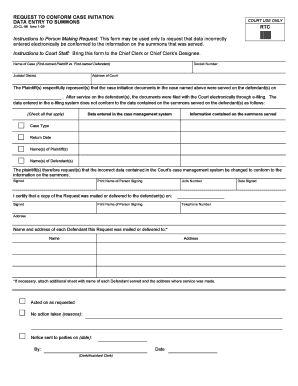
Ctronically be conformed to the information on the summons that was served. Instructions to Court Staff: Bring this form to the Chief Clerk or Chief Clerk's Designee. Name of Case (First-named Plaintiff vs. First-named Defendant) Judicial District Docket Number Address of Court The Plaintiff(s) respectfully represent(s) that the case initiation documents in the case named above were served on the defendant(s) on . After service on the defendant(s), the documents were filed with the Court elec.

How it works

  1. Open form

    Open form follow the instructions

  2. Easily sign form

    Easily sign the form with your finger

  3. Share form

    Send filled & signed form or save

How to fill out the CT JD-CL-96 online

The CT JD-CL-96 form is used to request that any data incorrectly entered in the court's electronic system be conformed to the information on the summons served. This guide provides a comprehensive, step-by-step approach to assist you in completing this form accurately and effectively.

Follow the steps to fill out the CT JD-CL-96 online successfully.

  1. Press the ‘Get Form’ button to obtain the CT JD-CL-96 and access it in the online editor.
  2. Enter the name of the case, specifying the first-named plaintiff and first-named defendant in the designated field.
  3. Fill in the judicial district where the case is being heard.
  4. Provide the docket number associated with your case.
  5. Indicate the address of the court handling your case.
  6. State the date when the case initiation documents were served on the defendant(s).
  7. Check all relevant boxes indicating discrepancies between the information entered in the case management system and the summons served, such as case type, return date, names of plaintiffs, and names of defendants.
  8. Include your signature and print your name in the specified fields.
  9. Enter your jurisdiction number to authenticate the request.
  10. Certify that a copy of the request was mailed or delivered to the defendant(s) by indicating the date and signing again.
  11. Provide your telephone number and complete address.
  12. List the name and address of each defendant this request was mailed or delivered to. If needed, attach an additional sheet with further details.
  13. Document the action taken by court staff and any notices sent, including signature, date, and role (Clerk/Assistant Clerk).
  14. Once all fields are completed, you can save changes, download, print, or share the form as necessary.

Complete your legal document requests online efficiently by following this guide.

Get form

Experience a faster way to fill out and sign forms on the web. Access the most extensive library of templates available.
Get form

Related content

REQUEST TO CONFORM CASE INITIATION DATA ENTRY ...
JD-CL-96 New 1-09. COURT USE ONLY. RTC. *RTC*. Instructions to Person Making Request: This...
Learn more
Comparative epidemiology of citrus tristeza in...
by L Batista · 2008 · Cited by 5 — Due to similarities between the epidemiology of CSD...
Learn more
120 VAC Driver and Dimmer Compatibility
ULP-24060-JD. Universal Phase Dimming LED Driver - 24 VDC - 96W. ULP-24096-JD. 48 Watt 24...
Learn more

Related links form

VA Prince William County Public Schools 61582450404G 1997 IE Safe Electric Form R44 2020 Canada CFB Halifax Officers Mess Application For Associate Membership 2021 WA St. Anthony Parish Baptism Godparent Affirmation 2014

Questions & Answers

Get answers to your most pressing questions about US Legal Forms API.

Contact support

Yes, you can wear jeans to jury duty in Connecticut, as there is no strict dress code. However, it is advisable to dress in a manner that shows respect for the court. Wearing appropriate attire can help create a positive impression, reflecting your seriousness about your civic duty. If you have any concerns about what to wear, the court typically provides guidelines to ensure you feel prepared.

In a civil lawsuit, the party who loses typically bears the costs, including court fees and attorney expenses. However, in some cases, parties might agree to share these costs or negotiate terms in a settlement. Understanding the financial implications before you proceed is vital, especially when preparing your CT JD-CL-96, as it sets the groundwork for your case. Using platforms like USLegalForms can help you navigate these financial aspects effectively.

In Connecticut, you usually have a specific time frame known as the statute of limitations to file a lawsuit. This period can vary depending on the type of claim, typically ranging from two to six years. For claims related to property damage or personal injury, it's essential to act promptly and file the necessary documentation, including the CT JD-CL-96, to avoid losing your right to pursue your case.

If you don’t attend court for a judgement, the court may issue a default judgment against you. This means that the opposing party could win the case simply for your absence. It is crucial to understand that such a decision can lead to various consequences, including potential garnishment of wages or liens against your property. To avoid this, keep track of court dates and respond promptly, utilizing resources like the CT JD-CL-96 to prepare your filings.

In Connecticut, a judgment lien generally lasts for 20 years from the date it is recorded. However, you can renew the lien if necessary, which may help you secure your interests for a longer duration. It is advisable to stay informed about the timelines using relevant legal forms like the CT JD-CL-96 to ensure you manage your financial obligations effectively.

To request leave to amend a complaint in Connecticut, you’ll need to file a motion with the court. This involves submitting the CT JD-CL-96 form along with your proposed amendments. Make sure you clearly state your reasons for the amendment which will help the court understand the necessity of your request.

Avoiding payment on a judgment can be complex but not impossible. Consider negotiating a payment plan with the creditor or seeking legal advice on appealing the judgment if there are valid grounds. Always remember, utilizing the CT JD-CL-96 form can help you in formal proceedings to request modifications or to stay enforcement of the judgment while you explore your options.

Filing for workers' compensation in Connecticut involves several steps. First, inform your employer about your injury as soon as possible. They will provide you with the proper forms, including the CT JD-CL-96, which you need to complete for your claim. Ensure that you submit the necessary paperwork and any supporting documents to the appropriate agency to start your claim process.

You can file a civil lawsuit without a lawyer by completing the necessary court forms, which often include the CT JD-CL-96. First, gather all relevant documentation and understand the court's procedures. Resources like the uslegalforms platform can provide step-by-step guidance, ensuring you fill out forms correctly and meet all legal requirements. This approach allows you to navigate the legal process with greater confidence.

Fighting a ticket in Connecticut involves several steps. First, you should gather evidence and organize your defense strategy. Utilizing the CT JD-CL-96 form can be an effective way to document your plea and maintain compliance with court expectations. Consider consulting the US Legal Forms platform for resources and templates that can aid you in preparing a solid defense.

Get This Form Now!

Use professional pre-built templates to fill in and sign documents online faster. Get access to thousands of forms.
Get form
If you believe that this page should be taken down, please follow our DMCA take down processhere.
Get CT JD-CL-96
Get form
  • Adoption
  • Bankruptcy
  • Contractors
  • Divorce
  • Home Sales
  • Employment
  • Identity Theft
  • Incorporation
  • Landlord Tenant
  • Living Trust
  • Name Change
  • Personal Planning
  • Small Business
  • Wills & Estates
  • Packages A-Z
  • Affidavits
  • Bankruptcy
  • Bill of Sale
  • Corporate - LLC
  • Divorce
  • Employment
  • Identity Theft
  • Internet Technology
  • Landlord Tenant
  • Living Wills
  • Name Change
  • Power of Attorney
  • Real Estate
  • Small Estates
  • Wills
  • All Forms
  • Forms A-Z
  • Other Templates
  • Legal Hub
  • About Us
  • Help Portal
  • Legal Resources
  • Blog
  • Affiliates
  • Contact Us
  • Delete My Account
  • Site Map
  • Industries
  • Forms in Spanish
  • Localized Forms
  • State-specific Forms
  • Forms Kit
  • Real Estate Handbook
  • All Guides
  • Notarize
  • Incorporation services
  • For Consumers
  • For Small Business
  • For Attorneys
  • USLegal
  • FormsPass
  • pdfFiller
  • signNow
  • altaFlow
  • DocHub
  • Instapage
Form Packages
  • Adoption
  • Bankruptcy
  • Contractors
  • Divorce
  • Home Sales
  • Employment
  • Identity Theft
  • Incorporation
  • Landlord Tenant
  • Living Trust
  • Name Change
  • Personal Planning
  • Small Business
  • Wills & Estates
  • Packages A-Z
Form Categories
  • Affidavits
  • Bankruptcy
  • Bill of Sale
  • Corporate - LLC
  • Divorce
  • Employment
  • Identity Theft
  • Internet Technology
  • Landlord Tenant
  • Living Wills
  • Name Change
  • Power of Attorney
  • Real Estate
  • Small Estates
  • Wills
  • All Forms
  • Forms A-Z
  • Other Templates
Customer Service
  • Legal Hub
  • About Us
  • Help Portal
  • Legal Resources
  • Blog
  • Affiliates
  • Contact Us
  • Delete My Account
  • Site Map
  • Industries
  • Forms in Spanish
  • Localized Forms
  • State-specific Forms
  • Forms Kit
Legal Guides
  • Real Estate Handbook
  • All Guides
Prepared for you
  • Notarize
  • Incorporation services
Our Customers
  • For Consumers
  • For Small Business
  • For Attorneys
Our Sites
  • USLegal
  • FormsPass
  • pdfFiller
  • signNow
  • altaFlow
  • DocHub
  • Instapage
Social Media
Call us now toll free:
+1 833 426 79 33
As seen in:
© Copyright 1999-2026 airSlate Legal Forms, Inc. 17 Station Street, Ste. 203, Brookline, MA 02445
  • Your Privacy Choices
  • Terms of Service
  • Privacy Notice
  • Content Takedown Policy
  • Bug Bounty Program