Loading
Get Ak Mc-420 1987-2026
How it works
-

Open form follow the instructions
-

Easily sign the form with your finger
-

Send filled & signed form or save
How to fill out the AK MC-420 online
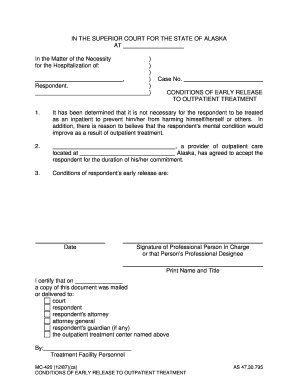
Filling out the AK MC-420 form is an important step in the process of outpatient treatment for individuals under commitment. This guide provides a clear and supportive walkthrough to help you complete the form accurately and efficiently.
Follow the steps to successfully fill out the AK MC-420 form.
- Click 'Get Form' button to obtain the form and open it in your editor.
- In the section marked 'In the Matter of the Necessity for the Hospitalization of', enter the name of the respondent.
- Enter the case number in the designated area to properly identify the legal matter.
- Carefully read and complete the first condition regarding the necessity of inpatient treatment and its determination.
- Fill in the name and location of the outpatient provider that has agreed to accept the respondent for treatment.
- Detail the specific conditions regarding the respondent's early release in the appropriate section.
- Provide the date of completion by entering it in the 'Date' section.
- Have a professional person in charge or their professional designee sign the form, and include their printed name and title.
- Finalize the process by certifying that a copy of the document was mailed or delivered to the necessary parties, including the court, respondent, attorney, and outpatient treatment center.
- Once all sections are completed, save your changes, download the document, print it, or share it as necessary.
Complete your AK MC-420 form online today to ensure a smooth outpatient treatment process.
Filing Documents With The Court "Filing" typically means visiting a court clerk at a filing window; paying a filing fee by cash, check, or credit card; and submitting the document to be filed (usually the original and two copies).