Loading
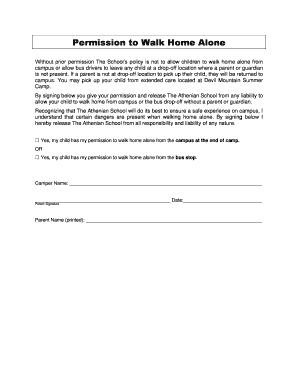
Get Permission To Walk Home From School Letter
How it works
-

Open form follow the instructions
-

Easily sign the form with your finger
-

Send filled & signed form or save
How to fill out the Permission To Walk Home From School Letter online
Filling out the Permission To Walk Home From School Letter is an essential step in ensuring your child's safety while allowing them some independence. This guide will provide you with clear, step-by-step instructions on how to complete the form online effectively.
Follow the steps to complete the letter accurately.
- Click ‘Get Form’ button to obtain the document and open it in the editor.
- Carefully read the introductory section of the letter, which outlines the school's policy on walking home alone. This section informs you of the risks associated and the school's responsibilities.
- In the designated area, indicate your permission by selecting one of the options: check the box that states, ‘Yes, my child has my permission to walk home alone from the campus at the end of camp’ or ‘Yes, my child has my permission to walk home alone from the bus stop’.
- Enter your child’s name in the 'Camper Name' field to clearly identify the person for whom permission is being granted.
- Sign and date the form in the provided spaces. This is an important step as your signature indicates your consent and understanding of the terms outlined in the letter.
- Print your name clearly in the 'Parent Name (printed)' field to ensure it is legible and properly recorded.
- Once all required fields are filled out, save your changes. You can then download, print, or share the completed form according to your needs.
Complete your documents online today for a smooth and efficient process.
To write a permission letter to travel, clearly state the purpose of your trip and the dates. Include necessary details such as destination and companions if any. Make sure to express your eagerness to adhere to any guidelines set and thank the recipient for their understanding and support.