Loading
Form preview
  • US Legal Forms
  • Other Templates
  • More Forms
  • More Uncategorized Forms
  • Arms Of Hope Donation Receipt

Get Arms Of Hope Donation Receipt

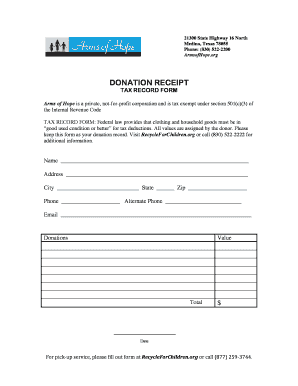
21300 State Highway 16 North Medina, Texas 78055 Phone: (830) 5222200 ArmsofHope.org DONATION RECEIPT TAX RECORD FORM Arms of Hope is a private, notforprofit corporation and is tax exempt under section.

How it works

  1. Open form

    Open form follow the instructions

  2. Easily sign form

    Easily sign the form with your finger

  3. Share form

    Send filled & signed form or save

How to fill out the Arms Of Hope Donation Receipt online

Filling out the Arms Of Hope Donation Receipt online is a straightforward process that allows you to document your charitable contributions. This guide will provide step-by-step instructions to ensure you complete the form accurately and efficiently.

Follow the steps to fill out the donation receipt accurately.

  1. Press the ‘Get Form’ button to retrieve the Arms Of Hope Donation Receipt online and open it for editing.
  2. In the 'Name' field, enter the full name of the person making the donation. Ensure that it is spelled correctly to maintain accurate records.
  3. Fill in the 'Address' section with your complete mailing address. This includes the street address, city, state, and zip code as specified in the respective fields.
  4. Provide your primary phone number in the 'Phone' field. If you have an alternate phone number, include it in the 'Alternate Phone' section.
  5. Enter your email address in the designated 'Email' field to facilitate future communications regarding your donation.
  6. In the 'Donations' section, specify the items or services you are donating. Clearly list each item for clarity.
  7. Assign a value to your donations in the 'Value' field. Remember, items must be in good used condition or better to be eligible for tax deductions.
  8. Fill in the 'Total' field with the sum total of your donations to finalize your contribution record.
  9. Record the date of your donation in the designated 'Date' field to complete the form.
  10. Review all the information for accuracy. Once confirmed, you can save your changes, download, print, or share the completed form as needed.

Begin the process of documenting your donation by filling out the Arms Of Hope Donation Receipt online today.

Get form

Experience a faster way to fill out and sign forms on the web. Access the most extensive library of templates available.
Get form

Related content

In the Supreme Court of the United States
Oct 28, 2024 — Arms of Hope is a tax-exempt nonprofit corporation organized under the...
Learn more
“You left a legacy.” | UK Healthcare
Anonymous letters written from an organ transplant recipient to their donor. The author...
Learn more
2019
Apr 1, 2019 — (Whole Dollars Only). Check the box for the return for which you are using...
Learn more

Related links form

Mmis Georgia Gov Form A Designated Physician Information - Georgia Composite ... - Medicalboard Georgia OFFICIAL COMPLAINT FORM - Georgia Secretary Of State - Sos Georgia Rescue Group Record Keeping Form Please Print All Information - Agr Georgia

Questions & Answers

Get answers to your most pressing questions about US Legal Forms API.

Contact support

Creating a donation form for Arms Of Hope involves including fields for donor information such as name, address, email, and phone number. Provide options for donation amounts, payment methods, and any specific fundraising campaigns. Make the form user-friendly and easy to navigate, ensuring that potential donors can complete it quickly and feel good about their contribution.

To write an acknowledgment for a donation, start by thanking the donor for their contribution to Arms Of Hope. Mention the specific purpose of their donation and express how it will be used to benefit those in need. Finally, include information about the tax-deductibility of their donation while encouraging future support and engagement.

An example of a written acknowledgment for charitable contributions can be as follows: 'Thank you for your generous gift to Arms Of Hope. We appreciate your support and commitment to our mission. Your contribution is essential in helping us provide essential services to those in need.' This acknowledgment serves both to thank the donor and to provide the necessary details for their records.

Filling out an Arms Of Hope Donation Receipt involves inserting the donor's name, the date of the contribution, and the amount donated. Additionally, provide a brief description of the purpose of the donation, along with a confirmation that no goods or services were exchanged. This ensures the receipt is complete and compliant for both the donor and the organization.

To download an ISKCON donation receipt, visit their official website and log into your account. Once logged in, navigate to your donation history, where you will find an option to view and download your Arms Of Hope Donation Receipt. This process is straightforward and allows you to keep accurate records for your contributions.

When crafting a short donation message, express your gratitude and the impact of the contribution. You can say something like, 'Thank you for your generous support to Arms Of Hope. Your donation will make a significant difference in the lives of those we serve.' Keep it clear and heartfelt, ensuring it connects emotionally with the donor and acknowledges their generosity.

The format of an Arms Of Hope Donation Receipt typically includes the name of the donor, the date of the donation, the amount donated, and a statement confirming that no goods or services were exchanged for the contribution. Additionally, the receipt should feature the organization's name and tax identification number, ensuring it meets IRS requirements. This format helps maintain transparency and provides the necessary documentation for tax purposes.

Typically, the name on a donation receipt is that of the donor who made the contribution. This could be an individual, a couple, or a business entity, depending on who provided the funds. If you utilize the Arms Of Hope Donation Receipt, it allows you to correctly personalize each receipt to accurately reflect the donor’s name.

A donation invoice is a document that outlines the details of a donation, similar to a receipt but often used for larger transactions or when goods and services are involved. It may include more extensive information, such as descriptions of the items donated or the purpose of the donation. It is important to distinguish it from the Arms Of Hope Donation Receipt, which primarily serves as proof of charitable contributions.

To make a donation receipt, gather essential details like the donor's name, donation amount, date, and the charity's name. You can either create a receipt manually or use a pre-designed template, such as the Arms Of Hope Donation Receipt. This will help ensure that all necessary information is included, making the process straightforward and efficient.

Get This Form Now!

Use professional pre-built templates to fill in and sign documents online faster. Get access to thousands of forms.
Get form
If you believe that this page should be taken down, please follow our DMCA take down processhere.
Get Arms Of Hope Donation Receipt
Get form
  • Adoption
  • Bankruptcy
  • Contractors
  • Divorce
  • Home Sales
  • Employment
  • Identity Theft
  • Incorporation
  • Landlord Tenant
  • Living Trust
  • Name Change
  • Personal Planning
  • Small Business
  • Wills & Estates
  • Packages A-Z
  • Affidavits
  • Bankruptcy
  • Bill of Sale
  • Corporate - LLC
  • Divorce
  • Employment
  • Identity Theft
  • Internet Technology
  • Landlord Tenant
  • Living Wills
  • Name Change
  • Power of Attorney
  • Real Estate
  • Small Estates
  • Wills
  • All Forms
  • Forms A-Z
  • Other Templates
  • Legal Hub
  • About Us
  • Help Portal
  • Legal Resources
  • Blog
  • Affiliates
  • Contact Us
  • Delete My Account
  • Site Map
  • Industries
  • Forms in Spanish
  • Localized Forms
  • State-specific Forms
  • Forms Kit
  • Real Estate Handbook
  • All Guides
  • Notarize
  • Incorporation services
  • For Consumers
  • For Small Business
  • For Attorneys
  • USLegal
  • FormsPass
  • pdfFiller
  • signNow
  • altaFlow
  • DocHub
  • Instapage
Form Packages
  • Adoption
  • Bankruptcy
  • Contractors
  • Divorce
  • Home Sales
  • Employment
  • Identity Theft
  • Incorporation
  • Landlord Tenant
  • Living Trust
  • Name Change
  • Personal Planning
  • Small Business
  • Wills & Estates
  • Packages A-Z
Form Categories
  • Affidavits
  • Bankruptcy
  • Bill of Sale
  • Corporate - LLC
  • Divorce
  • Employment
  • Identity Theft
  • Internet Technology
  • Landlord Tenant
  • Living Wills
  • Name Change
  • Power of Attorney
  • Real Estate
  • Small Estates
  • Wills
  • All Forms
  • Forms A-Z
  • Other Templates
Customer Service
  • Legal Hub
  • About Us
  • Help Portal
  • Legal Resources
  • Blog
  • Affiliates
  • Contact Us
  • Delete My Account
  • Site Map
  • Industries
  • Forms in Spanish
  • Localized Forms
  • State-specific Forms
  • Forms Kit
Legal Guides
  • Real Estate Handbook
  • All Guides
Prepared for you
  • Notarize
  • Incorporation services
Our Customers
  • For Consumers
  • For Small Business
  • For Attorneys
Our Sites
  • USLegal
  • FormsPass
  • pdfFiller
  • signNow
  • altaFlow
  • DocHub
  • Instapage
Social Media
Call us now toll free:
+1 833 426 79 33
As seen in:
© Copyright 1999-2026 airSlate Legal Forms, Inc. 17 Station Street, Ste. 203, Brookline, MA 02445
  • Your Privacy Choices
  • Terms of Service
  • Privacy Notice
  • Content Takedown Policy
  • Bug Bounty Program