Loading
Form preview
  • US Legal Forms
  • Other Templates
  • More Forms
  • More Multi-State Forms
  • Medical Fitness Certificate

Get Medical Fitness Certificate

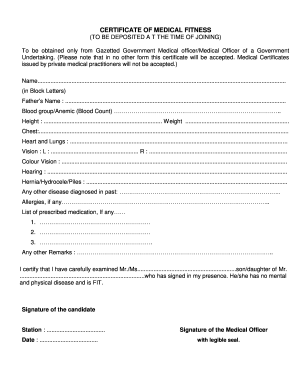
In no other form this certificate will be accepted. Medical Certificates issued by private medical practitioners will not be accepted.) Name......................................................................................................................................................... (in Block Letters) Father s Name : ........................................................................................................................................ Blood group/Anemic (Blood Count.

How it works

  1. Open form

    Open form follow the instructions

  2. Easily sign form

    Easily sign the form with your finger

  3. Share form

    Send filled & signed form or save

How to fill out the Medical Fitness Certificate online

This guide provides clear and detailed instructions on filling out the Medical Fitness Certificate online. It aims to assist users in navigating the form effectively to ensure a smooth process for obtaining the necessary medical certification.

Follow the steps to complete the Medical Fitness Certificate online

  1. Press the ‘Get Form’ button to access the Medical Fitness Certificate and open it in your editing space.
  2. In the section for the name, enter your full name in block letters. Ensure that it is legible and correct.
  3. Fill in your father's name in the designated field, clearly indicating your relationship.
  4. Provide your blood group or any relevant details regarding anemia in the respective section.
  5. Indicate your height and weight accurately in the corresponding fields.
  6. Measure and record your chest measurement in the specified space.
  7. For the heart and lungs section, summarize any pertinent health information as required.
  8. Fill in your vision details for both the left and right eye, providing accurate numbers.
  9. Detail your colour vision status alongside any hearing health information.
  10. Report any conditions such as hernia, hydrocele, or piles if applicable.
  11. List any diseases diagnosed in the past that are relevant to your medical fitness.
  12. Mention any allergies you may have in the designated area.
  13. If prescribed medication is part of your health management, list it clearly in the provided section.
  14. Use the remarks section for any additional comments or clarifications regarding your health.
  15. The medical officer will certify your fitness, verifying your details and ensuring you do not have any mental or physical diseases. Include their signature, stamp with a legible seal, and the date.
  16. As the candidate, affix your signature at the designated area.
  17. Once completed, save your changes, and you may choose to download, print, or share the Medical Fitness Certificate as needed.

Start filling out the Medical Fitness Certificate online today to ensure your health is documented properly.

Get form

Experience a faster way to fill out and sign forms on the web. Access the most extensive library of templates available.
Get form

Related content

Medical Examiner's Certificate (MEC), Form...
Apr 1, 2025 — The Medical Examiner will complete and provide the driver with a Medical...
Learn more
Medical Fitness Certificate Format
CERTIFICATE OF MEDICAL FITNESS. Name of the candidate: Date of Birth & Age...
Learn more
Medical Card DOT
DOT Medical Card, also known as the DOT Physical Card or Medical Examiner's Certificate...
Learn more

Related links form

Emergency Medical Form - Maple Heights City Schools Patient Responsibility Form Non-Formulary Drug Exception Form - Riverside Health Blood Lead Lab Reporting - CommunityConnect HealthPlan ...

Questions & Answers

Get answers to your most pressing questions about US Legal Forms API.

Contact support

The quickest medical license to acquire is often related to basic first aid or CPR certification, rather than broad medical licenses. However, obtaining a Medical Fitness Certificate also qualifies as a swift process, as it typically involves straightforward exams. Use US Legal Forms to find the right documentation and templates to guide your licensing journey efficiently.

The fastest certification to secure in the medical realm is often the Medical Fitness Certificate, which generally requires a straightforward physical exam and can be completed quickly. Many healthcare providers streamline this service for those seeking to engage in physical activities. US Legal Forms can help you access the necessary forms to facilitate quicker processing.

The shortest course in the medical field is often a certification program, such as a Medical Fitness Certificate, which allows individuals to demonstrate their readiness to engage in physical activities. These courses can typically be completed in a matter of weeks, providing an efficient pathway into the field. US Legal Forms can assist you by providing relevant resources and documentation to support your studies.

To get a physical Medical Fitness Certificate, you need to visit a licensed healthcare provider for a medical examination. Once you complete your exam, the provider will issue your certificate. You can also use US Legal Forms to find appropriate forms and guidelines to make this process easier and more efficient.

The quickest medical certificate to obtain is typically the Medical Fitness Certificate, especially if you have all necessary documentation ready. Many clinics or healthcare facilities can provide this certificate immediately after a physical examination. To simplify the process, check US Legal Forms for templates that help streamline your application.

The time it takes to obtain your Medical Fitness Certificate varies depending on your location and the specific requirements of your healthcare provider. Generally, you can expect to receive it within a few days to a couple of weeks after your medical exam. For a seamless experience, consider utilizing US Legal Forms, which offers resources to expedite the process.

You can obtain a medical examiner's certificate from a licensed medical professional who conducts physical examinations. To find a certified examiner, you can search through local health clinics or use platforms like US Legal Forms to find the appropriate forms and resources. This will help you ensure that you receive a valid Medical Fitness Certificate, confirming your health status.

Yes, many healthcare providers offer telehealth services that allow you to complete a physical exam online. You can discuss your health concerns and receive preliminary assessments through a virtual appointment. However, you may still need an in-person visit for tests or to acquire a Medical Fitness Certificate. Always confirm with your provider about the requirements.

Getting a full physical exam is simple. Start by scheduling an appointment with your doctor or healthcare provider. During the visit, the doctor will review your medical history, conduct a physical examination, and discuss any concerns you might have. Completing this process is essential to receiving your Medical Fitness Certificate.

To obtain a Medical Fitness Certificate, you typically need to present a valid photo ID, insurance information, and any medical history documents required by your healthcare provider. It's also helpful to have a list of your current medications and any allergies. Having these documents ready ensures a smooth physical exam process. Remember, being prepared can expedite your visit.

Get This Form Now!

Use professional pre-built templates to fill in and sign documents online faster. Get access to thousands of forms.
Get form
If you believe that this page should be taken down, please follow our DMCA take down processhere.
Get Medical Fitness Certificate
Get form
  • Adoption
  • Bankruptcy
  • Contractors
  • Divorce
  • Home Sales
  • Employment
  • Identity Theft
  • Incorporation
  • Landlord Tenant
  • Living Trust
  • Name Change
  • Personal Planning
  • Small Business
  • Wills & Estates
  • Packages A-Z
  • Affidavits
  • Bankruptcy
  • Bill of Sale
  • Corporate - LLC
  • Divorce
  • Employment
  • Identity Theft
  • Internet Technology
  • Landlord Tenant
  • Living Wills
  • Name Change
  • Power of Attorney
  • Real Estate
  • Small Estates
  • Wills
  • All Forms
  • Forms A-Z
  • Other Templates
  • Legal Hub
  • About Us
  • Help Portal
  • Legal Resources
  • Blog
  • Affiliates
  • Contact Us
  • Delete My Account
  • Site Map
  • Industries
  • Forms in Spanish
  • Localized Forms
  • State-specific Forms
  • Forms Kit
  • Real Estate Handbook
  • All Guides
  • Notarize
  • Incorporation services
  • For Consumers
  • For Small Business
  • For Attorneys
  • USLegal
  • FormsPass
  • pdfFiller
  • signNow
  • altaFlow
  • DocHub
  • Instapage
Form Packages
  • Adoption
  • Bankruptcy
  • Contractors
  • Divorce
  • Home Sales
  • Employment
  • Identity Theft
  • Incorporation
  • Landlord Tenant
  • Living Trust
  • Name Change
  • Personal Planning
  • Small Business
  • Wills & Estates
  • Packages A-Z
Form Categories
  • Affidavits
  • Bankruptcy
  • Bill of Sale
  • Corporate - LLC
  • Divorce
  • Employment
  • Identity Theft
  • Internet Technology
  • Landlord Tenant
  • Living Wills
  • Name Change
  • Power of Attorney
  • Real Estate
  • Small Estates
  • Wills
  • All Forms
  • Forms A-Z
  • Other Templates
Customer Service
  • Legal Hub
  • About Us
  • Help Portal
  • Legal Resources
  • Blog
  • Affiliates
  • Contact Us
  • Delete My Account
  • Site Map
  • Industries
  • Forms in Spanish
  • Localized Forms
  • State-specific Forms
  • Forms Kit
Legal Guides
  • Real Estate Handbook
  • All Guides
Prepared for you
  • Notarize
  • Incorporation services
Our Customers
  • For Consumers
  • For Small Business
  • For Attorneys
Our Sites
  • USLegal
  • FormsPass
  • pdfFiller
  • signNow
  • altaFlow
  • DocHub
  • Instapage
Social Media
Call us now toll free:
+1 833 426 79 33
As seen in:
© Copyright 1999-2026 airSlate Legal Forms, Inc. 17 Station Street, Ste. 203, Brookline, MA 02445
  • Your Privacy Choices
  • Terms of Service
  • Privacy Notice
  • Content Takedown Policy
  • Bug Bounty Program