Loading
Form preview
  • US Legal Forms
  • Other Templates
  • Industry Forms
  • Industry Academic Forms
  • Sleep Study Order Form - Uf Health Jacksonville

Get Sleep Study Order Form - Uf Health Jacksonville

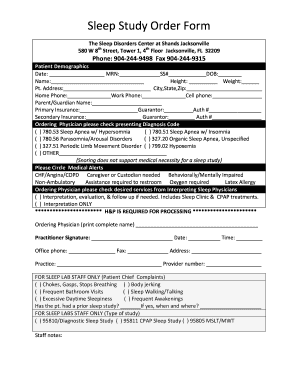
: MRN: SS# DOB: Name: Height: Weight: Pt. Address: City,State,Zip: Home Phone: Work Phone: Cell phone: Parent/Guardian Name: Primary Insurance: Guarantor: Auth # Secondary Insurance: Guarantor: Auth #.

How it works

  1. Open form

    Open form follow the instructions

  2. Easily sign form

    Easily sign the form with your finger

  3. Share form

    Send filled & signed form or save

How to fill out the Sleep Study Order Form - UF Health Jacksonville online

This guide provides clear and supportive instructions for users on how to accurately complete the Sleep Study Order Form at UF Health Jacksonville online. Following these steps will help ensure that all necessary information is provided for effective processing.

Follow the steps to successfully complete the Sleep Study Order Form.

  1. Press the ‘Get Form’ button to obtain the Sleep Study Order Form and open it for editing.
  2. Enter the patient demographics information. Fill in the date, medical record number (MRN), social security number (SS#), and date of birth (DOB). Complete the name, height, weight, and the patient's address including city, state, and zip code.
  3. Provide contact details by entering the home phone, work phone, and cell phone numbers. If applicable, include the parent or guardian's name.
  4. Specify the primary insurance details by entering the insurance provider's name, the guarantor's name, and the authorization number. If there is secondary insurance, complete that section similarly.
  5. Ordering physicians should check the appropriate presenting diagnosis code from the options provided. Ensure to note any medical alerts by circling each relevant item, if necessary.
  6. In the section for desired services, the ordering physician needs to check either interpretation with follow-up services or interpretation only.
  7. Input the ordering physician's complete name, signature, date, time, office phone, fax number, address, practice name, and provider number.
  8. For sleep lab staff only, check any relevant patient chief complaints and indicate if the patient has had a prior sleep study, including the date and location of the study.
  9. Indicate the type of sleep study by checking the appropriate option for diagnostic sleep study, CPAP sleep study, or MSLT/MWT.
  10. After ensuring all information is accurately filled, you can save the changes, download, print, or share the Sleep Study Order Form.

Complete the Sleep Study Order Form online to ensure a timely and effective sleep study process.

Get form

Experience a faster way to fill out and sign forms on the web. Access the most extensive library of templates available.
Get form

Related content

CITY OF JACKSONVILLE UF HEALTH DIRECT CARE ...
Charges for sleep studies and treatment of sleep apnea and other sleep ... order option”...
Learn more
Recover SLEEP - UF College of Medicine –...
We want to enroll adults from many different backgrounds in this clinical trial to learn...
Learn more
Healthy Housing Reference Manual
Suggested citation: Centers for Disease Control and Prevention and U.S. Department of...
Learn more

Related links form

Cna Surety Bond Form 10 E Electric Sample Form No. 79-1099 Property Manager ... English Enrollment/Change Form - BCBSTX.com Group Administered Texas Nine (9) Month State Continuation Of ...

Questions & Answers

Get answers to your most pressing questions about US Legal Forms API.

Contact support

Yes, you can go to the bathroom during a sleep study. The staff understands that you may need to use the restroom, especially since you are monitored overnight. They will ensure that your sensors are designed to be easily removable for such occasions. Ultimately, the staff aims to create a comfortable environment, allowing for a successful assessment as indicated in the Sleep Study Order Form - UF Health Jacksonville.

During a sleep study, having your phone is usually discouraged, as it may interfere with the monitoring equipment. Most clinics will ask you to keep personal devices out of the sleep area to ensure accurate readings. It’s best to check with the specific facility where you’ll be undergoing the study. Remember, the goal is to gather the best data possible to address your sleep concerns as outlined in the Sleep Study Order Form - UF Health Jacksonville.

Completing a sleep study typically involves preparing for your overnight stay at the clinic. You'll check in and have sensors placed on your body to monitor your sleep patterns. While the process may seem a bit intrusive, the technicians are trained to make you feel comfortable. The information obtained from the Sleep Study Order Form - UF Health Jacksonville is invaluable in diagnosing any sleep issues.

A sleep study, also known as polysomnography, is completed by monitoring various physiological functions while you sleep. During the study, you'll stay overnight at a sleep clinic where techs will attach sensors to measure your brainwaves, breathing, and heart rate. This data is then analyzed to identify any sleep disorders. The process is comfortable, and you can rest assured, knowing the Sleep Study Order Form - UF Health Jacksonville ensures a thorough evaluation.

Arranging a sleep study involves several straightforward steps. Start by discussing your sleep concerns with your healthcare provider, who can issue a Sleep Study Order Form - UF Health Jacksonville. After you receive the order, contact a sleep clinic or facility to schedule your study. It's essential to confirm your insurance coverage and any preparations required for your appointment.

To obtain an order for a sleep study, first speak to your primary care doctor or a sleep specialist about your sleep concerns. They will evaluate your symptoms and may decide to issue a Sleep Study Order Form - UF Health Jacksonville. Once you have the order, you can schedule your sleep study at a facility that accepts it, ensuring you meet any pre-study requirements.

To get your sleep study approved by insurance, begin by consulting with your healthcare provider. They can help you determine whether a sleep study is necessary based on your symptoms. Once your physician decides, they will typically need to complete a Sleep Study Order Form - UF Health Jacksonville, which you can then submit to your insurance for coverage approval. Following up with both your doctor and your insurance can ensure everything is in order.

You can bring a guest to your sleep study, but it's best to double-check with the facility. Bringing someone can provide emotional support, which can be beneficial during the study. However, because of space limitations or specific protocols, it may not always be permitted. Always review the guidelines from the Sleep Study Order Form - UF Health Jacksonville to avoid surprises.

A sleep study primarily monitors your sleep patterns and identifies sleep disorders. While it does not directly measure anxiety, it can highlight irregularities in your sleep that may stem from anxiety. If you have concerns about anxiety affecting your sleep, it's a good idea to discuss them with your physician when filling out your Sleep Study Order Form - UF Health Jacksonville.

You are welcome to bring someone with you to your sleep study. This can help reduce any anxiety you might feel during the procedure. However, it's essential to confirm with the sleep center about their visitor policy. Ensuring that you have the right support can make the experience smoother.

Get This Form Now!

Use professional pre-built templates to fill in and sign documents online faster. Get access to thousands of forms.
Get form
If you believe that this page should be taken down, please follow our DMCA take down processhere.
Get Sleep Study Order Form - UF Health Jacksonville
Get form
  • Adoption
  • Bankruptcy
  • Contractors
  • Divorce
  • Home Sales
  • Employment
  • Identity Theft
  • Incorporation
  • Landlord Tenant
  • Living Trust
  • Name Change
  • Personal Planning
  • Small Business
  • Wills & Estates
  • Packages A-Z
  • Affidavits
  • Bankruptcy
  • Bill of Sale
  • Corporate - LLC
  • Divorce
  • Employment
  • Identity Theft
  • Internet Technology
  • Landlord Tenant
  • Living Wills
  • Name Change
  • Power of Attorney
  • Real Estate
  • Small Estates
  • Wills
  • All Forms
  • Forms A-Z
  • Other Templates
  • Legal Hub
  • About Us
  • Help Portal
  • Legal Resources
  • Blog
  • Affiliates
  • Contact Us
  • Delete My Account
  • Site Map
  • Industries
  • Forms in Spanish
  • Localized Forms
  • State-specific Forms
  • Forms Kit
  • Real Estate Handbook
  • All Guides
  • Notarize
  • Incorporation services
  • For Consumers
  • For Small Business
  • For Attorneys
  • USLegal
  • FormsPass
  • pdfFiller
  • signNow
  • altaFlow
  • DocHub
  • Instapage
Form Packages
  • Adoption
  • Bankruptcy
  • Contractors
  • Divorce
  • Home Sales
  • Employment
  • Identity Theft
  • Incorporation
  • Landlord Tenant
  • Living Trust
  • Name Change
  • Personal Planning
  • Small Business
  • Wills & Estates
  • Packages A-Z
Form Categories
  • Affidavits
  • Bankruptcy
  • Bill of Sale
  • Corporate - LLC
  • Divorce
  • Employment
  • Identity Theft
  • Internet Technology
  • Landlord Tenant
  • Living Wills
  • Name Change
  • Power of Attorney
  • Real Estate
  • Small Estates
  • Wills
  • All Forms
  • Forms A-Z
  • Other Templates
Customer Service
  • Legal Hub
  • About Us
  • Help Portal
  • Legal Resources
  • Blog
  • Affiliates
  • Contact Us
  • Delete My Account
  • Site Map
  • Industries
  • Forms in Spanish
  • Localized Forms
  • State-specific Forms
  • Forms Kit
Legal Guides
  • Real Estate Handbook
  • All Guides
Prepared for you
  • Notarize
  • Incorporation services
Our Customers
  • For Consumers
  • For Small Business
  • For Attorneys
Our Sites
  • USLegal
  • FormsPass
  • pdfFiller
  • signNow
  • altaFlow
  • DocHub
  • Instapage
Social Media
Call us now toll free:
+1 833 426 79 33
As seen in:
© Copyright 1999-2026 airSlate Legal Forms, Inc. 17 Station Street, Ste. 203, Brookline, MA 02445
  • Your Privacy Choices
  • Terms of Service
  • Privacy Notice
  • Content Takedown Policy
  • Bug Bounty Program