Loading
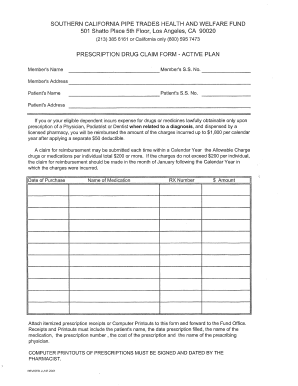
Get Ca Scptac Prescription Drug Claim Form 2001
How it works
-

Open form follow the instructions
-

Easily sign the form with your finger
-

Send filled & signed form or save
How to fill out the CA SCPTAC Prescription Drug Claim Form online
Filling out the CA SCPTAC Prescription Drug Claim Form online can be a straightforward process when you have the right guidance. This guide provides step-by-step instructions to help you complete the form accurately and efficiently.
Follow the steps to complete the form online with ease.
- Click ‘Get Form’ button to obtain the form and open it in the online editor.
- Begin by entering your personal information in the designated fields. Ensure that your name, address, and contact information are accurately filled out, as this information is crucial for processing your claim.
- Provide the details of the prescribed medications. List each medication along with the corresponding prescription number, quantity, and the date it was filled. Make sure the information matches your receipts for a smooth claim process.
- Attach any required documentation, such as receipts or additional forms, if applicable. Ensure that all documents are clear and legible to avoid delays in processing.
- Review all the information entered to confirm its accuracy. Double-check for any missed fields or errors that may need correction before submission.
- Once you have completed the form, choose to save your changes, then select an option to download, print, or share the completed form as needed.
Complete your CA SCPTAC Prescription Drug Claim Form online today for a seamless experience.
Get form
Experience a faster way to fill out and sign forms on the web. Access the most extensive library of templates available.
You should send your completed CA SCPTAC Prescription Drug Claim Form to the address provided by your insurance company or the instructions included with the form. It's important to double-check this address to ensure your claim is processed without delays. If you're using the US Legal Forms platform, it provides clear guidance on where to send your claims.
Get This Form Now!
Use professional pre-built templates to fill in and sign documents online faster. Get access to thousands of forms.