Loading
Form preview
  • US Legal Forms
  • Other Templates
  • Industry Forms
  • Industry Bank & Financial Forms
  • Ally Domestic Wire Transfer Request 2019

Get Ally Domestic Wire Transfer Request 2019-2026

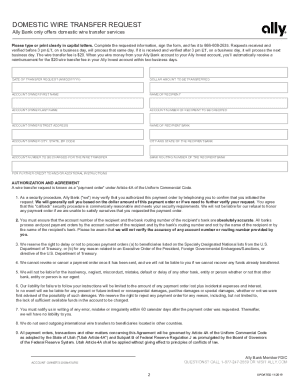
Tters the requested recipient and personal information on page 2 Print and sign the completed Domestic Wire Transfer Request form Fax the completed form with this cover page to Ally Bank at 1-866-608-2635 You can also request a wire transfer in online banking. Details For security reasons, we may attempt to call you to verify your wire instructions. Requests received and verified before 3 pm ET, on a business day, will process that same day Requests received and verifie.

How it works

  1. Open form

    Open form follow the instructions

  2. Easily sign form

    Easily sign the form with your finger

  3. Share form

    Send filled & signed form or save

How to fill out the Ally Domestic Wire Transfer Request online

This guide will assist users in navigating the Ally Domestic Wire Transfer Request form to facilitate smooth and secure wire transfers. By following these instructions, users can ensure that all necessary information is correctly provided for efficient processing.

Follow the steps to complete your wire transfer request form online.

  1. Press the ‘Get Form’ button to download the Domestic Wire Transfer Request form and open it for editing.
  2. Fill in the 'date of transfer request' by entering the appropriate date in MM/DD/YYYY format.
  3. Specify the 'dollar amount to be transferred' by clearly stating the amount you wish to send.
  4. Complete the 'account owner first name' and 'account owner last name' fields with your full name.
  5. Provide the 'account number of the recipient to be credited' to ensure the funds reach the right account.
  6. Enter your 'account owner street address' for verification purposes.
  7. Fill in the 'name of recipient bank' where the funds will be transferred.
  8. Complete your 'account owner city, state, zip code' information.
  9. Add the 'city and state of the recipient bank' in the designated field.
  10. Provide the 'account number to be charged for the wire transfer' to specify your account from which money will be withdrawn.
  11. Insert the 'bank routing number of the recipient bank' for accurate processing of the wire transfer.
  12. Include any 'further credit to and/or additional instructions' if necessary.
  13. Once all fields have been filled out, print and sign the completed Domestic Wire Transfer Request form.
  14. Fax the signed form to Ally Bank at the provided number, 1-866-608-2635.
  15. Make sure to retain a copy for your records. After submitting, you may check on the status of your request.

Complete your Domestic Wire Transfer Request online today to ensure your funds are transferred efficiently.

Get form

Experience a faster way to fill out and sign forms on the web. Access the most extensive library of templates available.
Get form

Related content

Search the Consumer Complaint Database
Consumer complaint narrative. On XX/XX/2020 at approximately XXXX on I initiated an online...
Learn more
The Mechanisms of Wire Transfer
The simplest funds transfers involve two accounts in the same bank. Here, money is moved...
Learn more
2011 Publication 334
Dec 21, 2011 — Paying by authorizing an electronic funds withdrawal ceived one credit...
Learn more

Related links form

MANAGER'S STATEMENT - CAF - City Of Chicago - Cityofchicago Temperature Log - Fahrenheit.pdf - City Of Chicago - Cityofchicago Chicago Chauffereur Surrender Form City Of Chicagoduelemploymentform

Questions & Answers

Get answers to your most pressing questions about US Legal Forms API.

Contact support

For a wire transfer, you will need the recipient's name, bank account number, bank routing number, and the amount being sent. Double-check all details to ensure your Ally Domestic Wire Transfer Request goes through without issues. Having this information ready streamlines the process.

Requesting a wire transfer with Ally Bank is straightforward. Access your account online, go to the 'Transfers' section, and choose 'Wire Transfer.' Enter the required information, check everything for correctness, and then confirm your Ally Domestic Wire Transfer Request.

To request a wire transfer, visit your Ally Bank account portal. Select 'Transfers' followed by 'Wire Transfers' to begin. Fill in the necessary fields with the receiver’s details, ensuring accuracy to facilitate a successful Ally Domestic Wire Transfer Request.

Typically, an Ally Domestic Wire Transfer Request processes within one business day. However, it may take additional time depending on the receiving bank's processing schedule. For a smooth experience, ensure that all required details are accurate to minimize potential delays.

To send an Ally Domestic Wire Transfer Request, log into your Ally Bank account online or through the mobile app. Navigate to the 'Transfers' section and select 'Wire Transfers.' Follow the prompts to enter the required information, and review your request to ensure accuracy before submission.

Yes, Ally Bank uses ACH transfers as part of their banking services. ACH transfers are ideal for everyday transactions and automatic bill payments. Understanding how to use both ACH and wire transfer options can enhance your financial management with Ally Bank.

Yes, you can easily conduct a domestic wire transfer online through Ally Bank. The online platform simplifies the process, allowing you to complete your Ally Domestic Wire Transfer Request from the comfort of your home. Just ensure you have the correct recipient details to avoid delays.

Yes, Ally Bank does provide wire transfer services to its customers. By using the Ally Domestic Wire Transfer Request, you can easily send and receive funds securely and quickly. This service is especially beneficial for urgent payments, making it a convenient option for your financial transactions.

Ally Bank offers both ACH and wire transfer options to meet different customer needs. ACH transfers are suitable for regular payments, while wire transfers, like the Ally Domestic Wire Transfer Request, facilitate faster transactions, especially for larger amounts. Knowing the right option can streamline your banking experience and ensure efficiency in your transactions.

Receiving an Ally Domestic Wire Transfer Request is easy. First, provide the sender with your bank account number and routing number. Once the transfer is initiated, your bank will handle the incoming funds, and you should see them available in your account shortly, making it a straightforward process.

Get This Form Now!

Use professional pre-built templates to fill in and sign documents online faster. Get access to thousands of forms.
Get form
If you believe that this page should be taken down, please follow our DMCA take down processhere.
Get Ally Domestic Wire Transfer Request
Get form

Form categories

Real Estate
  • Home Sale
  • Deeds
  • Leases
  • Landlord Tenant
  • First Refusal Agreement
  • Lis Pendens
  • View all Real Estate
Business & Commercial
  • Small Business
  • Contracts
  • Construction
  • Employment
  • Limited Liability Company
  • Partnerships
  • View all Business & Commercial
Estate Planning
  • Personal Planning
  • Last Will and Testament
  • Living Trust
  • Power of Attorney
  • Living Will (Healthcare Directive)
  • Probate
  • Trusts
  • Small Estate
  • View all Estate Planning

Other Legal Areas

  • Civil Actions
  • Civil Procedure
  • Animals
  • Affidavits
  • Bill of Sale
  • Oil Gas and Minerals
  • Name Change
  • Other
Family Law
  • Divorce
  • Annulment
  • Adoption
  • Marriage
  • Child Justice
  • View all Family Law
  • Forms Catalog
  • Other Templates

Company

  • About Us
  • Pricing
  • Legal Hub
  • Affiliate Program

Knowledge Base

  • Help Portal
  • Legal Resources
  • Blog
  • Industries
  • Legal Guides
  • Sitemap

Services

  • Notarize
  • Form Selector

Support

  • Contact Us
  • Delete My Account

Products

  • USLegal
  • FormsPass
  • pdfFiller
  • signNow
  • altaFlow
  • DocHub
  • Instapage
Social Media
Call us now toll free:
+1 833 426 79 33
As seen in:
© 2026 US Legal Forms. All rights reserved.
  • Your Privacy Choices
  • Terms of Service
  • Privacy Notice
  • Content Takedown Policy
  • Bug Bounty Program