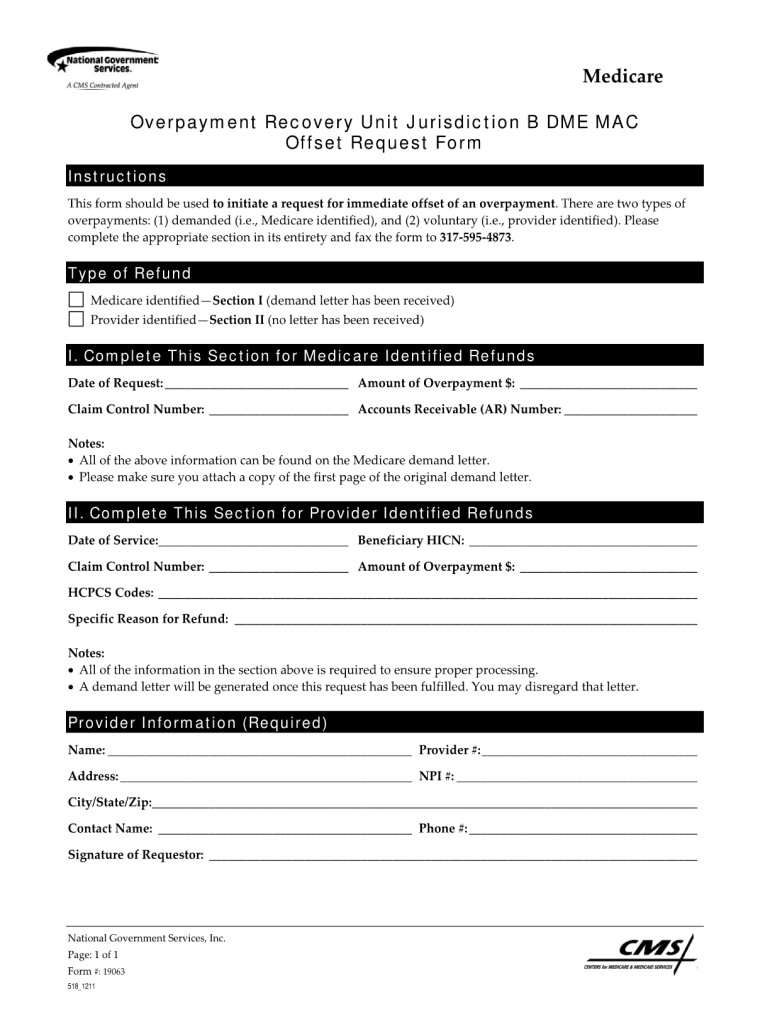
Medicare Overpayment Recovery Unit Jurisdiction B DME MAC Offset Request Form Instructions This form should be used to initiate a request for immediate offset of an overpayment. There are two types.
Loading

Open form follow the instructions

Easily sign the form with your finger

Send filled & signed form or save
How to fill out the National Government Services 19063 online
Filling out the National Government Services 19063 form online can streamline your application process. This guide will provide clear, step-by-step instructions to help you complete the form accurately and efficiently.
Follow the steps to complete the National Government Services 19063 form online.
- Click the ‘Get Form’ button to access the form and open it in your preferred editing tool.
- Begin by entering your personal information in the designated fields. This typically includes your full name, contact information, and any relevant identification numbers.
- Proceed to the next section, which may ask for details about your employment or current status. Ensure all information is current and accurate.
- Review each field and section carefully, ensuring that no areas are left blank unless otherwise instructed. Accuracy is essential for processing.
- Upon completing all required fields, review your entire form for errors or omissions. It’s helpful to take a moment to double-check your entries.
- Once you are satisfied with the information provided, save your changes. You can then download, print, or share the form as needed.
Take the next step and complete your documents online today.
Experience a faster way to fill out and sign forms on the web. Access the most extensive library of templates available.
Related content
Contact. 201 West Front Street, Media, PA 19063 8:30AM - 4:30PM Monday - Friday...
Chester County Department of Drug and Alcohol Services Government Services Center 601...
As a leader in the Memorialization industry, Matthews is committed to helping our...
Get answers to your most pressing questions about US Legal Forms API.
How long does PECOS enrollment take?
The PECOS enrollment process can vary, but on average, it may take between 30 to 60 days to complete through National Government Services 19063. Factors such as the completeness of your application and verification of information can affect this timeframe. Staying organized and ensuring all documents are in order can help expedite the process.
What states do national government services cover?
National Government Services 19063 covers multiple states, including New Jersey, Illinois, and Ohio. This wide coverage ensures that a significant number of residents within these states have access to Medicare services. By offering support in various regions, National Government Services plays an important role in meeting healthcare needs.
How do I contact NGs?
You can contact National Government Services 19063 via their customer service hotline or through their website. They provide multiple channels for communication, ensuring that you have access to the help you need. Reaching out to them directly is often the quickest way to resolve any questions or concerns.
What does NGs stand for in Medicare?
In the context of Medicare, NGs stands for National Government Services 19063. This designation signifies their role in managing Medicare claims and providing support to beneficiaries. By understanding this terminology, individuals can better navigate the Medicare system and access the resources they need.
Is National Government Services a MAC?
Yes, National Government Services 19063 operates as a Medicare Administrative Contractor (MAC). This designation allows them to process claims and manage Medicare functions in their designated jurisdictions. As a MAC, they play a vital role in ensuring that Medicare services are delivered efficiently and effectively.
Who is the parent company of National Government Services?
The parent company of National Government Services 19063 is Anthem, Inc. This connection allows National Government Services to leverage Anthem's extensive resources and expertise in healthcare management. By being part of a larger organization, National Government Services can enhance its service offerings to beneficiaries.
What states are covered by NGs Medicare?
National Government Services 19063 provides Medicare coverage across several states. This includes areas such as Massachusetts, New York, and Connecticut. By ensuring these locations are included, National Government Services helps a substantial number of individuals access essential healthcare services.
Is NGS a Medicare contractor?
Yes, National Government Services operates as a Medicare contractor. In this role, they facilitate essential healthcare support for beneficiaries within the Medicare program. Their dedication to this sector means they play an invaluable part in healthcare delivery and customer service, ensuring beneficiaries get the help they need.
What do national government services do?
National Government Services provide essential support that includes managing healthcare programs and assisting individuals with understanding their benefits. They work to ensure that citizens have access to the necessary programs to maintain their health. Their commitment to quality service shines through, especially for those navigating Medicare.
How do I contact Medicare NGS?
To contact Medicare NGS, you can visit their official website or call their dedicated hotline. They offer various communication methods to ensure that you receive timely assistance. Whether you have questions about services or need help with a specific issue, National Government Services 19063 is equipped to support you.
Use professional pre-built templates to fill in and sign documents online faster. Get access to thousands of forms.
If you believe that this page should be taken down, please follow our DMCA take down process here.