Loading
Form preview
  • US Legal Forms
  • Other Templates
  • Social Forms
  • Oregon Social Forms
  • Nc Cacfp Civil Rights Sign-in Sheet 2015

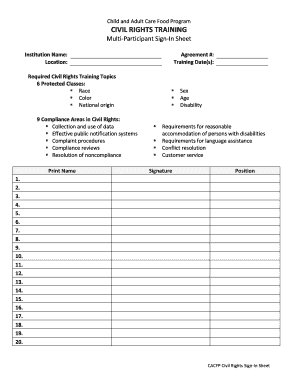
Get Nc Cacfp Civil Rights Sign-in Sheet 2015-2026

3. 4. 5. 6. 7. 8. 9. 10. 11. 12. 13. 14. 15. 16. 17. 18. 19. 20. CACFP Civil Rights Sign-In Sheet CIVIL RIGHTS TRAINING Sign-In Sheet (continued) Print Name Signature Position 21. 22. 23. 24. 25. 26. 27. 28. 29. 30. 31. 32. 33. 34. 35. 36. 37. 38. 39. 40. 41. 42. 43. 44. 45. 46. 47. 48. 49. 50. 51. 52. 53. 54. CACFP Civil Rights Sign-In Sheet .

How it works

  1. Open form

    Open form follow the instructions

  2. Easily sign form

    Easily sign the form with your finger

  3. Share form

    Send filled & signed form or save

How to fill out the NC CACFP Civil Rights Sign-In Sheet online

The NC CACFP Civil Rights Sign-In Sheet is an essential document for ensuring compliance with civil rights training in child and adult care programs. This guide will help you navigate through the process of completing the form online with confidence and clarity.

Follow the steps to effectively complete the sign-in sheet.

  1. Select the ‘Get Form’ button to access the sign-in sheet and open it in your preferred online editor.
  2. In the first section, provide the institution name and location where the training is taking place. This information is vital for identifying the organization responsible for the training.
  3. Fill in the agreement number associated with your institution, ensuring accuracy as it links the training session to your organization.
  4. Enter the training date(s) to indicate when the civil rights training occurred. This helps track compliance and training schedules.
  5. Review the required civil rights training topics outlined in the form. Familiarize yourself with the six protected classes and nine compliance areas to guide your training activities.
  6. In the subsequent fields, fill in the names of participants attending the training, along with their signatures and positions. This creates a verified record of attendance.
  7. As you proceed to additional participant rows, ensure that all required fields are completed before submission to maintain accurate records.
  8. Once all participant information is recorded, review the entire form for any errors or omissions ensuring complete and accurate data.
  9. After verifying the information, save your changes. You may choose to download, print, or share the completed form as needed for your records.

Begin completing the NC CACFP Civil Rights Sign-In Sheet online today for organized and compliant record-keeping.

Get form

Experience a faster way to fill out and sign forms on the web. Access the most extensive library of templates available.
Get form

Related content

CACFP Forms
Sign-in to NC CACFP CONNECTS for all required forms and documents for FY 2026. CACFP Forms...
Learn more
CHILD AND ADULT CARE FOOD PROGRAM MEDIA ...
Oct 16, 2019 — To request a copy of the complaint form, call (866) 632-9992. Submit your...
Learn more

Related links form

Clark Foundation Fellowship Program - Slc TransitChek Getting Started Guide - Slc Mid-Year Or First Trimester School Report - Sarah Lawrence College - Slc Terms Of Payment Policy - Sarah Lawrence College - Slc

Questions & Answers

Get answers to your most pressing questions about US Legal Forms API.

Contact support

The five components of the CACFP include meal patterns, eligibility determination, reimbursement claims, monitoring, and training. Meal patterns guide what foods should be served to ensure nutritional standards are met. Eligibility determination assesses which participants qualify for benefits. Monitoring ensures programs adhere to guidelines, while training provides the necessary education to staff. Together, these components ensure the effective implementation of the NC CACFP Civil Rights Sign-In Sheet and other important policies.

Reiterating the importance of accuracy, two critical edit checks before submitting a CACFP claim include validating the total claimed meals against the serving records and ensuring participant data aligns with the official enrollment records. These edits help maintain the integrity of the data submitted. Properly using the NC CACFP Civil Rights Sign-In Sheet can assist in ensuring compliance with these checks.

CACFP reimbursement works by compensating providers for the nutritious meals served to eligible participants. After submitting a claim that includes the number of meals served, providers receive reimbursement based on federal and state guidelines. This funding helps sustain meal programs while ensuring that children and adults enjoy healthy food options. The NC CACFP Civil Rights Sign-In Sheet is crucial in substantiating these claims.

Civil rights for CACFP participants ensures access to nutritious meals without discrimination based on race, color, national origin, age, or disability. It reflects a commitment to providing equal opportunities for all individuals involved in the program. Upholding civil rights reinforces trust among participants and promotes inclusivity. The NC CACFP Civil Rights Sign-In Sheet plays a role in tracking compliance with these principles.

The CACFP enrollment form is used to enroll children in the Child and Adult Care Food Program, collecting key information needed for eligibility. This form aids providers in determining which participants qualify for benefits, ensuring families receive appropriate meal services. Completing the form accurately is crucial for maintaining compliance and utilizing resources effectively, including the NC CACFP Civil Rights Sign-In Sheet.

Yes, civil rights training must be documented to comply with CACFP requirements. This documentation serves as proof that staff members have received necessary training on civil rights policies. By recording this information, you demonstrate commitment to equitable treatment and provide assurance during audits. Utilizing the NC CACFP Civil Rights Sign-In Sheet can help streamline this documentation process.

Before submitting a claim for CACFP, two essential edit checks must be completed. First, ensure that the total number of meals claimed matches the number of meals served. Second, verify that the participant information aligns with the data recorded, particularly in the NC CACFP Civil Rights Sign-In Sheet, to maintain accuracy and compliance.

The three basic tools for program accountability in CACFP include documentation, monitoring, and evaluation. Documentation ensures that all actions taken within the program are recorded, creating a traceable history. Monitoring involves regularly reviewing processes and outcomes to ensure compliance with regulations. Finally, evaluation helps assess the overall effectiveness of the program and guides improvements, ensuring that the NC CACFP Civil Rights Sign-In Sheet is properly utilized.

In a child nutrition program, civil rights represent a commitment to providing inclusive and equitable services. These rights frame the policies and practices that ensure all children receive the nutrition they need. Emphasizing civil rights helps build trust within the community and fosters a supportive environment. Implementing tools like the NC CACFP Civil Rights Sign-In Sheet can facilitate a clearer understanding of these essential rights among staff and participants.

The civil rights in the Child and Adult Care Food Program (CACFP) are the principles that protect against discrimination. These principles include the rights to fair treatment and access to food services without bias. Organizations must promote awareness of these civil rights among staff and participants. Utilizing tools like the NC CACFP Civil Rights Sign-In Sheet can help reinforce these vital concepts.

Get This Form Now!

Use professional pre-built templates to fill in and sign documents online faster. Get access to thousands of forms.
Get form
If you believe that this page should be taken down, please follow our DMCA take down processhere.
Get NC CACFP Civil Rights Sign-In Sheet
Get form
  • Adoption
  • Bankruptcy
  • Contractors
  • Divorce
  • Home Sales
  • Employment
  • Identity Theft
  • Incorporation
  • Landlord Tenant
  • Living Trust
  • Name Change
  • Personal Planning
  • Small Business
  • Wills & Estates
  • Packages A-Z
  • Affidavits
  • Bankruptcy
  • Bill of Sale
  • Corporate - LLC
  • Divorce
  • Employment
  • Identity Theft
  • Internet Technology
  • Landlord Tenant
  • Living Wills
  • Name Change
  • Power of Attorney
  • Real Estate
  • Small Estates
  • Wills
  • All Forms
  • Forms A-Z
  • Other Templates
  • Legal Hub
  • About Us
  • Help Portal
  • Legal Resources
  • Blog
  • Affiliates
  • Contact Us
  • Delete My Account
  • Site Map
  • Industries
  • Forms in Spanish
  • Localized Forms
  • State-specific Forms
  • Forms Kit
  • Real Estate Handbook
  • All Guides
  • Notarize
  • Incorporation services
  • For Consumers
  • For Small Business
  • For Attorneys
  • USLegal
  • FormsPass
  • pdfFiller
  • signNow
  • altaFlow
  • DocHub
  • Instapage
Form Packages
  • Adoption
  • Bankruptcy
  • Contractors
  • Divorce
  • Home Sales
  • Employment
  • Identity Theft
  • Incorporation
  • Landlord Tenant
  • Living Trust
  • Name Change
  • Personal Planning
  • Small Business
  • Wills & Estates
  • Packages A-Z
Form Categories
  • Affidavits
  • Bankruptcy
  • Bill of Sale
  • Corporate - LLC
  • Divorce
  • Employment
  • Identity Theft
  • Internet Technology
  • Landlord Tenant
  • Living Wills
  • Name Change
  • Power of Attorney
  • Real Estate
  • Small Estates
  • Wills
  • All Forms
  • Forms A-Z
  • Other Templates
Customer Service
  • Legal Hub
  • About Us
  • Help Portal
  • Legal Resources
  • Blog
  • Affiliates
  • Contact Us
  • Delete My Account
  • Site Map
  • Industries
  • Forms in Spanish
  • Localized Forms
  • State-specific Forms
  • Forms Kit
Legal Guides
  • Real Estate Handbook
  • All Guides
Prepared for you
  • Notarize
  • Incorporation services
Our Customers
  • For Consumers
  • For Small Business
  • For Attorneys
Our Sites
  • USLegal
  • FormsPass
  • pdfFiller
  • signNow
  • altaFlow
  • DocHub
  • Instapage
Social Media
Call us now toll free:
+1 833 426 79 33
As seen in:
© Copyright 1999-2026 airSlate Legal Forms, Inc. 17 Station Street, Ste. 203, Brookline, MA 02445
  • Your Privacy Choices
  • Terms of Service
  • Privacy Notice
  • Content Takedown Policy
  • Bug Bounty Program