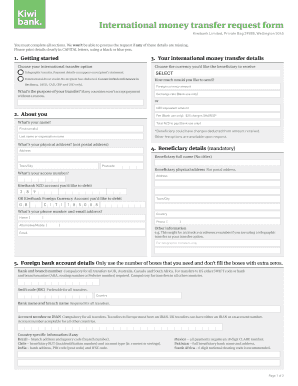
Se sign the next page before returning this form to us. Without your signature we can’t process your request. Page 1 of 2 5. Beneficiary details (mandatory) Beneficiary full name (No titles) Bank use only Fax this back by 3pm for the international money transfer to be processed on the same business day. Beneficiary physical address Not postal address. Staff member’s name IMT reference no. Address PBU: Kiwibank Limited, Private Bag 39888, Wellington 5045, Fax: 0800 222 486, Fax from .
Open form follow the instructions
Easily sign the form with your finger
Send filled & signed form or save
How to fill out the Kiwi Bank FM3085 online
This guide provides comprehensive instructions on how to fill out the Kiwi Bank FM3085 form for international money transfers. Whether you are a first-time user or need a refresher, this step-by-step approach will help you complete the form efficiently.
Follow the steps to complete your Kiwi Bank FM3085 form.
- Click ‘Get Form’ button to obtain the form and open it in the editor.
- Begin by filling out your personal information in the 'About You' section. Include your first name(s), last name or organisation name, physical address (not postal), town/city, postcode, phone number, and email address.
- In the 'Your International Money Transfer Details' section, choose your international transfer option (international direct credit or telegraphic transfer) and select the currency you would like the beneficiary to receive.
- Fill in the amount you wish to send in foreign currency, and the corresponding NZD equivalent will be automatically calculated by the bank.
- Complete the 'Foreign Bank Account Details' section by entering the required information including bank and branch number, SWIFT code, and account number or IBAN as necessary.
- In the 'Beneficiary Details' section, provide the full name (no titles) and physical address of the beneficiary, including town/city and country.
- Finally, read through the 'Transfer Terms & Conditions' carefully. You will need to acknowledge your acceptance by signing the document.
- Save your changes, download the completed form, and print or share it as needed.
Complete your Kiwi Bank FM3085 form online with ease and ensure your international transfer is processed smoothly.
Experience a faster way to fill out and sign forms on the web. Access the most extensive library of templates available.
Related content
Get answers to your most pressing questions about US Legal Forms API.
What is the international number for Kiwibank?
The international number for Kiwibank can typically be found on their website or through their customer service. This number is vital for contacting Kiwibank from outside the country regarding your transactions, especially when considering the Kiwi Bank FM3085 feature. Ensure you include the proper country code when dialing.
Is the SWIFT code the same for all branches?
No, the SWIFT code is not the same for all Kiwibank branches. Each branch may have its unique code to facilitate accurate transactions. For those using the Kiwi Bank FM3085 feature, it's essential to confirm the specific SWIFT code associated with your branch directly from Kiwibank.
What is the swift code for Kiwibank?
The SWIFT code for Kiwibank is typically found on their official website or by contacting customer service. This code is essential for making international transfers using the Kiwi Bank FM3085 option, ensuring your funds reach the correct destination. Each branch may have a different code, so always verify with Kiwibank directly.
How to fill international bank transfer form?
Filling out an international bank transfer form may seem daunting, but it's straightforward. First, gather the recipient's banking details, including their SWIFT code, which you will need when using the Kiwi Bank FM3085 option. Follow the form’s sections carefully, providing all required information, and don’t hesitate to seek help from Kiwibank representatives if necessary.
How do I find my SWIFT code at Kiwibank?
To find your SWIFT code at Kiwibank, you can visit their official website or contact customer support. The SWIFT code is crucial for international transactions, including the Kiwi Bank FM3085 feature. Additionally, you may check your account details through online banking, where this information is typically listed clearly.
Is Kiwibank a safe bank?
Kiwibank is considered a safe banking option, offering comprehensive security measures for its customers. It operates under strict regulations and employs modern security protocols to protect your account. By choosing Kiwibank, you can manage your finances confidently, knowing your personal information is safeguarded.
Who owns the Kiwibank?
Kiwibank is owned by the New Zealand government, which ensures its operation aligns with the needs of Kiwis. This ownership structure promotes stability and trust, offering peace of mind for customers. By being a publicly owned bank, Kiwibank prioritizes community welfare and financial inclusion.
What is the address for Kiwibank international transfers?
For international transfers, Kiwibank uses specific routing and banking details. Generally, you should use the Kiwibank's SWIFT code when transferring funds from overseas. Ensure you have the correct details and refer to the Kiwibank FM3085 specifications to avoid delays in your transactions.
Which country uses Kiwibank?
Kiwibank primarily serves customers in New Zealand. It was created to provide reliable banking services within the country, enhancing banking accessibility for New Zealanders. If you are in New Zealand and require banking solutions, Kiwibank is an excellent choice.
Is Kiwibank a real bank?
Yes, Kiwibank is a legitimate financial institution that operates under strict regulations set by the Reserve Bank of New Zealand. It offers a full suite of banking services and is known for its commitment to customer service. When you choose Kiwibank, you can confidently manage your finances with a trusted partner.
Use professional pre-built templates to fill in and sign documents online faster. Get access to thousands of forms.
If you believe that this page should be taken down, please follow our DMCA take down process here.