Loading
Form preview
  • US Legal Forms
  • Other Templates
  • More Forms
  • More Multi-State Forms
  • Iowa Contractors Statement: Fill Out & Sign Online

Get Iowa Contractors Statement: Fill Out & Sign Online

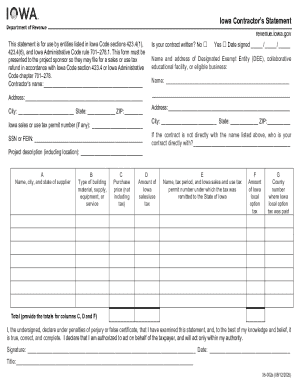
Iowa Contractors Statement revenue.iowa.gov This statement is for use by entities listed in Iowa Code sections 423.4(1), 423.4(6), and Iowa Administrative Code rule 701278.1. This form must be presented.

How it works

  1. Open form

    Open form follow the instructions

  2. Easily sign form

    Easily sign the form with your finger

  3. Share form

    Send filled & signed form or save

How to fill out and sign Iowa Contractors Statement: Fill Out & Sign Online online?

Get your online template and fill it in using progressive features. Enjoy smart fillable fields and interactivity.Follow the simple instructions below:

Tips on how to fill out, edit and sign Iowa Contractors Statement: Fill Out & Sign Online online

How to edit Iowa Contractors Statement: Fill Out & Sign Online: customize forms online

Facilitate your document preparation process and adapt it to your needs within clicks. Fill out and sign Iowa Contractors Statement: Fill Out & Sign Online using a powerful yet user-friendly online editor.

Managing paperwork is always troublesome, especially when you deal with it occasionally. It demands you strictly follow all the formalities and precisely complete all fields with full and accurate information. However, it often happens that you need to modify the document or add more fields to fill out. If you need to optimize Iowa Contractors Statement: Fill Out & Sign Online prior to submitting it, the easiest way to do it is by using our powerful yet easy-to-use online editing tools.

This comprehensive PDF editing solution allows you to quickly and easily complete legal paperwork from any internet-connected device, make simple edits to the form, and add more fillable fields. The service allows you to choose a particular area for each data type, like Name, Signature, Currency and SSN etc. You can make them required or conditional and decide who should complete each field by assigning them to a specific recipient.

Make the steps listed below to optimize your Iowa Contractors Statement: Fill Out & Sign Online online:

  1. Open needed sample from the catalog.
  2. Fill out the blanks with Text and place Check and Cross tools to the tickboxes.
  3. Utilize the right-side toolbar to alter the template with new fillable areas.
  4. Opt for the fields depending on the type of information you want to be collected.
  5. Make these fields required, optional, and conditional and customize their order.
  6. Assign each area to a particular party using the Add Signer option.
  7. Check if you’ve made all the necessary changes and click Done.

Our editor is a versatile multi-featured online solution that can help you easily and quickly adapt Iowa Contractors Statement: Fill Out & Sign Online and other templates in accordance with your requirements. Minimize document preparation and submission time and make your documentation look perfect without hassle.

Get form

Experience a faster way to fill out and sign forms on the web. Access the most extensive library of templates available.
Get form

Related content

PROJECT MANUAL - Forms & Applications - Iowa DNR
Dec 18, 2025 — The DEPARTMENT will issue an authorization letter and exemption...
Learn more
Design Revision Packet 2020 Edition
Upon acceptance, sign and date the document and provide a copy to the contractor....
Learn more
Owner's Manual Supplement
Press the “Source” button on the touchscreen to select the desired audio source...
Learn more

Related links form

Sdatawp51Agency Complaints260223 26070223 Bb - Bell County UTILITY INSTALLATION Offense Report 2009 Minority Scholarship Application

Get This Form Now!

Use professional pre-built templates to fill in and sign documents online faster. Get access to thousands of forms.
Get form
If you believe that this page should be taken down, please follow our DMCA take down processhere.
Get Iowa Contractors Statement: Fill Out & Sign Online
Get form
  • Adoption
  • Bankruptcy
  • Contractors
  • Divorce
  • Home Sales
  • Employment
  • Identity Theft
  • Incorporation
  • Landlord Tenant
  • Living Trust
  • Name Change
  • Personal Planning
  • Small Business
  • Wills & Estates
  • Packages A-Z
  • Affidavits
  • Bankruptcy
  • Bill of Sale
  • Corporate - LLC
  • Divorce
  • Employment
  • Identity Theft
  • Internet Technology
  • Landlord Tenant
  • Living Wills
  • Name Change
  • Power of Attorney
  • Real Estate
  • Small Estates
  • Wills
  • All Forms
  • Forms A-Z
  • Other Templates
  • Legal Hub
  • About Us
  • Help Portal
  • Legal Resources
  • Blog
  • Affiliates
  • Contact Us
  • Delete My Account
  • Site Map
  • Industries
  • Forms in Spanish
  • Localized Forms
  • State-specific Forms
  • Forms Kit
  • Real Estate Handbook
  • All Guides
  • Notarize
  • Incorporation services
  • For Consumers
  • For Small Business
  • For Attorneys
  • USLegal
  • FormsPass
  • pdfFiller
  • signNow
  • altaFlow
  • DocHub
  • Instapage
Form Packages
  • Adoption
  • Bankruptcy
  • Contractors
  • Divorce
  • Home Sales
  • Employment
  • Identity Theft
  • Incorporation
  • Landlord Tenant
  • Living Trust
  • Name Change
  • Personal Planning
  • Small Business
  • Wills & Estates
  • Packages A-Z
Form Categories
  • Affidavits
  • Bankruptcy
  • Bill of Sale
  • Corporate - LLC
  • Divorce
  • Employment
  • Identity Theft
  • Internet Technology
  • Landlord Tenant
  • Living Wills
  • Name Change
  • Power of Attorney
  • Real Estate
  • Small Estates
  • Wills
  • All Forms
  • Forms A-Z
  • Other Templates
Customer Service
  • Legal Hub
  • About Us
  • Help Portal
  • Legal Resources
  • Blog
  • Affiliates
  • Contact Us
  • Delete My Account
  • Site Map
  • Industries
  • Forms in Spanish
  • Localized Forms
  • State-specific Forms
  • Forms Kit
Legal Guides
  • Real Estate Handbook
  • All Guides
Prepared for you
  • Notarize
  • Incorporation services
Our Customers
  • For Consumers
  • For Small Business
  • For Attorneys
Our Sites
  • USLegal
  • FormsPass
  • pdfFiller
  • signNow
  • altaFlow
  • DocHub
  • Instapage
Social Media
Call us now toll free:
+1 833 426 79 33
As seen in:
© Copyright 1999-2026 airSlate Legal Forms, Inc. 17 Station Street, Ste. 203, Brookline, MA 02445
  • Your Privacy Choices
  • Terms of Service
  • Privacy Notice
  • Content Takedown Policy
  • Bug Bounty Program