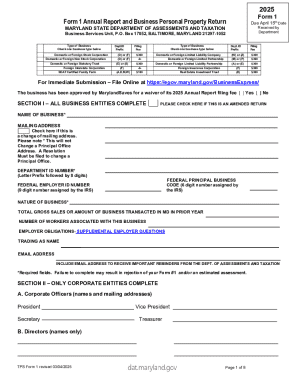
Get Form 1 Annual Report And Business Personal Property Return
How it works
-

Open form follow the instructions
-

Easily sign the form with your finger
-

Send filled & signed form or save
How to fill out and sign Form 1 Annual Report And Business Personal Property Return online?
Get your online template and fill it in using progressive features. Enjoy smart fillable fields and interactivity.Follow the simple instructions below:Tips on how to fill out, edit and sign Form 1 Annual Report And Business Personal Property Return online
How to edit Form 1 Annual Report And Business Personal Property Return: customize forms online
Fill out and sign your Form 1 Annual Report And Business Personal Property Return quickly and error-free. Find and edit, and sign customizable form templates in a comfort of a single tab.
Your document workflow can be considerably more efficient if everything required for modifying and handling the flow is arranged in one place. If you are looking for a Form 1 Annual Report And Business Personal Property Return form sample, this is a place to get it and fill it out without looking for third-party solutions. With this intelligent search engine and editing tool, you won’t need to look any further.
Simply type the name of the Form 1 Annual Report And Business Personal Property Return or any other form and find the right sample. If the sample seems relevant, you can start modifying it right on the spot by clicking Get form. No need to print out or even download it. Hover and click on the interactive fillable fields to place your information and sign the form in a single editor.
Use more modifying instruments to customize your template:
- Check interactive checkboxes in forms by clicking on them. Check other parts of the Form 1 Annual Report And Business Personal Property Return form text with the help of the Cross, Check, and Circle instruments
- If you need to insert more textual content into the document, utilize the Text tool or add fillable fields with the respective button. You may also specify the content of each fillable field.
- Add pictures to forms with the Image button. Add pictures from your device or capture them with your computer camera.
- Add custom visual elements to the document. Use Draw, Line, and Arrow instruments to draw on the document.
- Draw over the text in the document if you wish to conceal it or stress it. Cover text fragments with theErase and Highlight, or Blackout tool.
- Add custom elements like Initials or Date with the respective instruments. They will be generated automatically.
- Save the form on your computer or convert its format to the one you require.
When equipped with a smart forms catalog and a powerful document modifying solution, working with documentation is easier. Find the form you require, fill it out right away, and sign it on the spot without downloading it. Get your paperwork routine simplified with a solution tailored for modifying forms.
Yes, if you operate an LLC in Maryland, you are required to file the Form 1 Annual Report and Business Personal Property Return. This filing ensures your LLC remains compliant with state regulations and maintains its good standing. Using a platform like USLegalForms can simplify the process, making it easier for you to complete and submit your annual report on time.