Loading
Form preview
  • US Legal Forms
  • Other Templates
  • More Forms
  • More Multi-State Forms
  • Ca Pl-cw003 - County Of Placer 2025

Get Ca Pl-cw003 - County Of Placer 2025-2026

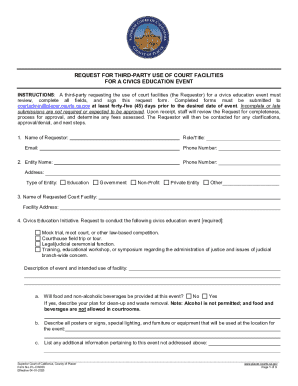
Omplete all fields, and sign this request form. Completed forms must be submitted to courtadmin placer.courts.ca.gov at least forty-five (45) days prior to the desired date of event. Incomplete or late submissions are not required or expected to be approved. Upon receipt, staff will review the Request for completeness, process for approval, and determine any fees assessed. The Requestor will then be contacted for any clarifications, approval/denial, and next steps. 1. Name of Requestor: Role/Ti.

How it works

  1. Open form

    Open form follow the instructions

  2. Easily sign form

    Easily sign the form with your finger

  3. Share form

    Send filled & signed form or save

How to fill out and sign CA PL-CW003 - County Of Placer online?

Get your online template and fill it in using progressive features. Enjoy smart fillable fields and interactivity.Follow the simple instructions below:

The prep of lawful documents can be costly and time-ingesting. However, with our preconfigured web templates, things get simpler. Now, working with a CA PL-CW003 - County Of Placer takes not more than 5 minutes. Our state browser-based blanks and crystal-clear instructions eliminate human-prone errors.

Comply with our simple steps to get your CA PL-CW003 - County Of Placer well prepared rapidly:

  1. Pick the template in the library.
  2. Type all necessary information in the necessary fillable areas. The user-friendly drag&drop interface makes it easy to add or move areas.
  3. Make sure everything is filled in appropriately, without typos or missing blocks.
  4. Apply your e-signature to the PDF page.
  5. Click on Done to save the changes.
  6. Save the data file or print your copy.
  7. Distribute immediately to the receiver.

Use the quick search and innovative cloud editor to produce an accurate CA PL-CW003 - County Of Placer. Eliminate the routine and make paperwork on the web!

Tips on how to fill out, edit and sign CA PL-CW003 - County Of Placer online

How to fill out and sign CA PL-CW003 - County Of Placer online?

Get your online template and fill it in using progressive features. Enjoy smart fillable fields and interactivity.Follow the simple instructions below:

The prep of lawful documents can be costly and time-ingesting. However, with our preconfigured web templates, things get simpler. Now, working with a CA PL-CW003 - County Of Placer takes not more than 5 minutes. Our state browser-based blanks and crystal-clear instructions eliminate human-prone errors.

Comply with our simple steps to get your CA PL-CW003 - County Of Placer well prepared rapidly:

  1. Pick the template in the library.
  2. Type all necessary information in the necessary fillable areas. The user-friendly drag&drop interface makes it easy to add or move areas.
  3. Make sure everything is filled in appropriately, without typos or missing blocks.
  4. Apply your e-signature to the PDF page.
  5. Click on Done to save the changes.
  6. Save the data file or print your copy.
  7. Distribute immediately to the receiver.

Use the quick search and innovative cloud editor to produce an accurate CA PL-CW003 - County Of Placer. Eliminate the routine and make paperwork on the web!

How to edit CA PL-CW003 - County Of Placer: customize forms online

Have your stressless and paper-free way of modifying CA PL-CW003 - County Of Placer. Use our reliable online solution and save a great deal of time.

Drafting every document, including CA PL-CW003 - County Of Placer, from scratch requires too much time, so having a tried-and-true solution of pre-drafted form templates can do wonders for your productivity.

But modifying them can be struggle, especially when it comes to the files in PDF format. Luckily, our huge library has a built-in editor that lets you quickly complete and edit CA PL-CW003 - County Of Placer without leaving our website so that you don't need to lose hours executing your paperwork. Here's what you can do with your file utilizing our tools:

  • Step 1. Find the necessary form on our website.
  • Step 2. Click Get Form to open it in the editor.
  • Step 3. Take advantage of professional editing features that allow you to add, remove, annotate and highlight or blackout text.
  • Step 4. Create and add a legally-binding signature to your file by utilizing the sign option from the top toolbar.
  • Step 5. If the form layout doesn’t look the way you want it, utilize the features on the right to remove, add, and re-order pages.
  • step 6. Add fillable fields so other parties can be invited to complete the form (if applicable).
  • Step 7. Pass around or send the document, print it out, or select the format in which you’d like to download the document.

Whether you need to execute editable CA PL-CW003 - County Of Placer or any other form available in our catalog, you’re well on your way with our online document editor. It's easy and secure and doesn’t require you to have particular skills. Our web-based tool is designed to deal with virtually everything you can imagine when it comes to document editing and completion.

No longer use traditional way of working with your documents. Choose a more efficient solution to help you simplify your activities and make them less reliant on paper.

Get form

Experience a faster way to fill out and sign forms on the web. Access the most extensive library of templates available.
Get form

Related content

Local Forms
PL-CW003, 04/2025. Courtwide, Request for Court Reporter, PL-CW007, 1/2019 ... Public...
Learn more

Related links form

DD Form 1800 2024 UK Milton Keynes Council Direct Debits Form 2002 MD IRP-B 2019 PA Motion - Lycoming County 2021

Questions & Answers

Get answers to your most pressing questions about US Legal Forms API.

Contact support

The dress code for Placer County Court requires visitors to dress in a manner that shows respect for the court. Attire should be professional and appropriate; avoid wearing shorts, tank tops, or flip-flops. Dressing appropriately helps create an atmosphere of seriousness and respect. Always review court guidelines for specifics on acceptable dress.

California courts typically open at AM, but it is wise to check each court’s specific hours. Timings can differ depending on the county and even the type of court. Knowing these details is essential for anyone planning to visit the court. You can consult the Placer County website for any variations in hours that may exist.

You can contact the Placer County Court through their official website, where you'll find phone numbers for different departments. If you prefer direct communication, visit the court in person during regular hours. Additionally, solutions provided by uslegalforms can help guide you in obtaining the information you need without hassle. Utilizing these resources can save you time.

Local courts in Placer County usually begin at AM. However, it is crucial to confirm this information as schedules may vary by department. Arriving on time allows you to complete any necessary check-ins before your case is heard. By staying informed about court schedules, you can avoid unnecessary delays.

To obtain a copy of your divorce decree in Placer County, you need to contact the clerk's office of the Placer County Court. You can request your decree in person or through the mail. Alternatively, you may find useful services on the uslegalforms platform, which can simplify this process for you. Ensure you have your case number ready to expedite the request.

The Placer County Court generally opens at AM on weekdays. It is important to arrive early to avoid any last-minute rush. Always check the official website for any updates or changes in operating hours, especially during holidays. Knowing the court hours can help you plan your visit more effectively.

To apply for In-Home Supportive Services (IHSS) in Placer County, you must submit an application through the county's Health and Human Services. After submitting the application, a social worker will assess your needs to determine eligibility. For detailed guidance and support throughout the process, you can rely on resources provided by CA PL-CW003 - County Of Placer to ensure you complete your application accurately.

The FL 300 form is a request for order used in family law cases in California, allowing you to ask the court to make a temporary, legally binding decision. This form is essential for matters such as child custody, support, and visitation. If you are dealing with family law issues in the CA PL-CW003 - County Of Placer area, utilizing the FL 300 helps facilitate your legal proceedings effectively.

In California, grounds for change of venue typically include prejudice in the current county, convenience of witnesses, or if the case is better suited for another court. If you feel that you cannot receive a fair trial in your current location, you may pursue a change of venue. The CA PL-CW003 - County Of Placer regulation outlines specific guidelines, making it essential to understand your rights within the Placer County system.

To file an abstract of judgment in California, you need to obtain the judgment from the court. Once you have the judgment, fill out the abstract form and submit it to the county recorder's office, such as the CA PL-CW003 - County Of Placer. It's crucial to include the right details to ensure proper recording. For an easier process, consider using USLegalForms to access the necessary forms and instructions.

Get This Form Now!

Use professional pre-built templates to fill in and sign documents online faster. Get access to thousands of forms.
Get form
If you believe that this page should be taken down, please follow our DMCA take down processhere.
Get CA PL-CW003 - County Of Placer
Get form
  • Adoption
  • Bankruptcy
  • Contractors
  • Divorce
  • Home Sales
  • Employment
  • Identity Theft
  • Incorporation
  • Landlord Tenant
  • Living Trust
  • Name Change
  • Personal Planning
  • Small Business
  • Wills & Estates
  • Packages A-Z
  • Affidavits
  • Bankruptcy
  • Bill of Sale
  • Corporate - LLC
  • Divorce
  • Employment
  • Identity Theft
  • Internet Technology
  • Landlord Tenant
  • Living Wills
  • Name Change
  • Power of Attorney
  • Real Estate
  • Small Estates
  • Wills
  • All Forms
  • Forms A-Z
  • Other Templates
  • Legal Hub
  • About Us
  • Help Portal
  • Legal Resources
  • Blog
  • Affiliates
  • Contact Us
  • Delete My Account
  • Site Map
  • Industries
  • Forms in Spanish
  • Localized Forms
  • State-specific Forms
  • Forms Kit
  • Real Estate Handbook
  • All Guides
  • Notarize
  • Incorporation services
  • For Consumers
  • For Small Business
  • For Attorneys
  • USLegal
  • FormsPass
  • pdfFiller
  • signNow
  • altaFlow
  • DocHub
  • Instapage
Form Packages
  • Adoption
  • Bankruptcy
  • Contractors
  • Divorce
  • Home Sales
  • Employment
  • Identity Theft
  • Incorporation
  • Landlord Tenant
  • Living Trust
  • Name Change
  • Personal Planning
  • Small Business
  • Wills & Estates
  • Packages A-Z
Form Categories
  • Affidavits
  • Bankruptcy
  • Bill of Sale
  • Corporate - LLC
  • Divorce
  • Employment
  • Identity Theft
  • Internet Technology
  • Landlord Tenant
  • Living Wills
  • Name Change
  • Power of Attorney
  • Real Estate
  • Small Estates
  • Wills
  • All Forms
  • Forms A-Z
  • Other Templates
Customer Service
  • Legal Hub
  • About Us
  • Help Portal
  • Legal Resources
  • Blog
  • Affiliates
  • Contact Us
  • Delete My Account
  • Site Map
  • Industries
  • Forms in Spanish
  • Localized Forms
  • State-specific Forms
  • Forms Kit
Legal Guides
  • Real Estate Handbook
  • All Guides
Prepared for you
  • Notarize
  • Incorporation services
Our Customers
  • For Consumers
  • For Small Business
  • For Attorneys
Our Sites
  • USLegal
  • FormsPass
  • pdfFiller
  • signNow
  • altaFlow
  • DocHub
  • Instapage
Social Media
Call us now toll free:
+1 833 426 79 33
As seen in:
© Copyright 1999-2026 airSlate Legal Forms, Inc. 17 Station Street, Ste. 203, Brookline, MA 02445
  • Your Privacy Choices
  • Terms of Service
  • Privacy Notice
  • Content Takedown Policy
  • Bug Bounty Program