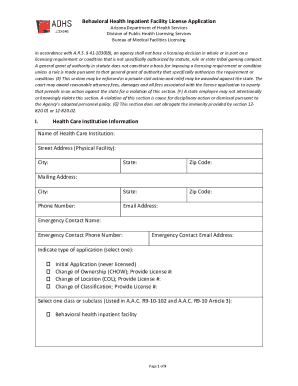
Get Az Behavioral Health Inpatient Facility License Application 2022-2026
How it works
-

Open form follow the instructions
-

Easily sign the form with your finger
-

Send filled & signed form or save
How to fill out and sign AZ Behavioral Health Inpatient Facility License Application online?
Get your online template and fill it in using progressive features. Enjoy smart fillable fields and interactivity.Follow the simple instructions below:Are you still seeking a fast and convenient tool to fill out AZ Behavioral Health Inpatient Facility License Application at a reasonable cost? Our service provides you with a rich selection of forms that are offered for completing online. It only takes a few minutes.
Stick to these simple actions to get AZ Behavioral Health Inpatient Facility License Application prepared for sending:
- Get the form you want in our library of legal forms.
- Open the document in our online editor.
- Go through the recommendations to learn which data you have to give.
- Click the fillable fields and add the necessary details.
- Put the date and insert your e-signature after you complete all other fields.
- Double-check the completed document for misprints and other mistakes. In case there?s a necessity to correct some information, the online editing tool and its wide variety of tools are at your disposal.
- Save the completed form to your device by clicking Done.
- Send the electronic form to the intended recipient.
Submitting AZ Behavioral Health Inpatient Facility License Application does not really have to be perplexing anymore. From now on simply get through it from home or at your office right from your smartphone or personal computer.
Tips on how to fill out, edit and sign AZ Behavioral Health Inpatient Facility License Application online
How to fill out and sign AZ Behavioral Health Inpatient Facility License Application online?
Get your online template and fill it in using progressive features. Enjoy smart fillable fields and interactivity.Follow the simple instructions below:
Are you still seeking a fast and convenient tool to fill out AZ Behavioral Health Inpatient Facility License Application at a reasonable cost? Our service provides you with a rich selection of forms that are offered for completing online. It only takes a few minutes.
Stick to these simple actions to get AZ Behavioral Health Inpatient Facility License Application prepared for sending:
- Get the form you want in our library of legal forms.
- Open the document in our online editor.
- Go through the recommendations to learn which data you have to give.
- Click the fillable fields and add the necessary details.
- Put the date and insert your e-signature after you complete all other fields.
- Double-check the completed document for misprints and other mistakes. In case there?s a necessity to correct some information, the online editing tool and its wide variety of tools are at your disposal.
- Save the completed form to your device by clicking Done.
- Send the electronic form to the intended recipient.
Submitting AZ Behavioral Health Inpatient Facility License Application does not really have to be perplexing anymore. From now on simply get through it from home or at your office right from your smartphone or personal computer.
How to edit AZ Behavioral Health Inpatient Facility License Application: customize forms online
Make the most of our comprehensive online document editor while preparing your forms. Complete the AZ Behavioral Health Inpatient Facility License Application, emphasize on the most significant details, and effortlessly make any other necessary alterations to its content.
Completing documents electronically is not only time-saving but also comes with an opportunity to modify the sample according to your requirements. If you’re about to work on AZ Behavioral Health Inpatient Facility License Application, consider completing it with our robust online editing tools. Whether you make an error or enter the requested details into the wrong field, you can rapidly make changes to the form without the need to restart it from the beginning as during manual fill-out. Besides that, you can stress on the essential data in your document by highlighting certain pieces of content with colors, underlining them, or circling them.
Adhere to these simple and quick actions to fill out and edit your AZ Behavioral Health Inpatient Facility License Application online:
- Open the file in the editor.
- Enter the required information in the empty areas using Text, Check, and Cross tools.
- Follow the document navigation to avoid missing any required areas in the sample.
- Circle some of the critical details and add a URL to it if needed.
- Use the Highlight or Line tools to emphasize the most significant facts.
- Choose colors and thickness for these lines to make your sample look professional.
- Erase or blackout the data you don’t want to be visible to other people.
- Substitute pieces of content containing errors and type in text that you need.
- Finish editing with the Done button as soon as you make certain everything is correct in the document.
Our powerful online solutions are the simplest way to complete and customize AZ Behavioral Health Inpatient Facility License Application in accordance with your demands. Use it to prepare personal or business documents from anyplace. Open it in a browser, make any changes in your forms, and return to them anytime in the future - they all will be safely kept in the cloud.
To become a licensed mental health counselor in Arizona, you must fulfill specific educational and experiential requirements. Obtain a master’s degree in counseling or a related field and complete a defined number of supervised hours. After that, pass the required licensing exam to qualify for your license. Understanding the AZ Behavioral Health Inpatient Facility License Application can further guide your career in counseling settings.