Loading
Get Au Acas Community Referral 2010-2026
How it works
-

Open form follow the instructions
-

Easily sign the form with your finger
-

Send filled & signed form or save
How to fill out the AU ACAS Community Referral online
Filling out the AU ACAS Community Referral form online is a crucial step in ensuring individuals receive the necessary support and care. This guide will provide clear and detailed instructions to help users navigate the process with ease.
Follow the steps to complete the AU ACAS Community Referral form successfully.
- Click ‘Get Form’ button to access the AU ACAS Community Referral form and open it in your editor.
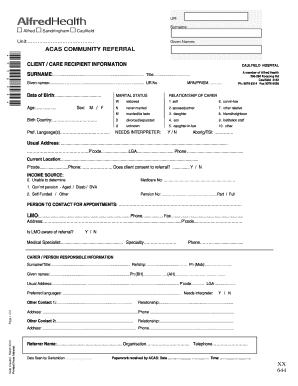
- Begin by filling out the client or care recipient information. Enter the surname, given names, and ur number accurately. Ensure that you provide contact details and specify the date of birth.
- Complete the marital status section by selecting the appropriate option from the dropdown. Specify the relationship of the carer, and include any other relevant details regarding the user’s family structure.
- Provide information regarding the income source, selecting an option based on the user’s financial status. Ensure that all fields, particularly the Medicare number and pension number, are filled out correctly.
- Fill out the information regarding the person to contact for appointments as well as the LMO’s details. Indicate if the LMO is aware of the referral.
- Move to the carer or person responsible information section. Enter their surname, given names, relationship, and contact details accurately.
- Provide information on additional contacts, including their relationship to the user and contact details.
- In the referral section, describe the reason for the referral along with current problems and health status, ensuring that comprehensive details are included.
- Document the medical history and any recent investigations, including specifics of medications, mobility status, and the user’s functional capacity.
- Ensure to address any behavioral problems, psychological symptoms, and social situations. These are vital for proper assessment.
- Finally, review all entered information for accuracy. Save your changes, and choose to download, print, or share the filled form as needed.
Complete your AU ACAS Community Referral form online to ensure timely access to necessary support.
ACAS status indicates whether a case or inquiry is currently under review by the Advisory, Conciliation and Arbitration Service. Understanding your ACAS status is essential for navigating workplace disputes, as it directly affects the steps you can take in seeking resolution. By utilizing AU ACAS Community Referral, you can stay informed about your case and receive support throughout the process.