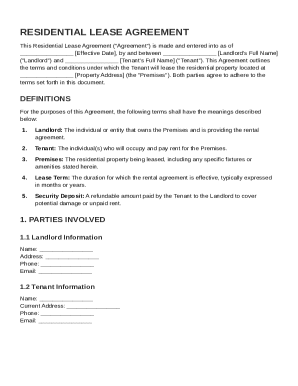
Get Rental Or Residential Lease Agreement Template
How it works
-

Open form follow the instructions
-

Easily sign the form with your finger
-

Send filled & signed form or save
How to fill out and sign Rental Or Residential Lease Agreement Template online?
Get your online template and fill it in using progressive features. Enjoy smart fillable fields and interactivity.Follow the simple instructions below:Feel all the key benefits of submitting and completing legal documents on the internet. Using our solution filling out Rental Or Residential Lease Agreement Template requires just a matter of minutes. We make that possible by giving you access to our full-fledged editor effective at changing/correcting a document?s original text, adding special fields, and e-signing.
Execute Rental Or Residential Lease Agreement Template within several moments by using the recommendations listed below:
- Pick the template you will need from our library of legal form samples.
- Choose the Get form key to open it and move to editing.
- Complete all the required boxes (they are marked in yellow).
- The Signature Wizard will enable you to add your e-signature right after you?ve finished imputing data.
- Add the date.
- Double-check the whole template to make certain you have completed all the data and no changes are needed.
- Click Done and save the filled out form to the gadget.
Send the new Rental Or Residential Lease Agreement Template in an electronic form right after you finish completing it. Your information is well-protected, as we adhere to the newest security criteria. Become one of numerous satisfied customers who are already filling in legal forms from their houses.
Tips on how to fill out, edit and sign Rental Or Residential Lease Agreement Template online
How to fill out and sign Rental Or Residential Lease Agreement Template online?
Get your online template and fill it in using progressive features. Enjoy smart fillable fields and interactivity.Follow the simple instructions below:
Feel all the key benefits of submitting and completing legal documents on the internet. Using our solution filling out Rental Or Residential Lease Agreement Template requires just a matter of minutes. We make that possible by giving you access to our full-fledged editor effective at changing/correcting a document?s original text, adding special fields, and e-signing.
Execute Rental Or Residential Lease Agreement Template within several moments by using the recommendations listed below:
- Pick the template you will need from our library of legal form samples.
- Choose the Get form key to open it and move to editing.
- Complete all the required boxes (they are marked in yellow).
- The Signature Wizard will enable you to add your e-signature right after you?ve finished imputing data.
- Add the date.
- Double-check the whole template to make certain you have completed all the data and no changes are needed.
- Click Done and save the filled out form to the gadget.
Send the new Rental Or Residential Lease Agreement Template in an electronic form right after you finish completing it. Your information is well-protected, as we adhere to the newest security criteria. Become one of numerous satisfied customers who are already filling in legal forms from their houses.
How to edit Rental Or Residential Lease Agreement Template: customize forms online
Fill out and sign your Rental Or Residential Lease Agreement Template quickly and error-free. Find and edit, and sign customizable form samples in a comfort of a single tab.
Your document workflow can be far more efficient if all you need for modifying and handling the flow is arranged in one place. If you are looking for a Rental Or Residential Lease Agreement Template form sample, this is a place to get it and fill it out without searching for third-party solutions. With this intelligent search engine and editing tool, you won’t need to look any further.
Just type the name of the Rental Or Residential Lease Agreement Template or any other form and find the right sample. If the sample seems relevant, you can start modifying it right on the spot by clicking Get form. No need to print out or even download it. Hover and click on the interactive fillable fields to insert your information and sign the form in a single editor.
Use more modifying instruments to customize your form:
- Check interactive checkboxes in forms by clicking on them. Check other parts of the Rental Or Residential Lease Agreement Template form text by using the Cross, Check, and Circle instruments
- If you need to insert more text into the file, utilize the Text tool or add fillable fields with the respective button. You can even specify the content of each fillable field.
- Add pictures to forms with the Image button. Add pictures from your device or capture them with your computer camera.
- Add custom visual elements to the document. Use Draw, Line, and Arrow instruments to draw on the document.
- Draw over the text in the document if you wish to hide it or stress it. Cover text fragments with theErase and Highlight, or Blackout tool.
- Add custom elements such as Initials or Date with the respective instruments. They will be generated automatically.
- Save the form on your device or convert its format to the one you want.
When equipped with a smart forms catalog and a powerful document modifying solution, working with documentation is easier. Find the form you need, fill it out instantly, and sign it on the spot without downloading it. Get your paperwork routine simplified with a solution designed for modifying forms.
Writing a lease agreement form involves drafting essential components like tenant and landlord names, property address, and terms of the lease. Start with a Rental Or Residential Lease Agreement Template to ensure you cover all necessary elements, including notice periods and renewal options. A well-structured form can protect the interests of both parties and minimize potential disputes.