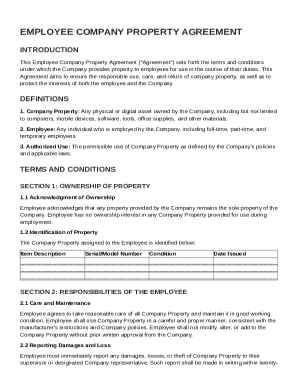
Get Employee Company Property Agreement Template
How it works
-

Open form follow the instructions
-

Easily sign the form with your finger
-

Send filled & signed form or save
How to fill out and sign Employee Company Property Agreement Template online?
Get your online template and fill it in using progressive features. Enjoy smart fillable fields and interactivity.Follow the simple instructions below:The days of distressing complicated tax and legal forms have ended. With US Legal Forms filling out legal documents is anxiety-free. The best editor is right close at hand offering you an array of advantageous instruments for completing a Employee Company Property Agreement Template. These guidelines, in addition to the editor will assist you with the entire process.
- Click on the Get Form button to begin modifying.
- Switch on the Wizard mode on the top toolbar to have more recommendations.
- Fill out each fillable area.
- Ensure the information you add to the Employee Company Property Agreement Template is updated and correct.
- Indicate the date to the form using the Date function.
- Click on the Sign icon and create an electronic signature. There are three available options; typing, drawing, or uploading one.
- Check once more each and every area has been filled in correctly.
- Click Done in the top right corne to save and send or download the form. There are several ways for receiving the doc. An attachment in an email or through the mail as a hard copy, as an instant download.
We make completing any Employee Company Property Agreement Template simpler. Get started now!
Tips on how to fill out, edit and sign Employee Company Property Agreement Template online
How to fill out and sign Employee Company Property Agreement Template online?
Get your online template and fill it in using progressive features. Enjoy smart fillable fields and interactivity.Follow the simple instructions below:
The days of distressing complicated tax and legal forms have ended. With US Legal Forms filling out legal documents is anxiety-free. The best editor is right close at hand offering you an array of advantageous instruments for completing a Employee Company Property Agreement Template. These guidelines, in addition to the editor will assist you with the entire process.
- Click on the Get Form button to begin modifying.
- Switch on the Wizard mode on the top toolbar to have more recommendations.
- Fill out each fillable area.
- Ensure the information you add to the Employee Company Property Agreement Template is updated and correct.
- Indicate the date to the form using the Date function.
- Click on the Sign icon and create an electronic signature. There are three available options; typing, drawing, or uploading one.
- Check once more each and every area has been filled in correctly.
- Click Done in the top right corne to save and send or download the form. There are several ways for receiving the doc. An attachment in an email or through the mail as a hard copy, as an instant download.
We make completing any Employee Company Property Agreement Template simpler. Get started now!
How to edit Employee Company Property Agreement Template: customize forms online
Your easily editable and customizable Employee Company Property Agreement Template template is within easy reach. Take advantage of our library with a built-in online editor.
Do you put off completing Employee Company Property Agreement Template because you simply don't know where to start and how to proceed? We understand your feelings and have an excellent tool for you that has nothing nothing to do with fighting your procrastination!
Our online catalog of ready-to-edit templates lets you sort through and choose from thousands of fillable forms adapted for various purposes and scenarios. But obtaining the file is just scratching the surface. We provide you with all the needed tools to complete, certfy, and modify the form of your choosing without leaving our website.
All you need to do is to open the form in the editor. Check the verbiage of Employee Company Property Agreement Template and verify whether it's what you’re looking for. Begin completing the template by taking advantage of the annotation tools to give your document a more organized and neater look.
- Add checkmarks, circles, arrows and lines.
- Highlight, blackout, and correct the existing text.
- If the form is meant for other people too, you can add fillable fields and share them for others to complete.
- Once you’re through completing the template, you can download the document in any available format or select any sharing or delivery options.
Summing up, along with Employee Company Property Agreement Template, you'll get:
- A powerful set of editing} and annotation tools.
- A built-in legally-binding eSignature solution.
- The option to generate documents from scratch or based on the pre-uploaded template.
- Compatibility with various platforms and devices for increased convenience.
- Numerous possibilities for safeguarding your documents.
- An array of delivery options for more frictionless sharing and sending out documents.
- Compliance with eSignature frameworks regulating the use of eSignature in electronic transactions.
With our professional tool, your completed documents are usually lawfully binding and totally encrypted. We guarantee to safeguard your most hypersensitive information and facts.
Get what is needed to produce a professional-looking Employee Company Property Agreement Template. Make the best choice and try our program now!
Writing an agreement between employer and employee involves summarizing the essential terms of employment clearly. Utilizing an Employee Company Property Agreement Template can streamline the process and ensure that key elements like job duties, compensation, and confidentiality clauses are included. Take care to outline the expectations from both parties to create a balanced agreement.