Loading
Form preview
  • US Legal Forms
  • Other Templates
  • More Forms
  • More Multi-State Forms
  • Equipment Rent To Own Agreement Template

Get Equipment Rent To Own Agreement Template

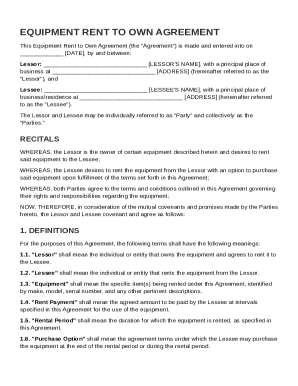
By and between: Lessor: LESSOR'S NAME , with a principal place of business at ADDRESS (hereinafter referred to as the "Lessor"), and Lessee: LESSEE'S NAME , with a principal place of business/residence at ADDRESS (hereinafter referred to as the "Lessee"). The Lessor and Lessee may be individually referred to as "Party" and collectively as the "Parties." RECITALS.

How it works

  1. Open form

    Open form follow the instructions

  2. Easily sign form

    Easily sign the form with your finger

  3. Share form

    Send filled & signed form or save

How to fill out and sign Equipment Rent To Own Agreement Template online?

Get your online template and fill it in using progressive features. Enjoy smart fillable fields and interactivity.Follow the simple instructions below:

The times of terrifying complicated tax and legal forms are over. With US Legal Forms creating legal documents is anxiety-free. The leading editor is right close at hand providing you with a wide variety of beneficial instruments for submitting a Equipment Rent To Own Agreement Template. The following tips, with the editor will guide you through the complete process.

  1. Select the Get Form button to start modifying.
  2. Activate the Wizard mode on the top toolbar to have more pieces of advice.
  3. Fill each fillable field.
  4. Make sure the details you fill in Equipment Rent To Own Agreement Template is up-to-date and correct.
  5. Include the date to the record using the Date function.
  6. Click on the Sign icon and create a digital signature. There are three available choices; typing, drawing, or uploading one.
  7. Be sure that each area has been filled in properly.
  8. Select Done in the top right corne to save and send or download the template. There are various choices for receiving the doc. An attachment in an email or through the mail as a hard copy, as an instant download.

We make completing any Equipment Rent To Own Agreement Template faster. Start now!

Tips on how to fill out, edit and sign Equipment Rent To Own Agreement Template online

How to fill out and sign Equipment Rent To Own Agreement Template online?

Get your online template and fill it in using progressive features. Enjoy smart fillable fields and interactivity.Follow the simple instructions below:

The times of terrifying complicated tax and legal forms are over. With US Legal Forms creating legal documents is anxiety-free. The leading editor is right close at hand providing you with a wide variety of beneficial instruments for submitting a Equipment Rent To Own Agreement Template. The following tips, with the editor will guide you through the complete process.

  1. Select the Get Form button to start modifying.
  2. Activate the Wizard mode on the top toolbar to have more pieces of advice.
  3. Fill each fillable field.
  4. Make sure the details you fill in Equipment Rent To Own Agreement Template is up-to-date and correct.
  5. Include the date to the record using the Date function.
  6. Click on the Sign icon and create a digital signature. There are three available choices; typing, drawing, or uploading one.
  7. Be sure that each area has been filled in properly.
  8. Select Done in the top right corne to save and send or download the template. There are various choices for receiving the doc. An attachment in an email or through the mail as a hard copy, as an instant download.

We make completing any Equipment Rent To Own Agreement Template faster. Start now!

How to edit Equipment Rent To Own Agreement Template: customize forms online

Find the correct Equipment Rent To Own Agreement Template template and edit it on the spot. Simplify your paperwork with a smart document editing solution for online forms.

Your everyday workflow with documents and forms can be more effective when you have everything required in one place. For instance, you can find, get, and edit Equipment Rent To Own Agreement Template in just one browser tab. If you need a specific Equipment Rent To Own Agreement Template, you can easily find it with the help of the smart search engine and access it immediately. You don’t have to download it or look for a third-party editor to edit it and add your information. All the resources for productive work go in just one packaged solution.

This editing solution enables you to modify, fill, and sign your Equipment Rent To Own Agreement Template form right on the spot. Once you see a suitable template, click on it to open the editing mode. Once you open the form in the editor, you have all the necessary instruments at your fingertips. It is easy to fill in the dedicated fields and erase them if needed with the help of a simple yet multifunctional toolbar. Apply all the changes immediately, and sign the form without leaving the tab by simply clicking the signature field. After that, you can send or print out your file if necessary.

Make more custom edits with available instruments.

  • Annotate your file using the Sticky note tool by placing a note at any spot within the document.
  • Add required graphic elements, if required, with the Circle, Check, or Cross instruments.
  • Modify or add text anywhere in the document using Texts and Text box instruments. Add content with the Initials or Date tool.
  • Modify the template text using the Highlight and Blackout, or Erase instruments.
  • Add custom graphic elements using the Arrow and Line, or Draw tools.

Discover new options in efficient and easy paperwork. Find the Equipment Rent To Own Agreement Template you need in minutes and fill it out in in the same tab. Clear the mess in your paperwork for good with the help of online forms.

Get form

Experience a faster way to fill out and sign forms on the web. Access the most extensive library of templates available.
Get form

Related content

Equipment Lease to Own Agreement
Lessee shall have the option to extend this Agreement for 5 additional 1 year terms by...
Learn more
EQUIPMENT AGREEMENT
This. Equip ment Agreement governs any equipment that is rented to you on a month to month...
Learn more
Rental Agreement
The equipment herein shall be delivered and returned by the renter at his/her own rise...
Learn more

Related links form

Road Hazard Tire & Wheel CANCELLATION REQUEST ... - RPM ONE Milk Producer Tax Credit Certification Form - South Carolina ... - Agriculture Sc License Replacement Request Form - Vermont Division Of Fire Safety - Firesafety Vermont BOX 1715 Columbia, SC 29202-1715 (803) 737-5675 Claimant's Name: Carrier File #: Carrier Code #

Questions & Answers

Get answers to your most pressing questions about US Legal Forms API.

Contact support

An agreement to lease equipment is a legally binding contract between the equipment owner and the lessee. This document specifies the terms under which the lessee can use the equipment, including payment terms and duration. Using an Equipment Rent To Own Agreement Template can help lay out clear expectations and protect the interests of both parties.

Yes, you can create your own tenancy agreement, but it’s important to adhere to local laws and regulations. Ensure you include all necessary terms such as rent amount, duration, and rules for the property. An Equipment Rent To Own Agreement Template can provide a solid foundation, making it easier to draft a compliant and effective agreement.

To make an equipment rental contract, start by drafting a clear document that states the involved parties, equipment details, and payment structure. Incorporate terms covering maintenance, liability, and termination. Consider using an Equipment Rent To Own Agreement Template for a comprehensive approach that covers crucial legal points.

Making an equipment rental agreement requires outlining the essential details like the equipment description, rental period, and payment schedule. Additionally, include clauses regarding damage, liability, and termination conditions. An Equipment Rent To Own Agreement Template can streamline the creation of this document and protect your interests.

To set up an equipment lease, begin by identifying the equipment, its value, and the lease duration. Clearly define the payment terms, maintenance responsibilities, and any penalties for late payments. Utilizing an Equipment Rent To Own Agreement Template can simplify this process and help ensure all necessary clauses are included.

Creating a tenancy agreement involves specifying the terms and conditions between the landlord and tenant. Start by outlining the rental duration, payment details, and responsibilities of both parties. It's helpful to use an Equipment Rent To Own Agreement Template to ensure you cover all essential elements and comply with legal requirements.

To record a lease to own assets, create a document that captures important details, such as the assets involved, lease duration, and payment information. This record should also reflect the rights and obligations of both parties as agreed in the leasing terms. Using an Equipment Rent To Own Agreement Template ensures that you maintain a clear record for legal purposes.

A lease to own equipment arrangement allows a lessee to rent equipment with the intention of purchasing it at the end of the lease term. This type of agreement provides flexibility, allowing you to use the equipment while making payments toward ownership. An Equipment Rent To Own Agreement Template is ideal for drafting a clear and concise lease to own commitment.

Get This Form Now!

Use professional pre-built templates to fill in and sign documents online faster. Get access to thousands of forms.
Get form
If you believe that this page should be taken down, please follow our DMCA take down processhere.
Get Equipment Rent To Own Agreement Template
Get form
  • Adoption
  • Bankruptcy
  • Contractors
  • Divorce
  • Home Sales
  • Employment
  • Identity Theft
  • Incorporation
  • Landlord Tenant
  • Living Trust
  • Name Change
  • Personal Planning
  • Small Business
  • Wills & Estates
  • Packages A-Z
  • Affidavits
  • Bankruptcy
  • Bill of Sale
  • Corporate - LLC
  • Divorce
  • Employment
  • Identity Theft
  • Internet Technology
  • Landlord Tenant
  • Living Wills
  • Name Change
  • Power of Attorney
  • Real Estate
  • Small Estates
  • Wills
  • All Forms
  • Forms A-Z
  • Other Templates
  • Legal Hub
  • About Us
  • Help Portal
  • Legal Resources
  • Blog
  • Affiliates
  • Contact Us
  • Delete My Account
  • Site Map
  • Industries
  • Forms in Spanish
  • Localized Forms
  • State-specific Forms
  • Forms Kit
  • Real Estate Handbook
  • All Guides
  • Notarize
  • Incorporation services
  • For Consumers
  • For Small Business
  • For Attorneys
  • USLegal
  • FormsPass
  • pdfFiller
  • signNow
  • altaFlow
  • DocHub
  • Instapage
Form Packages
  • Adoption
  • Bankruptcy
  • Contractors
  • Divorce
  • Home Sales
  • Employment
  • Identity Theft
  • Incorporation
  • Landlord Tenant
  • Living Trust
  • Name Change
  • Personal Planning
  • Small Business
  • Wills & Estates
  • Packages A-Z
Form Categories
  • Affidavits
  • Bankruptcy
  • Bill of Sale
  • Corporate - LLC
  • Divorce
  • Employment
  • Identity Theft
  • Internet Technology
  • Landlord Tenant
  • Living Wills
  • Name Change
  • Power of Attorney
  • Real Estate
  • Small Estates
  • Wills
  • All Forms
  • Forms A-Z
  • Other Templates
Customer Service
  • Legal Hub
  • About Us
  • Help Portal
  • Legal Resources
  • Blog
  • Affiliates
  • Contact Us
  • Delete My Account
  • Site Map
  • Industries
  • Forms in Spanish
  • Localized Forms
  • State-specific Forms
  • Forms Kit
Legal Guides
  • Real Estate Handbook
  • All Guides
Prepared for you
  • Notarize
  • Incorporation services
Our Customers
  • For Consumers
  • For Small Business
  • For Attorneys
Our Sites
  • USLegal
  • FormsPass
  • pdfFiller
  • signNow
  • altaFlow
  • DocHub
  • Instapage
Social Media
Call us now toll free:
+1 833 426 79 33
As seen in:
© Copyright 1999-2026 airSlate Legal Forms, Inc. 17 Station Street, Ste. 203, Brookline, MA 02445
  • Your Privacy Choices
  • Terms of Service
  • Privacy Notice
  • Content Takedown Policy
  • Bug Bounty Program