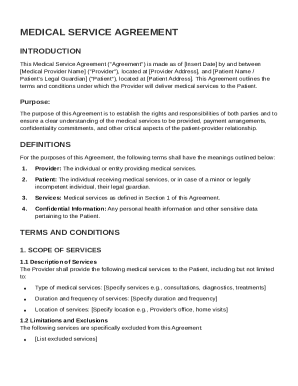
Get Medical Service Agreement Template
How it works
-

Open form follow the instructions
-

Easily sign the form with your finger
-

Send filled & signed form or save
How to fill out and sign Medical Service Agreement Template online?
Get your online template and fill it in using progressive features. Enjoy smart fillable fields and interactivity.Follow the simple instructions below:Finding a authorized expert, creating a scheduled visit and going to the business office for a personal conference makes doing a Medical Service Agreement Template from beginning to end exhausting. US Legal Forms lets you rapidly generate legally valid documents based on pre-constructed online samples.
Execute your docs in minutes using our easy step-by-step guideline:
- Get the Medical Service Agreement Template you require.
- Open it up with online editor and start editing.
- Fill the blank fields; involved parties names, addresses and numbers etc.
- Customize the template with exclusive fillable areas.
- Add the day/time and place your e-signature.
- Click Done after twice-examining all the data.
- Download the ready-created document to your gadget or print it as a hard copy.
Easily produce a Medical Service Agreement Template without needing to involve professionals. We already have over 3 million users taking advantage of our unique collection of legal forms. Join us today and gain access to the top library of browser-based samples. Try it yourself!
Tips on how to fill out, edit and sign Medical Service Agreement Template online
How to fill out and sign Medical Service Agreement Template online?
Get your online template and fill it in using progressive features. Enjoy smart fillable fields and interactivity.Follow the simple instructions below:
Finding a authorized expert, creating a scheduled visit and going to the business office for a personal conference makes doing a Medical Service Agreement Template from beginning to end exhausting. US Legal Forms lets you rapidly generate legally valid documents based on pre-constructed online samples.
Execute your docs in minutes using our easy step-by-step guideline:
- Get the Medical Service Agreement Template you require.
- Open it up with online editor and start editing.
- Fill the blank fields; involved parties names, addresses and numbers etc.
- Customize the template with exclusive fillable areas.
- Add the day/time and place your e-signature.
- Click Done after twice-examining all the data.
- Download the ready-created document to your gadget or print it as a hard copy.
Easily produce a Medical Service Agreement Template without needing to involve professionals. We already have over 3 million users taking advantage of our unique collection of legal forms. Join us today and gain access to the top library of browser-based samples. Try it yourself!
How to edit Medical Service Agreement Template: customize forms online
Fill out and sign your Medical Service Agreement Template quickly and error-free. Get and edit, and sign customizable form templates in a comfort of a single tab.
Your document workflow can be a lot more efficient if everything you need for editing and managing the flow is arranged in one place. If you are searching for a Medical Service Agreement Template form sample, this is a place to get it and fill it out without searching for third-party solutions. With this intelligent search engine and editing tool, you won’t need to look any further.
Just type the name of the Medical Service Agreement Template or any other form and find the right sample. If the sample seems relevant, you can start editing it right on the spot by clicking Get form. No need to print or even download it. Hover and click on the interactive fillable fields to insert your information and sign the form in a single editor.
Use more editing instruments to customize your template:
- Check interactive checkboxes in forms by clicking on them. Check other parts of the Medical Service Agreement Template form text with the help of the Cross, Check, and Circle instruments
- If you need to insert more text into the document, use the Text tool or add fillable fields with the respective button. You can also specify the content of each fillable field.
- Add pictures to forms with the Image button. Add pictures from your device or capture them with your computer camera.
- Add custom visual elements to the document. Use Draw, Line, and Arrow instruments to draw on the document.
- Draw over the text in the document if you wish to conceal it or stress it. Cover text fragments with theErase and Highlight, or Blackout instrument.
- Add custom elements such as Initials or Date with the respective instruments. They will be generated automatically.
- Save the form on your computer or convert its format to the one you want.
When equipped with a smart forms catalog and a powerful document editing solution, working with documentation is easier. Find the form look for, fill it out immediately, and sign it on the spot without downloading it. Get your paperwork routine simplified with a solution designed for editing forms.
To write a simple service agreement, start with a clear title and date. Include all parties' contact information, describe the services, and clearly outline payment terms. A well-structured Medical Service Agreement Template can greatly assist you in crafting this document effectively and efficiently.