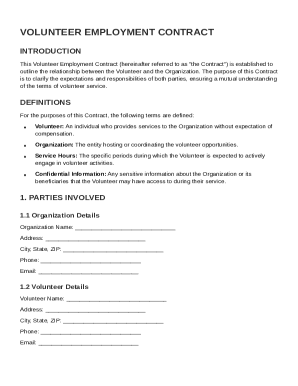
Get Volunteer Employment Contract Template
How it works
-

Open form follow the instructions
-

Easily sign the form with your finger
-

Send filled & signed form or save
How to fill out and sign Volunteer Employment Contract Template online?
Get your online template and fill it in using progressive features. Enjoy smart fillable fields and interactivity.Follow the simple instructions below:The days of terrifying complex tax and legal forms are over. With US Legal Forms the procedure of submitting official documents is anxiety-free. The leading editor is directly at your fingertips offering you a wide range of useful instruments for submitting a Volunteer Employment Contract Template. These tips, with the editor will guide you with the entire process.
- Hit the orange Get Form option to begin editing and enhancing.
- Turn on the Wizard mode on the top toolbar to acquire more tips.
- Fill out every fillable area.
- Be sure the details you fill in Volunteer Employment Contract Template is up-to-date and correct.
- Add the date to the template with the Date tool.
- Click the Sign tool and create an e-signature. You can use three options; typing, drawing, or capturing one.
- Be sure that every field has been filled in correctly.
- Click Done in the top right corne to save or send the sample. There are various options for receiving the doc. An attachment in an email or through the mail as a hard copy, as an instant download.
We make completing any Volunteer Employment Contract Template more convenient. Start now!
Tips on how to fill out, edit and sign Volunteer Employment Contract Template online
How to fill out and sign Volunteer Employment Contract Template online?
Get your online template and fill it in using progressive features. Enjoy smart fillable fields and interactivity.Follow the simple instructions below:
The days of terrifying complex tax and legal forms are over. With US Legal Forms the procedure of submitting official documents is anxiety-free. The leading editor is directly at your fingertips offering you a wide range of useful instruments for submitting a Volunteer Employment Contract Template. These tips, with the editor will guide you with the entire process.
- Hit the orange Get Form option to begin editing and enhancing.
- Turn on the Wizard mode on the top toolbar to acquire more tips.
- Fill out every fillable area.
- Be sure the details you fill in Volunteer Employment Contract Template is up-to-date and correct.
- Add the date to the template with the Date tool.
- Click the Sign tool and create an e-signature. You can use three options; typing, drawing, or capturing one.
- Be sure that every field has been filled in correctly.
- Click Done in the top right corne to save or send the sample. There are various options for receiving the doc. An attachment in an email or through the mail as a hard copy, as an instant download.
We make completing any Volunteer Employment Contract Template more convenient. Start now!
How to edit Volunteer Employment Contract Template: customize forms online
Make the most of our comprehensive online document editor while preparing your forms. Fill out the Volunteer Employment Contract Template, indicate the most important details, and easily make any other necessary adjustments to its content.
Completing documentation electronically is not only time-saving but also comes with a possibility to edit the template according to your requirements. If you’re about to manage the Volunteer Employment Contract Template, consider completing it with our robust online editing solutions. Whether you make an error or enter the requested information into the wrong field, you can rapidly make adjustments to the document without the need to restart it from the beginning as during manual fill-out. In addition to that, you can stress on the critical information in your document by highlighting certain pieces of content with colors, underlining them, or circling them.
Follow these simple and quick actions to fill out and edit your Volunteer Employment Contract Template online:
- Open the file in the editor.
- Provide the necessary information in the empty fields using Text, Check, and Cross tools.
- Adhere to the form navigation not to miss any mandatory fields in the template.
- Circle some of the significant details and add a URL to it if needed.
- Use the Highlight or Line tools to point out the most important facts.
- Select colors and thickness for these lines to make your sample look professional.
- Erase or blackout the facts you don’t want to be visible to other people.
- Replace pieces of content that contain mistakes and type in text that you need.
- End up editing with the Done key as soon as you make certain everything is correct in the form.
Our extensive online solutions are the best way to complete and modify Volunteer Employment Contract Template according to your needs. Use it to prepare personal or business documentation from anywhere. Open it in a browser, make any adjustments to your forms, and return to them anytime in the future - they all will be securely stored in the cloud.
Related links form
To write a simple contract agreement, start by clearly identifying all parties involved and outlining the scope of work or services. Include terms regarding payment, if applicable, and specify the duration of the agreement. A Volunteer Employment Contract Template can provide a straightforward format to use as a guide, making this process easier.