Loading
Get Uk Barclaycard 21400 2017
How it works
-

Open form follow the instructions
-

Easily sign the form with your finger
-

Send filled & signed form or save
How to fill out the UK Barclaycard 21400 online
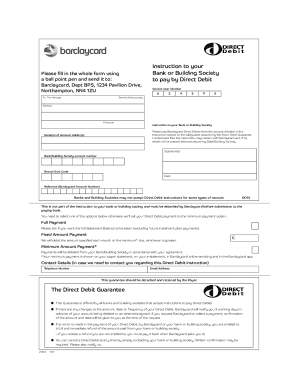
This guide provides detailed instructions on how to successfully complete the UK Barclaycard 21400 online. By following these steps, users can ensure that they submit their Direct Debit instruction accurately and efficiently.
Follow the steps to complete the UK Barclaycard 21400 online
- Press the ‘Get Form’ button to obtain the form and open it for editing.
- Fill in the Service User Number. This is typically a unique identifier related to your Barclaycard account.
- Specify your Bank/Building Society details including their name, address, and postcode.
- Provide the name(s) of the account holder(s) associated with the Bank/Building Society account.
- Enter the Bank/Building Society account number and the branch sort code.
- Indicate your Barclaycard Account Number in the Reference field.
- Select your preferred payment option from the choices provided: Full Payment, Fixed Amount Payment, or Minimum Amount Payment. Ensure to fill in the amount if applicable.
- Input your contact details, including your telephone number and email address, in case Barclaycard needs to reach you regarding this instruction.
- Sign and date the form to validate your Direct Debit instruction.
- Once completed, review the form for any errors, then save your changes, download, print, or share the form as required.
Complete your documents online today for a smoother experience.
Get form
Experience a faster way to fill out and sign forms on the web. Access the most extensive library of templates available.
Related links form
Get This Form Now!
Use professional pre-built templates to fill in and sign documents online faster. Get access to thousands of forms.