Loading
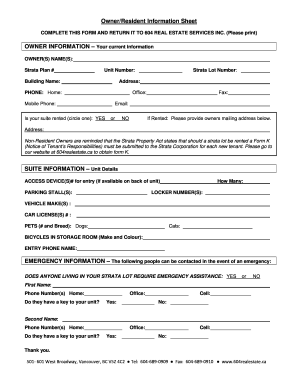
Get 604 Real Estate Services Inc Owner/resident Information Sheet
How it works
-

Open form follow the instructions
-

Easily sign the form with your finger
-

Send filled & signed form or save
How to fill out the 604 Real Estate Services Inc Owner/Resident Information Sheet online
Completing the 604 Real Estate Services Inc Owner/Resident Information Sheet is an essential task for ensuring proper communication and record-keeping with your property management. This guide provides step-by-step instructions to help you fill out the form correctly and efficiently online.
Follow the steps to complete the form with ease.
- Click the ‘Get Form’ button to access the document and open it in your online editor.
- Begin with the owner information section. Enter the current owner's name(s) as required in the designated fields. Provide the Strata Plan number and Unit number to identify your property.
- Fill in the building name and complete the address fields accurately, including home phone, mobile phone, and office contact details as needed. Indicate whether your suite is currently rented by circling 'YES' or 'NO'.
- If your suite is rented, provide the owner's mailing address in the specified section. It is important to note, especially for non-resident owners, that a Form K must be submitted for each new tenant.
- Proceed to suite information. Here, enter the access device number if available, the number of parking stalls, locker numbers, vehicle makes, license plate numbers, and details about any pets.
- In the emergency information section, indicate if anyone living in your strata lot requires emergency assistance by selecting 'YES' or 'NO'. Include the names and phone numbers of emergency contacts, and specify if they have a key to your unit.
- Review all entries for accuracy. After confirming that the information is complete, you can save your changes. Options may include downloading, printing, or sharing the completed form as needed.
Complete your document online today to ensure your information is accurately recorded!