Loading
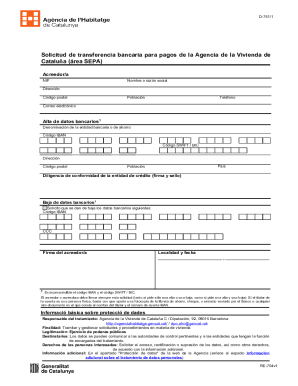
Get 2014 Es Generalitat De Catalunya Re-704/d-751/1 (spanish)
How it works
-

Open form follow the instructions
-

Easily sign the form with your finger
-

Send filled & signed form or save
How to fill out the 2014 ES Generalitat De Catalunya RE-704/D-751/1 (Spanish) online
This guide provides comprehensive instructions on how to effectively fill out the 2014 ES Generalitat De Catalunya RE-704/D-751/1 form online. Whether you are submitting a request for a bank transfer for payments to the Agency of Housing of Catalonia or updating your banking details, this step-by-step guide will assist you in completing the form accurately.
Follow the steps to complete the form online:
- Click the ‘Get Form’ button to obtain the form and open it in your editor of choice.
- Begin by entering the creditor's name or business name in the specified field.
- Provide the creditor's Tax Identification Number (NIF) accurately.
- Fill out the address section, including street name, postal code, and population.
- Input the contact phone number and email address for future communication.
- In the 'Bank Data Registration' section, specify the name of the banking entity or savings institution.
- Enter the IBAN code, which is essential for processing your request.
- Include the SWIFT/BIC code, ensuring you have the correct identifiers.
- Provide the address of the banking institution, along with postal code and population.
- Specify the country where the banking entity is located.
- The bank representative must sign and stamp the diligence of conformity.
- If you wish to remove bank details, request the cancellation by including the relevant IBAN code and CCC.
- Ensure that the creditor signs the application regardless of whether they are requesting a new registration or cancellation.
- Complete the locality and date at the bottom of the form.
- Once all fields are filled accurately, you can save changes, download, print, or share the form as needed.
Take action now and complete your documents online!