Loading
Form preview
  • US Legal Forms
  • Other Templates
  • More Forms
  • More Multi-State Forms
  • Tx Vacation Watch Request - Pilot Point 2022

Get Tx Vacation Watch Request - Pilot Point 2022-2026

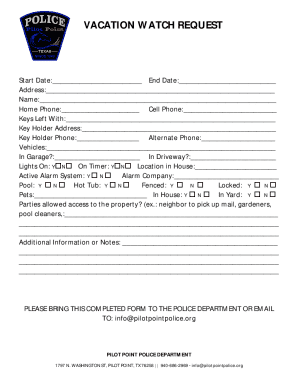
This form is used to request a watch for a residence while the occupants are away on vacation, providing essential information for the local police department to monitor the property.

How it works

  1. Open form

    Open form follow the instructions

  2. Easily sign form

    Easily sign the form with your finger

  3. Share form

    Send filled & signed form or save

How to fill out the TX Vacation Watch Request - Pilot Point online

Filling out the TX Vacation Watch Request is a straightforward process that ensures the safety of your home while you are away. This guide will walk you through each section of the form with clear instructions, making the online completion simple and efficient.

Follow the steps to complete your request with ease.

  1. Click ‘Get Form’ button to obtain the vacation watch request form and open it in the editor.
  2. Enter the start date and end date of your vacation in the designated fields.
  3. Fill in your address in the address field to specify the location of your property.
  4. Input your home phone number and cell phone number to allow for communication during your absence.
  5. Indicate the name of the person with whom you left your keys in the ‘Keys Left With’ field.
  6. Complete the key holder's address and phone details for additional security.
  7. List any vehicles that will be at your property and specify if they will be parked in the garage or driveway.
  8. Indicate whether lights will be left on and if they will be on a timer, including the specific location of the timers in your home.
  9. Specify if there is an active alarm system by selecting 'Yes' or 'No', and provide the alarm company information if applicable.
  10. State whether there is a pool or hot tub on the property by selecting 'Yes' or 'No' for each.
  11. Indicate if the property is fenced, locked, and describe any pets that will be present in or around the home.
  12. Detail any parties allowed access to your property, such as neighbors or service providers.
  13. Use the additional information or notes section to provide any other information crucial for the security of your home.
  14. Once all fields are completed, save changes, and download or print your completed form, as necessary.
  15. Return the completed form to the police department or send it via email to the specified address.

Complete your TX Vacation Watch Request online today to help keep your home secure while you enjoy your time away.

Get form

Experience a faster way to fill out and sign forms on the web. Access the most extensive library of templates available.
Get form

Related content

Texas Guidebook for Employers
Jul 22, 2002 — Our team remains committed to helping prepare your businesses for today's...
Learn more
Albert Einstein College of Medicine | Montefiore...
Programs & Services. Division of General Obstetrics & Gynecology; Division of...
Learn more
Volunteer Stream Monitoring: A Methods Manual
by SH Walk · 1997 · Cited by 22 — This draft manual was developed by the U.S...
Learn more

Related links form

Form FS Form 3062-4 FS Form 3062-4 Claim For United States ... Form TSP-41, Notification To TSP Of Nonpay Status - Hawaii DoD Name Change Form - Texas State Board Of Public Accountancy ENF001 - Criminal History Questionnaire

Get This Form Now!

Use professional pre-built templates to fill in and sign documents online faster. Get access to thousands of forms.
Get form
If you believe that this page should be taken down, please follow our DMCA take down processhere.
Get TX Vacation Watch Request - Pilot Point
Get form

Form categories

Real Estate
  • Home Sale
  • Deeds
  • Leases
  • Landlord Tenant
  • First Refusal Agreement
  • Lis Pendens
  • View all Real Estate
Business & Commercial
  • Small Business
  • Contracts
  • Construction
  • Employment
  • Limited Liability Company
  • Partnerships
  • View all Business & Commercial
Estate Planning
  • Personal Planning
  • Last Will and Testament
  • Living Trust
  • Power of Attorney
  • Living Will (Healthcare Directive)
  • Probate
  • Trusts
  • Small Estate
  • View all Estate Planning

Other Legal Areas

  • Civil Actions
  • Civil Procedure
  • Animals
  • Affidavits
  • Bill of Sale
  • Oil Gas and Minerals
  • Name Change
  • Other
Family Law
  • Divorce
  • Annulment
  • Adoption
  • Marriage
  • Child Justice
  • View all Family Law
  • Forms Catalog
  • Other Templates

Company

  • About Us
  • Pricing
  • Legal Hub
  • Affiliate Program

Knowledge Base

  • Help Portal
  • Legal Resources
  • Blog
  • Industries
  • Legal Guides
  • Sitemap

Services

  • Notarize
  • Form Selector

Support

  • Contact Us
  • Delete My Account

Products

  • USLegal
  • FormsPass
  • pdfFiller
  • signNow
  • altaFlow
  • DocHub
  • Instapage
Social Media
Call us now toll free:
+1 833 426 79 33
As seen in:
© 2026 US Legal Forms. All rights reserved.
  • Your Privacy Choices
  • Terms of Service
  • Privacy Notice
  • Content Takedown Policy
  • Bug Bounty Program