Loading
Form preview
  • US Legal Forms
  • Other Templates
  • More Forms
  • More Multi-State Forms
  • Ks Spring Hill School District Out Of District Transfer Request 2014

Get Ks Spring Hill School District Out Of District Transfer Request 2014-2026

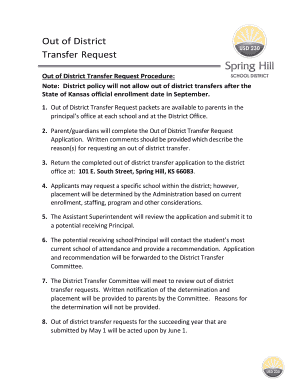
Out of District Transfer Request packets are available to parents in the principal s office at each school and at the District Office. 2. Parent/guardians will complete the Out of District Transfer Request Application. Written comments should be provided which describe the reason(s) for requesting an out of district transfer. 3. Return the completed out of district transfer application to the district office at: 101 E. South Street, Spring Hill, KS 66083. 4. Applicants may request a specific.

How it works

  1. Open form

    Open form follow the instructions

  2. Easily sign form

    Easily sign the form with your finger

  3. Share form

    Send filled & signed form or save

How to fill out the KS Spring Hill School District Out Of District Transfer Request online

Completing the KS Spring Hill School District Out Of District Transfer Request online is a straightforward process designed to assist families seeking to transfer their children into the district. This guide provides clear, step-by-step instructions to help users fill out the necessary form accurately and efficiently.

Follow the steps to successfully complete the transfer request online.

  1. Click the ‘Get Form’ button to access the Out of District Transfer Request form and open it in your preferred online document editor.
  2. Begin by entering the student’s name in the designated field. This information is crucial for identifying the application.
  3. Next, fill in the date of the request. Ensure it is the current date to maintain accurate records.
  4. Provide the student’s address, including city, state, and zip code. This helps to verify the residency status of the student.
  5. Indicate the home phone number in the specified field to facilitate communication regarding the application.
  6. Enter the parent or guardian names in the corresponding section. This ensures that the application is connected to the appropriate caregivers.
  7. Include a cell or work phone number and email address for effective communication throughout the process.
  8. If the parent or guardian’s address is different from the student’s, provide this information in the next set of fields, including city, state, and zip code.
  9. Fill in the enrollment year for the student, specifying the current year and the following year.
  10. Specify the student's grade level for the upcoming enrollment year to ensure proper placement.
  11. Document the last school attended by the student, along with the last grade completed. This data helps the district evaluate the student’s educational background.
  12. Provide the last school’s address, including the city, state, and zip code, along with the school’s phone number.
  13. In the section for reasons for the transfer request, provide a thorough explanation, either by typing directly or attaching a separate letter if needed.
  14. Select the school you are requesting for transfer from the available options. Consider ensuring the choice aligns with your preferences and needs.
  15. After completing the form, review all entries for accuracy to avoid delays in processing.
  16. Save your changes, and you may opt to download, print, or share the completed form as necessary for your records or submission.

Begin your Out Of District Transfer Request online today for a smooth process in enrolling your child in the KS Spring Hill School District.

Get form

Experience a faster way to fill out and sign forms on the web. Access the most extensive library of templates available.
Get form

Related content

Spring Hill Schools / Homepage
Access Board meetings, Apply for an open position, Contact a staff member, Log in to...
Learn more
Applicant
Please enter your full legal name in the fields below. Your legal name is your name as...
Learn more
Spanggord-1985-Env.Fate.pdf
Dec 16, 1985 — Quantitation was achieved by the external standard method, using a...
Learn more

Related links form

AU Form F4638 CFD 2017 HI Complaint For Divorce Automatic Restraining Order And Summons To Answer Complaint And Exhibit A 2018 NJ ELEC Compliance Manual For Political Committees 2021 CA JV-367 2021

Questions & Answers

Get answers to your most pressing questions about US Legal Forms API.

Contact support

To transfer schools, you should first determine the requirements of the district where you want to enroll. For the KS Spring Hill School District Out Of District Transfer Request, gather necessary documentation such as proof of residency and academic records. Complete the application process by submitting all required forms and tracking your request to ensure a timely response.

To successfully transfer schools, it’s important to research the new school and its academic offerings first. Complete the KS Spring Hill School District Out Of District Transfer Request accurately and in detail. Open communication with both the current and new schools can help facilitate a smoother transition for your child.

When you move, transferring schools involves submitting a KS Spring Hill School District Out Of District Transfer Request. Begin by notifying your current school of your upcoming move. Next, gather the required documents for your new district, and submit the transfer request as soon as possible to reduce any delays in your child’s education.

Yes, Spring Hill Independent School District does accept transfers. They aim to accommodate families through the KS Spring Hill School District Out Of District Transfer Request process. You will need to meet specific criteria and complete the necessary paperwork to ensure a smooth transition. Always check the latest guidelines to ensure your eligibility.

To transfer schools on PowerSchool, start by logging into your PowerSchool account. Navigate to the enrollment or transfer section and select 'KS Spring Hill School District Out Of District Transfer Request.' Fill out the required information and submit the request. Once submitted, you will receive confirmation and further instructions via email.

When expressing a desire to transfer schools, it's best to be clear and direct. You might say you are seeking a transfer due to specific educational needs or a better fit for your child within the KS Spring Hill School District. Open communication with both your current school and the desired school can facilitate a smoother transition for your child. Be prepared to discuss reasons and any supporting documentation.

To transfer a child from one school to another within the KS Spring Hill School District, you first need to gather the necessary documents, such as transcripts and proof of residency. Once you have the documents ready, complete the out-of-district transfer request form, which is available on the district's website. Make sure to submit the form before the deadline to ensure consideration for the next school year.

To attend a school that you are not zoned for, you need to submit an out-of-district transfer request to the KS Spring Hill School District. This process typically requires you to demonstrate a valid reason and provide necessary documentation, such as residency proof and academic history. Consult the district's guidelines to ensure you comply with all requirements. Using the US Legal forms can help make your transfer request clear and compliant.

When writing a letter to request a transfer to another school, be clear and concise. Start by addressing the appropriate school authority, then state your intention to transfer your child, mentioning the specific school. Include your reasons for the request, and ensure you provide contact information for follow-up. Utilizing templates on US Legal can help you craft a letter that meets all necessary requirements for the KS Spring Hill School District Out Of District Transfer Request.

To transfer schools from another state, start by understanding the KS Spring Hill School District Out Of District Transfer Request process. Gather all necessary documentation, including your child's academic records and proof of residency. Once you have everything ready, reach out to Spring Hill’s school administration for guidance on any additional steps. This ensures a smooth transition and helps you meet any state-specific regulations.

Get This Form Now!

Use professional pre-built templates to fill in and sign documents online faster. Get access to thousands of forms.
Get form
If you believe that this page should be taken down, please follow our DMCA take down processhere.
Get KS Spring Hill School District Out Of District Transfer Request
Get form
  • Adoption
  • Bankruptcy
  • Contractors
  • Divorce
  • Home Sales
  • Employment
  • Identity Theft
  • Incorporation
  • Landlord Tenant
  • Living Trust
  • Name Change
  • Personal Planning
  • Small Business
  • Wills & Estates
  • Packages A-Z
  • Affidavits
  • Bankruptcy
  • Bill of Sale
  • Corporate - LLC
  • Divorce
  • Employment
  • Identity Theft
  • Internet Technology
  • Landlord Tenant
  • Living Wills
  • Name Change
  • Power of Attorney
  • Real Estate
  • Small Estates
  • Wills
  • All Forms
  • Forms A-Z
  • Other Templates
  • Legal Hub
  • About Us
  • Help Portal
  • Legal Resources
  • Blog
  • Affiliates
  • Contact Us
  • Delete My Account
  • Site Map
  • Industries
  • Forms in Spanish
  • Localized Forms
  • State-specific Forms
  • Forms Kit
  • Real Estate Handbook
  • All Guides
  • Notarize
  • Incorporation services
  • For Consumers
  • For Small Business
  • For Attorneys
  • USLegal
  • FormsPass
  • pdfFiller
  • signNow
  • altaFlow
  • DocHub
  • Instapage
Form Packages
  • Adoption
  • Bankruptcy
  • Contractors
  • Divorce
  • Home Sales
  • Employment
  • Identity Theft
  • Incorporation
  • Landlord Tenant
  • Living Trust
  • Name Change
  • Personal Planning
  • Small Business
  • Wills & Estates
  • Packages A-Z
Form Categories
  • Affidavits
  • Bankruptcy
  • Bill of Sale
  • Corporate - LLC
  • Divorce
  • Employment
  • Identity Theft
  • Internet Technology
  • Landlord Tenant
  • Living Wills
  • Name Change
  • Power of Attorney
  • Real Estate
  • Small Estates
  • Wills
  • All Forms
  • Forms A-Z
  • Other Templates
Customer Service
  • Legal Hub
  • About Us
  • Help Portal
  • Legal Resources
  • Blog
  • Affiliates
  • Contact Us
  • Delete My Account
  • Site Map
  • Industries
  • Forms in Spanish
  • Localized Forms
  • State-specific Forms
  • Forms Kit
Legal Guides
  • Real Estate Handbook
  • All Guides
Prepared for you
  • Notarize
  • Incorporation services
Our Customers
  • For Consumers
  • For Small Business
  • For Attorneys
Our Sites
  • USLegal
  • FormsPass
  • pdfFiller
  • signNow
  • altaFlow
  • DocHub
  • Instapage
Social Media
Call us now toll free:
+1 833 426 79 33
As seen in:
© Copyright 1999-2026 airSlate Legal Forms, Inc. 17 Station Street, Ste. 203, Brookline, MA 02445
  • Your Privacy Choices
  • Terms of Service
  • Privacy Notice
  • Content Takedown Policy
  • Bug Bounty Program