Loading
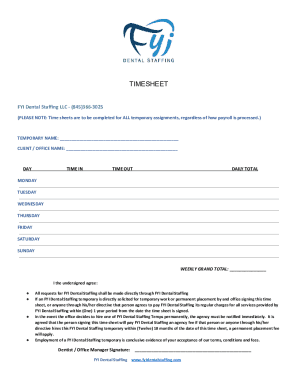
Get Ny Fyi Dental Staffing Timesheet 2019-2026
How it works
-

Open form follow the instructions
-

Easily sign the form with your finger
-

Send filled & signed form or save
How to fill out the NY FYI Dental Staffing Timesheet online
The NY FYI Dental Staffing Timesheet is an essential document for tracking temporary staff hours in dental offices. This guide provides detailed, step-by-step instructions for completing the timesheet accurately and efficiently online.
Follow the steps to complete the NY FYI Dental Staffing Timesheet online.
- Click ‘Get Form’ button to access the NY FYI Dental Staffing Timesheet and open it for filling out.
- Begin by entering the temporary staff member's name in the designated field labeled 'TEMPORARY NAME:'.
- Next, input the client's office name in the field labeled 'CLIENT / OFFICE NAME:'.
- For each day of the week, fill in the 'TIME IN' and 'TIME OUT' fields to capture the hours worked for Monday through Sunday.
- Calculate the daily total hours worked for each day and enter them in the 'DAILY TOTAL' section.
- Sum the daily totals and enter the overall hours in the 'WEEKLY GRAND TOTAL:' field.
- Read the agreement section carefully. Show your acknowledgment by signing where indicated with the 'Dentist / Office Manager Signature:' line.
Complete your timesheet online today to ensure accurate payroll processing.
To fill out a daily timesheet, enter the required information step by step on the NY FYI Dental Staffing Timesheet platform. Begin with the date, followed by your hours worked in the designated format. Regularly updating your timesheet guarantees accountability and provides documentation for your work hours.