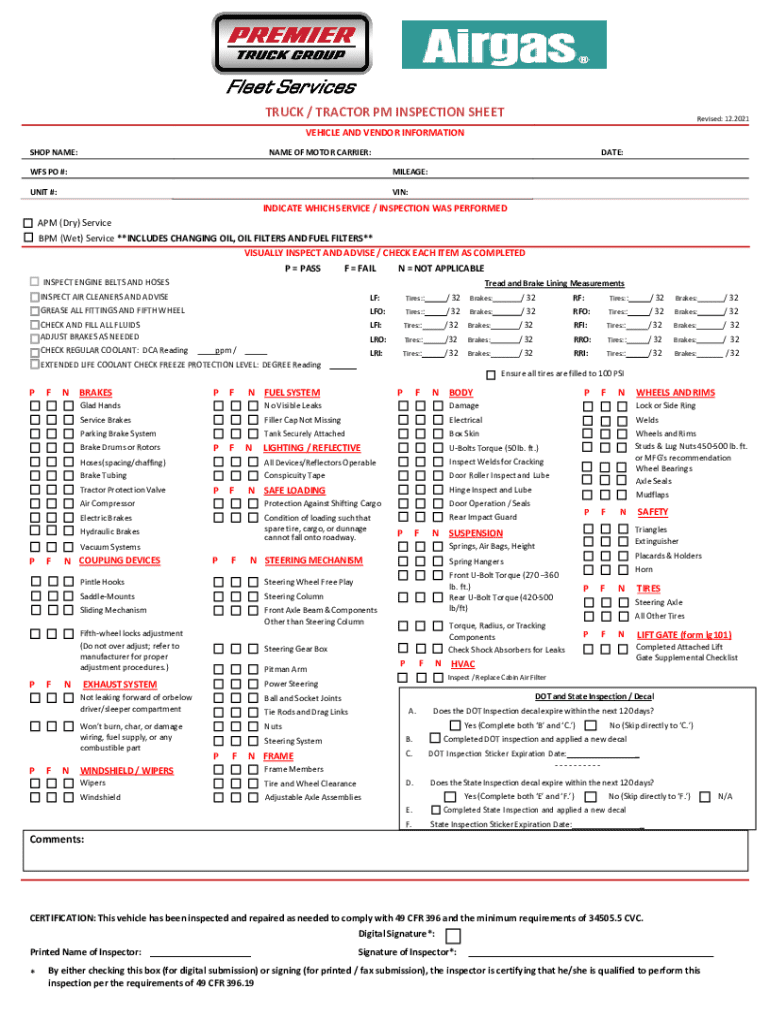
Truck / tractor pm inspection sheet revised: 12.2021 . shop name: vehicle and vendor information . name of motor carrier: date: wfs po #: mileage: unit #: vin: indicate which service / inspection.
Loading

Open form follow the instructions

Easily sign the form with your finger

Send filled & signed form or save
How to fill out the Warner Fleet Services Truck/Tractor PM Inspection Sheet online
The Warner Fleet Services Truck/Tractor PM Inspection Sheet is a vital tool for ensuring vehicles are thoroughly inspected and maintained. This guide will walk users through the process of completing the inspection sheet online, step by step, helping to streamline vehicle maintenance and compliance.
Follow the steps to effectively complete the inspection sheet online.
- Click ‘Get Form’ button to access the Warner Fleet Services Truck/Tractor PM Inspection Sheet and open it in your preferred editor.
- In the 'Vehicle and Vendor Information' section, enter the shop name, name of motor carrier, WFS PO number, date, mileage, unit number, and VIN. Make sure the information is accurate for record-keeping.
- Move to the 'Indicate Which Service/Inspection Was Performed' section. Select either APM or BPM as applicable, noting that BPM includes oil, oil filters, and fuel filters changes.
- In the 'Visually Inspect and Advise / Check Each Item as Completed' section, for each inspection item, mark 'P' for pass, 'F' for fail, or 'N' for not applicable. This includes engine belts, hoses, tire measurements, brakes, and various other components.
- Complete the fluid check section by filling in all necessary fluids and indicate whether adjustments to brakes or other components are needed.
- Review the inspection for the 'DOT Inspection Decal' expiration and note any completed inspections in the corresponding areas.
- Add any comments regarding the inspection in the comments section if necessary, to provide additional context or observations.
- Lastly, sign the form digitally by entering your name in the printed name field and signing where indicated. Ensure that the certification box is checked to confirm the validity of the inspection.
Complete your documenting process online to ensure efficient and compliant vehicle inspections.
Experience a faster way to fill out and sign forms on the web. Access the most extensive library of templates available.
Related content
We periodically inspect these tractors, in a manner similar to company tractor...
Jul 26, 2024 — Typical PM inspections and services are the same for an ADS-equipped...
Jun 15, 2012 — FleetNet America® provides vehicle maintenance and repair solutions to...
Use professional pre-built templates to fill in and sign documents online faster. Get access to thousands of forms.
If you believe that this page should be taken down, please follow our DMCA take down process here.