Loading
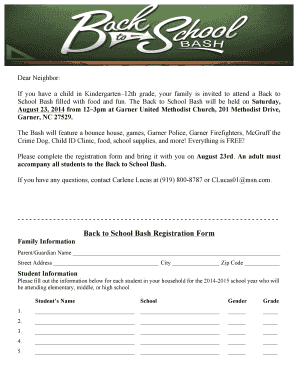
Get Nc Garner United Methodist Church Back To School Bash Registration Form 2014-2026
How it works
-

Open form follow the instructions
-

Easily sign the form with your finger
-

Send filled & signed form or save
How to fill out the NC Garner United Methodist Church Back To School Bash Registration Form online
This guide offers step-by-step instructions on how to efficiently complete the NC Garner United Methodist Church Back To School Bash Registration Form online. Engaging in this community event ensures that your family enjoys a day filled with activities and essential supplies for the school year.
Follow the steps to complete the registration form online.
- Click ‘Get Form’ button to obtain the form and open it in the editor.
- Begin with the Family Information section. Enter the parent or guardian’s name along with their complete street address, city, and zip code.
- Navigate to the Student Information section. Here, you will input details for each student in your household who will be attending school in the upcoming year.
- For each student, provide the student’s name, their respective school, gender, and grade for the 2014-2015 school year. Make sure to fill out all the required fields.
- Once all information is entered, review the form to ensure all details are correct and complete.
- Finally, you have options to save changes, download, print, or share the form as necessary.
Complete your registration form online today to join in the exciting Back to School Bash!