Loading
Form preview
  • US Legal Forms
  • Other Templates
  • More Forms
  • More Multi-State Forms
  • Nj Redwoods Grill & Bar Catering Order Form 2013

Get Nj Redwoods Grill & Bar Catering Order Form 2013-2026

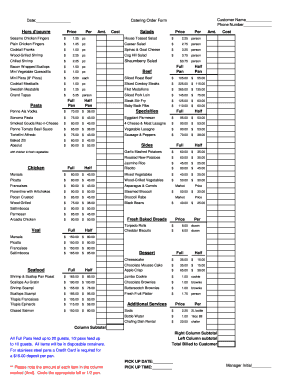
Tossed Salad $ 2.25 person Plain Chicken Fingers $ 1.25 pc Caesar Salad $ 2.75 person Cocktail Franks $ 1.00 pc Spinac & Goat Cheese $ 3.25 person Wood-Grilled Shrimp $ 2.25 pc Cog Hill Salad $ 3.75 person Chilled Shrimp $ 2.25 pc Shaumberry Salad $3.75 person Bacon Wrapped Scallops Mini Vegetable Quesodilla $ 1.50 pc $ 1.00 pc Mini Pizza (8" Pizza) $ 5.50 each Sliced Roast Beef $ 105.00 $ Cocktail Meatballs $ 1.00 pc Sliced Cowboy Steaks $.

How it works

  1. Open form

    Open form follow the instructions

  2. Easily sign form

    Easily sign the form with your finger

  3. Share form

    Send filled & signed form or save

How to fill out the NJ Redwoods Grill & Bar Catering Order Form online

Filling out the NJ Redwoods Grill & Bar Catering Order Form online is a straightforward process. This guide provides step-by-step instructions to help ensure that your catering needs are accurately documented and processed.

Follow the steps to complete your catering order form online.

  1. Click 'Get Form' button to access the form and open it in your preferred editor.
  2. Begin by entering your customer name in the designated field. Ensure that the name reflects the person or organization responsible for the order.
  3. Next, fill in your phone number in the corresponding field. This information is crucial for the catering team to contact you with any questions or clarifications regarding your order.
  4. Proceed to the hors d'oeuvre selections. For each item, enter the quantity in the 'Amt.' column next to the desired items. Be mindful of the prices listed per item when calculating your total.
  5. Continue to other sections such as salads, specialties, sides, and desserts. Again, specify the amount required for each item by filling in the respective 'Amt.' column.
  6. Make sure to review the subtotal for both columns on the form. It’s important to keep track of your total costs as you fill out various sections.
  7. Add the pick-up date and time in the appropriate fields. Ensure that this information aligns with your event schedule.
  8. After completing the form, check all entries for accuracy. Confirm that quantities, types of food, and any additional services are correctly listed.
  9. Finally, you can save any changes. Depending on your setup, you may have the option to download, print, or share the completed form as needed.

Start filling out your NJ Redwoods Grill & Bar Catering Order Form online today to ensure a seamless catering experience.

Get form

Experience a faster way to fill out and sign forms on the web. Access the most extensive library of templates available.
Get form

Related content

Cancelled Licenses
Application Kits & Forms · Application Kits · Alphabetical Forms ... ALTITUDES BAR &...
Learn more
Yum! Brands
We're building the world's most loved, most trusted and fastest-growing restaurant brands...
Learn more
US Trademark Application Serial No. 98590046...
Response deadline. File a response to this nonfinal Office action within three months of...
Learn more

Related links form

Mctx Earth's Story And Those Who First Listened Answer Key Directed Reading A (Lesson 11-3) Section: Water Underground Rates Of Weathering Worksheet

Get This Form Now!

Use professional pre-built templates to fill in and sign documents online faster. Get access to thousands of forms.
Get form
If you believe that this page should be taken down, please follow our DMCA take down processhere.
Get NJ Redwoods Grill & Bar Catering Order Form
Get form
  • Adoption
  • Bankruptcy
  • Contractors
  • Divorce
  • Home Sales
  • Employment
  • Identity Theft
  • Incorporation
  • Landlord Tenant
  • Living Trust
  • Name Change
  • Personal Planning
  • Small Business
  • Wills & Estates
  • Packages A-Z
  • Affidavits
  • Bankruptcy
  • Bill of Sale
  • Corporate - LLC
  • Divorce
  • Employment
  • Identity Theft
  • Internet Technology
  • Landlord Tenant
  • Living Wills
  • Name Change
  • Power of Attorney
  • Real Estate
  • Small Estates
  • Wills
  • All Forms
  • Forms A-Z
  • Other Templates
  • Legal Hub
  • About Us
  • Help Portal
  • Legal Resources
  • Blog
  • Affiliates
  • Contact Us
  • Delete My Account
  • Site Map
  • Industries
  • Forms in Spanish
  • Localized Forms
  • State-specific Forms
  • Forms Kit
  • Real Estate Handbook
  • All Guides
  • Notarize
  • Incorporation services
  • For Consumers
  • For Small Business
  • For Attorneys
  • USLegal
  • FormsPass
  • pdfFiller
  • signNow
  • altaFlow
  • DocHub
  • Instapage
Form Packages
  • Adoption
  • Bankruptcy
  • Contractors
  • Divorce
  • Home Sales
  • Employment
  • Identity Theft
  • Incorporation
  • Landlord Tenant
  • Living Trust
  • Name Change
  • Personal Planning
  • Small Business
  • Wills & Estates
  • Packages A-Z
Form Categories
  • Affidavits
  • Bankruptcy
  • Bill of Sale
  • Corporate - LLC
  • Divorce
  • Employment
  • Identity Theft
  • Internet Technology
  • Landlord Tenant
  • Living Wills
  • Name Change
  • Power of Attorney
  • Real Estate
  • Small Estates
  • Wills
  • All Forms
  • Forms A-Z
  • Other Templates
Customer Service
  • Legal Hub
  • About Us
  • Help Portal
  • Legal Resources
  • Blog
  • Affiliates
  • Contact Us
  • Delete My Account
  • Site Map
  • Industries
  • Forms in Spanish
  • Localized Forms
  • State-specific Forms
  • Forms Kit
Legal Guides
  • Real Estate Handbook
  • All Guides
Prepared for you
  • Notarize
  • Incorporation services
Our Customers
  • For Consumers
  • For Small Business
  • For Attorneys
Our Sites
  • USLegal
  • FormsPass
  • pdfFiller
  • signNow
  • altaFlow
  • DocHub
  • Instapage
Social Media
Call us now toll free:
+1 833 426 79 33
As seen in:
© Copyright 1999-2026 airSlate Legal Forms, Inc. 17 Station Street, Ste. 203, Brookline, MA 02445
  • Your Privacy Choices
  • Terms of Service
  • Privacy Notice
  • Content Takedown Policy
  • Bug Bounty Program