Loading
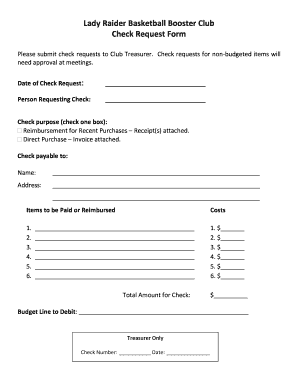
Get Lady Raider Basketball Booster Club Check Request Form
How it works
-

Open form follow the instructions
-

Easily sign the form with your finger
-

Send filled & signed form or save
How to fill out the Lady Raider Basketball Booster Club Check Request Form online
This guide provides a step-by-step approach to effectively completing the Lady Raider Basketball Booster Club Check Request Form online. Whether you are requesting reimbursement or making a direct purchase, these instructions will help ensure your submission is accurate and complete.
Follow the steps to successfully complete and submit your check request form.
- Click ‘Get Form’ button to obtain the form and open it in the editor.
- Enter the date of your check request in the designated field, ensuring it reflects the correct date.
- Fill in the name of the person requesting the check in the specified area.
- Select the purpose of the check by ticking the appropriate box—either for reimbursement of recent purchases with attached receipts or for direct purchases with attached invoices.
- Complete the section for the check payable to, including the name and address of the individual or entity.
- List the items to be paid or reimbursed along with their respective costs in the provided fields, ensuring all costs are accurately noted.
- Calculate the total amount for the check and enter it in the designated area.
- Specify the budget line to debit, as applicable, following any relevant financial guidelines.
- Once all fields are completed, review the form for accuracy and completeness before proceeding.
- Finally, save changes to your document, and if applicable, download, print, or share the completed form as needed.
Complete your check request form online today to ensure timely processing.