Loading
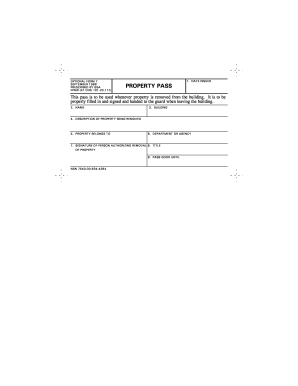
Get Gsa Of 7 1988
How it works
-

Open form follow the instructions
-

Easily sign the form with your finger
-

Send filled & signed form or save
How to fill out the GSA OF 7 online
The GSA OF 7 is an important form used for recording the removal of property from a building. This guide will help you navigate the form step-by-step, ensuring you complete it accurately and efficiently.
Follow the steps to successfully complete the GSA OF 7 online.
- Click ‘Get Form’ button to obtain the form and open it in your preferred online editor.
- In the 'Date Issued' field, enter the current date when the pass is being filled out. This is crucial for tracking the validity of the property pass.
- In the 'Name' section, provide the full name of the person who is removing the property. Ensure you spell the name correctly to avoid any confusion.
- Next, indicate the 'Building' from which the property is being removed. This helps to clarify the location of the transaction.
- In the 'Description of Property Being Removed' section, offer a clear and detailed description of the item or items. This could include serial numbers, quantities, or any identifying features.
- Specify under 'Property Belongs To' the name of the person or organization that owns the property. This ensures accountability and traceability.
- In the 'Department or Agency' field, indicate the name of the department or agency associated with the property. This is important for organizational records.
- The 'Signature of Person Authorizing Removal' should be completed by the individual who has the authority to allow the property to leave the premises.
- In the 'Title of Property' field, provide the official title associated with the property. This may refer to a specific designation within the organization.
- Lastly, fill in the 'Pass Good Until' date to indicate how long the pass will remain valid. Generally, this would be the duration necessary for the property removal.
- Once all fields are completed, review the form for accuracy, then choose to save changes, download, print, or share the form as needed.
Complete your GSA OF 7 form online today for efficient property management.
Get form
Experience a faster way to fill out and sign forms on the web. Access the most extensive library of templates available.
Get This Form Now!
Use professional pre-built templates to fill in and sign documents online faster. Get access to thousands of forms.