Loading
Get Ca Calpers Hbd-40 2013-2026
How it works
-

Open form follow the instructions
-

Easily sign the form with your finger
-

Send filled & signed form or save
How to fill out the CA CalPERS HBD-40 online
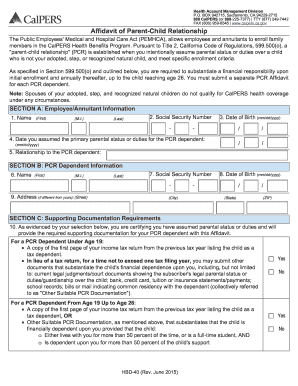
The CA CalPERS HBD-40 form is essential for enrolling a child in a health plan under the Public Employees' Medical and Hospital Care Act. This guide will provide you with a clear and step-by-step approach to successfully completing the form online.
Follow the steps to complete the CA CalPERS HBD-40 form online.
- Press the ‘Get Form’ button to access the HBD-40 form and open it in your chosen online editor.
- Begin by entering your information as the employee or annuitant. Fill in your first name, middle initial, and last name. Provide your Social Security number and specify the date you assumed the primary custodial parental role for the child.
- Next, complete the child information section. Enter the child’s first name, middle initial, last name, Social Security number, and address (if it differs from yours). Ensure to include the child's date of birth.
- Address the question on whether you have enrolled other children under the same regulation. If yes, specify the number of additional children enrolled.
- In the eligibility section, certify the parent-child relationship by answering each statement with 'Yes' or 'No,' and provide your initials for verification.
- Finalize the form by acknowledging that this affidavit is legally binding. Review the information provided, ensuring accuracy. Sign and date where indicated.
- Once all information is filled in, save your changes. You may also download, print, or share the completed form as required.
Complete your CA CalPERS HBD-40 form online today for a smoother enrollment process.
The earliest age to retire with CalPERS is generally 50, provided you have the required service credit. This option allows you to start receiving benefits early but may decrease the monthly payment. It's essential to weigh the lifetime impact of retiring early. If you're uncertain about your options, consult USLegalForms for guidance on navigating CalPERS retirement.