Loading
Get Au Nsw Retail Bond Lodgement 2021-2026
How it works
-

Open form follow the instructions
-

Easily sign the form with your finger
-

Send filled & signed form or save
How to fill out the AU NSW Retail Bond Lodgement online
Filling out the AU NSW Retail Bond Lodgement form is an essential step for securing retail bonds effectively. This guide will provide you with detailed, step-by-step instructions to ensure a smooth and compliant completion of the form online.
Follow the steps to fill out the AU NSW Retail Bond Lodgement form online
- Click ‘Get Form’ button to obtain the form and open it in the online editor.
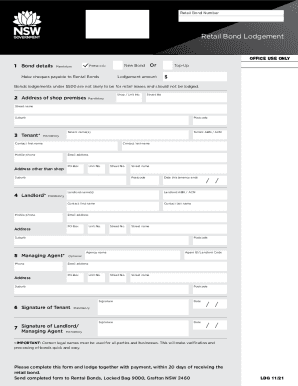
- In the 'Bond details' section, indicate whether this is for a new bond or a top-up. Ensure to complete the lodgement amount, which needs to be over $500 if it’s a retail bond. Cheques should be made payable to Rental Bonds.
- Provide the 'Address of shop premises' by entering the street number, street name, postcode, and suburb. This information is mandatory.
- In the 'Tenant' section, enter the names of the tenant(s), their ABN or ACN, a contact first and last name, mobile phone number, alternate address (different from shop), and email address. This information is also mandatory.
- Complete the 'Landlord' section by inputting the landlord's name(s), ABN or ACN, contact first and last name, mobile phone number, email address, and address details. Ensure that all fields are filled out as this section is essential.
- If applicable, fill in the 'Managing Agent' section with their phone number, email address, and address details. This section is optional.
- Gather the required signatures. The tenant and landlord or managing agent must sign in the designated areas, which are mandatory for processing.
- Once all sections are completed, make sure to save the changes. You may have options to download, print, or share the form electronically.
Complete your AU NSW Retail Bond Lodgement form online today!