Loading
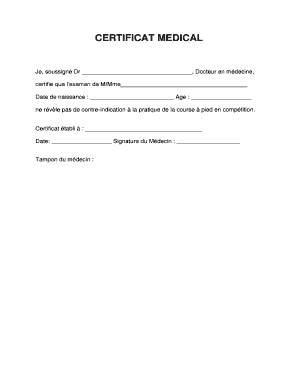
Get Fr Lepape-info Certificat Medical 2011-2026
How it works
-

Open form follow the instructions
-

Easily sign the form with your finger
-

Send filled & signed form or save
How to fill out the FR Lepape-Info Certificat Medical online
Filling out the FR Lepape-Info Certificat Medical is an essential step for individuals seeking certification to participate in competitive running. This guide provides clear, step-by-step instructions to help users complete the form accurately and efficiently.
Follow the steps to complete the certificate online.
- Press the ‘Get Form’ button to obtain the document and open it in your chosen online editor.
- In the first field labeled ‘Dr _________________________________’, input the full name of the physician certifying the examination.
- Fill in the next field with the name of the individual being examined, represented as ‘M/Mme______________________________________’.
- Enter the date of birth of the individual in the designated space marked ‘Date de naissance : _________________________’.
- Indicate the age of the individual in the field labeled ‘Age : __________________’.
- In the section ‘Certificat établi à : ___________________________________’, provide the location where the certificate is being issued.
- Enter the current date in the space labeled ‘Date: __________________’.
- The physician must sign the document in the space ‘Signature du Médecin : ___________________’.
- If applicable, include the physician's stamp in the designated area labeled ‘Tampon du médecin’.
- Once all fields are filled correctly, save your changes. You can then download, print, or share the completed form as needed.
Complete your FR Lepape-Info Certificat Medical online today.