Loading
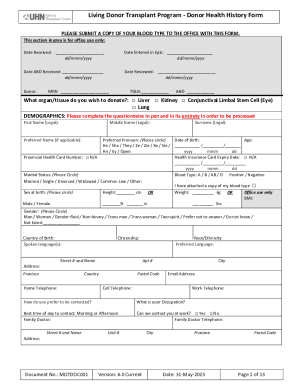
Get University Health Network Motdoc001 2023-2026
How it works
-

Open form follow the instructions
-

Easily sign the form with your finger
-

Send filled & signed form or save
How to fill out the University Health Network MOTDOC001 online
Completing the University Health Network MOTDOC001 form is an essential step for individuals wishing to donate organs or tissues. This guide provides clear and supportive instructions to help you navigate each section of the form successfully.
Follow the steps to complete the form accurately and efficiently.
- Press the ‘Get Form’ button to obtain the form, and open it in your preferred online editor.
- Begin by entering your personal details in the demographics section. Include your first name, middle name, surname, and preferred name if applicable. Make sure to also specify your preferred pronoun, date of birth, age, and health card number if necessary.
- Indicate your marital status and blood type, and provide information regarding your sex at birth, height, and weight. It's important to provide this information accurately.
- Enter your contact information, including home and cell telephone numbers, email address, and preferred method of communication.
- Complete the medical history section, answering questions related to your general health, history of illnesses, surgeries, and any medications you may currently be taking.
- Fill out the sections related to specific health categories including liver health, cancer history, infection risks, neurological and psychological health, cardiovascular issues, and respiratory conditions.
- Review the sections pertaining to gastrointestinal, genitourinary, and endocrine health. Be thorough in your responses to ensure all relevant information is provided.
- In the social and other information sections, share details about your family health history, support system, and any other relevant information that could impact your qualification as a donor.
- Once you have completed the form, review all your entries for accuracy and completeness. Make sure to sign and date the form before submission.
- Save your changes, and choose to download, print, or share the completed form as needed.
Begin filling out the University Health Network MOTDOC001 online now.
To log into your account, enter your UPN and password. Your UPN is firstname.lastname@uhn.ca (replace uhn.ca with the appropriate domain if your user account is in a different one (e.g., @uhnresearch.ca, or @tc.lhins.on.ca.) Contact the UHN Digital Service Desk if you are unsure of your UPN.