Loading
Get Doc Pto/sb/02lr 2017-2026
How it works
-

Open form follow the instructions
-

Easily sign the form with your finger
-

Send filled & signed form or save
How to fill out the DOC PTO/SB/02LR online
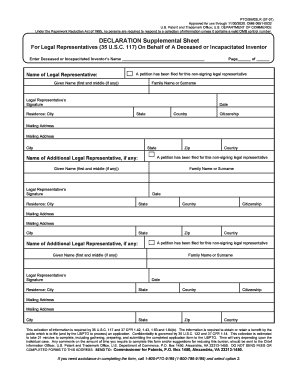
Filling out the DOC PTO/SB/02LR form is an important step for legal representatives acting on behalf of a deceased or incapacitated inventor. This guide provides clear instructions to ensure that users can complete the form accurately and efficiently.
Follow the steps to successfully complete the DOC PTO/SB/02LR form online.
- Click the ‘Get Form’ button to acquire the form and open it in your browser for editing.
- Begin by entering the name of the deceased or incapacitated inventor in the designated field. This includes providing their first name and surname.
- In the 'Name of Legal Representative' section, fill in your given name (first and middle if applicable) and family name or surname.
- Sign in the specified area for the legal representative’s signature. Ensure that your signature is clear and legible.
- Fill in your residence city, state, country, and zip code. This information helps in identifying the location of the legal representative.
- Indicate your citizenship in the provided field to meet legal requirements.
- If there are additional legal representatives, repeat steps 3 to 6 for each additional person, noting that a signature is also required for each.
- Review all the entered information for accuracy. Ensure that there are no typos or missing details.
- After confirming that all information is correct, you can save changes, download the form, print it for physical submission, or share it as needed.
Start completing the DOC PTO/SB/02LR form online today to ensure compliance and smooth processing.
Related links form
You can find out an application number by searching Public Pair (Patent Application and Information Retrieval), which is a search portal maintained by the United States Patent and Trademark Office (“U.S. PTO”).