Loading
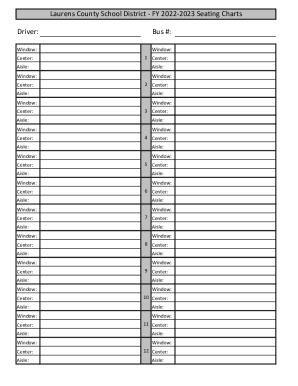
Get Ga Laurens County School District Seating Charts 2022-2026
How it works
-

Open form follow the instructions
-

Easily sign the form with your finger
-

Send filled & signed form or save
How to fill out the GA Laurens County School District Seating Charts online
Filling out the GA Laurens County School District Seating Charts online is a straightforward process designed to ensure that all necessary information is documented accurately. This guide will walk you through each section of the form, providing clear instructions for a successful submission.
Follow the steps to accurately complete the seating charts form.
- Click the ‘Get Form’ button to access the seating chart form and open it for editing.
- Begin by entering the driver's name in the 'Driver' field. This identifies who will be operating the bus for the designated seating chart.
- Fill in the applicable 'Bus #' field with the unique identification number of the bus being used.
- For each row of seating, indicate the position of windows and aisles by marking the relevant sections as 'Window' or 'Aisle' accordingly.
- In the 'Center' columns for each row, specify how many seats are available in that section to provide a clear layout of seating capacity.
- Repeat the above steps for each seating row, ensuring each section is filled out accurately from Center 1 through Center 12.
- Once all fields are completed to your satisfaction, you can save your changes, download a copy, print the seating chart, or share it as needed.
Complete your seating charts online to ensure proper arrangements for your students.