Loading
Form preview
  • US Legal Forms
  • Other Templates
  • More Forms
  • More Multi-State Forms
  • Umpqua Bank Business Enrollment Form 2005

Get Umpqua Bank Business Enrollment Form 2005-2026

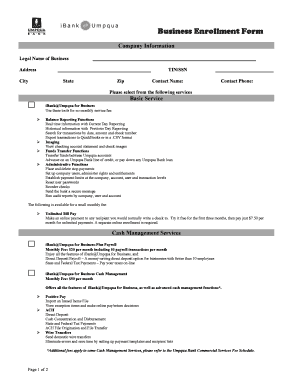
K Umpqua for Business Use these tools for no monthly service fee: Balance Reporting Functions Real time information with Current Day Reporting Historical information with Previous Day Reporting Search for transactions by date, amount and check number Export transactions to QuickBooks or in a .CSV format Imaging View checking account statement and check images Funds Transfer Functions Transfer funds between Umpqua accounts Advance on an Umpqua Bank line of credit, or pay down any Umpqua Bank loan.

How it works

  1. Open form

    Open form follow the instructions

  2. Easily sign form

    Easily sign the form with your finger

  3. Share form

    Send filled & signed form or save

How to fill out the Umpqua Bank Business Enrollment Form online

Completing the Umpqua Bank Business Enrollment Form online is a straightforward process designed to assist businesses in accessing essential banking services. This guide provides step-by-step instructions to ensure a seamless enrollment experience.

Follow the steps to complete the enrollment form accurately.

  1. Click ‘Get Form’ button to obtain the form and open it in your chosen editor.
  2. Provide the company information in the designated fields, ensuring to include the legal name of your business, address, TIN/SSN, city, state, and zip code. Include a contact name and phone number for correspondence.
  3. Select the services your business will require from the list provided. You can choose from options such as Basic Service and additional features like unlimited bill pay or cash management services.
  4. List the Umpqua Bank accounts that you wish to access via iBank. Specify each account number and type. This includes checking, savings, time certificates of deposit, and loans.
  5. Designate a Company System Administrator (CSA). It is advisable to choose at least two CSAs. Fill in their name, title, phone number, and email address in the respective fields.
  6. Individuals authorized to sign the form must do so in the signatures section. Ensure the signature and title, along with the date, are filled out correctly. If applicable, note the required signatures per the business's structure.
  7. Complete and verify the bank information section as needed, which may include signatures and details for the bank's use.
  8. After reviewing all information for accuracy, save any changes made to the form. You can also download, print, or share the completed document as necessary.

Get started by filling out your Umpqua Bank Business Enrollment Form online today.

Get form

Experience a faster way to fill out and sign forms on the web. Access the most extensive library of templates available.
Get form

Related content

Umpqua Form 10-K
On December 1, 2000, Umpqua completed a "merger of equals" with VRB Bancorp, a bank...
Learn more
Umpqua Business Online Banking
Oct 3, 2023 — WebBusiness Online Banking Enrolling in Online Statements. Follow these...
Learn more
2018 Annual Report cover
This annual report includes forward-looking statements within the meaning of the “Safe...
Learn more

Related links form

ME Sheila A. Balog Psychotherapist-Patient Services Agreement 2012 Tacoma Community College Transcript Request Form 2025 OR Fee Waivers/Deferrals Pkg - County Of Clackamas 2021 Tacoma Community College Transcript Request Form 2013

Questions & Answers

Get answers to your most pressing questions about US Legal Forms API.

Contact support

Umpqua Bank Grow Savings Account Opening an account requires an initial deposit of at least $25. The $25 deposit gets you in the door, but you may want to start with even more than that: the monthly fee of $3 applies to accounts that don't maintain a minimum balance of $200.

Opening a business bank account is easy once you've picked your bank. Simply go online or to a local branch to begin the process. Here are some of the most common documents banks ask for when you open a business bank account. Some banks may ask for more.

On March 1, 2023, the merger between Umpqua Bank and Columbia Bank was completed. As a result of the combination, you now have access to over 300 branch and ATM locations throughout the West.

With Online Banking, you can set up and authorize other people to manage your online business banking accounts. You control and assign roles to users that define their ability to view and access accounts, make transactions, use Bill Pay and more.

You can apply for most checking accounts online if you're 18 or older by going to the bank's website and filling out the application.

Yes, it is possible to open a business bank account remotely in many cases. Some banks offer the option to complete the account opening process online or through mail, allowing you to open an account without visiting a branch in person.

Details you'll need to apply online: Name and address of business. Business tax ID number: Business Employer Identification Number (EIN) provided by the IRS in the following 9-digit format XX-X. Date business was established (month/year) Country and state of legal formation (must be formed in the US)

We offer 3 convenient ways to open a business checking account: Choose your business checking account and apply online. Call 866.283.4075. Visit a financial center.

Get This Form Now!

Use professional pre-built templates to fill in and sign documents online faster. Get access to thousands of forms.
Get form
If you believe that this page should be taken down, please follow our DMCA take down processhere.
Get Umpqua Bank Business Enrollment Form
Get form

Form categories

Real Estate
  • Home Sale
  • Deeds
  • Leases
  • Landlord Tenant
  • First Refusal Agreement
  • Lis Pendens
  • View all Real Estate
Business & Commercial
  • Small Business
  • Contracts
  • Construction
  • Employment
  • Limited Liability Company
  • Partnerships
  • View all Business & Commercial
Estate Planning
  • Personal Planning
  • Last Will and Testament
  • Living Trust
  • Power of Attorney
  • Living Will (Healthcare Directive)
  • Probate
  • Trusts
  • Small Estate
  • View all Estate Planning

Other Legal Areas

  • Civil Actions
  • Civil Procedure
  • Animals
  • Affidavits
  • Bill of Sale
  • Oil Gas and Minerals
  • Name Change
  • Other
Family Law
  • Divorce
  • Annulment
  • Adoption
  • Marriage
  • Child Justice
  • View all Family Law
  • Forms Catalog
  • Other Templates

Company

  • About Us
  • Pricing
  • Legal Hub
  • Affiliate Program

Knowledge Base

  • Help Portal
  • Legal Resources
  • Blog
  • Industries
  • Legal Guides
  • Sitemap

Services

  • Notarize
  • Form Selector

Support

  • Contact Us
  • Delete My Account

Products

  • USLegal
  • FormsPass
  • pdfFiller
  • signNow
  • altaFlow
  • DocHub
  • Instapage
Social Media
Call us now toll free:
+1 833 426 79 33
As seen in:
© 2026 US Legal Forms. All rights reserved.
  • Your Privacy Choices
  • Terms of Service
  • Privacy Notice
  • Content Takedown Policy
  • Bug Bounty Program