Loading
Form preview
  • US Legal Forms
  • Other Templates
  • More Forms
  • More Multi-State Forms
  • Medco Pharmacy New Prescription Form 2010

Get Medco Pharmacy New Prescription Form 2010-2026

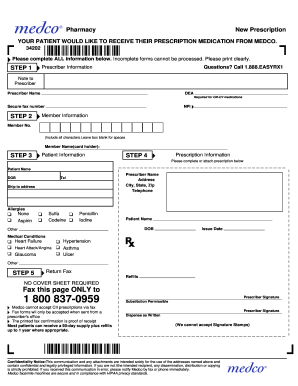
Te forms cannot be processed. Please print clearly. Prescriber Information STEP 1 Questions? Call 1.888.EASYRX1 Note to Prescriber Prescriber Name DEA Required for CIII-CV medications Secure fax number STEP 2 NPI Member Information Member No. (Include all characters.Leave box blank for spaces Member Name(card holder): STEP 3 Patient Information STEP 4 Prescription Information Please complete or attach prescription below Patient Name DOB Te.

How it works

  1. Open form

    Open form follow the instructions

  2. Easily sign form

    Easily sign the form with your finger

  3. Share form

    Send filled & signed form or save

How to fill out the Medco Pharmacy New Prescription Form online

Filling out the Medco Pharmacy New Prescription Form online is a straightforward process that ensures prescriptions are processed smoothly. This guide will walk you through each section of the form, providing clear instructions for users of all experience levels.

Follow the steps to complete the Medco Pharmacy New Prescription Form.

  1. Click ‘Get Form’ button to obtain the form and open it in your selected editor.
  2. Begin by providing prescriber information. Enter the prescriber's name, DEA number (if applicable for CIII-CV medications), secure fax number, and NPI.
  3. Next, move to the member information section. Fill in the member number, ensuring to include all characters and leaving box blank for any spaces. Enter the member's name as it appears on their card.
  4. In the patient information section, provide the patient’s name, date of birth, and contact telephone number.
  5. Fill in the prescription information by completing or attaching the prescription details, including medication name, dosage, and instructions. Specify the shipping address for the medications.
  6. Indicate any allergies the patient may have by checking the relevant boxes or writing down other allergies in the provided space.
  7. List any medical conditions that may be relevant to the prescription by checking the appropriate boxes.
  8. Finally, return to the final section. Fill in prescriber name, address, city, state, and zip code. Include telephone number, issue date, and specify the number of refills.
  9. Ensure the prescriber signs the form, marking either 'substitution permissible' or 'dispense as written' as applicable. Note that signature stamps are not acceptable.
  10. Fax this completed page only to the number provided (1 800 837-0959) without a cover sheet. Remember, Medco cannot accept CII prescriptions via fax.

Complete the Medco Pharmacy New Prescription Form online today for quick and efficient processing.

Get form

Experience a faster way to fill out and sign forms on the web. Access the most extensive library of templates available.
Get form

Related content

Medco Pharmacy
Jun 23, 2010 — Beginning July 1, 2010, please be sure to present your Medco prescription...
Learn more
The Medco Pharmacy® is now a part of the Express...
Express Scripts does not compensate for completing this form. The Medco Pharmacy® is now...
Learn more
A CLINICIAN'S GUIDE TO ELECTRONIC PRESCRIBING
E-prescribing allows a physician, nurse practitioner, or physician assistant to...
Learn more

Related links form

CA DE 2501 2024 TX DL-101 2004 NJ Health Screening Form - Monmouth County 2021 CA Medi-Cal Eligibility Division Information Letter 2024

Questions & Answers

Get answers to your most pressing questions about US Legal Forms API.

Contact support

Fax: Have your doctor call 888.327. 9791 for faxing instructions. (Faxes can only be accepted from a doctor's office.)

The Medco Pharmacy® is now a part of the Express Scripts family of pharmacies.

In April 2012, Medco Health Solutions was acquired by Express Scripts.

For most medications, Express Scripts will be able to contact your doctor and arrange for your first mail-order supply. Ask your doctor for a new prescription for up to a 90-day supply, plus refills for up to one year (if appropriate). Then, have your doctor fax the prescription to the Express Scripts Pharmacy.

Following closing of the Medco acquisition, both Express Scripts, Inc. and Medco Health Solutions, Inc. are wholly-owned subsidiaries of Express Scripts Holding Company. As the parent company, Express Scripts Holding Company is the new, publicly-traded entity, trading on NASDAQ under the symbol ESRX.

ST. LOUIS, April 2, 2012 /PRNewswire/ -- Express Scripts (NASDAQ: ESRX) completed its previously announced $29.1 billion acquisition of Medco Health Solutions today, creating the country's leading healthcare services company.

Express Scripts is evolving. We are now part of EvernorthSM–health services built on the recognition that health makes progress possible. Elevating health for all.

Express Scripts and Medco Health Solutions, Inc. have come together as one company to manage your prescription benefit. Medco is now a part of the Express Scripts family of pharmacies.

Get This Form Now!

Use professional pre-built templates to fill in and sign documents online faster. Get access to thousands of forms.
Get form
If you believe that this page should be taken down, please follow our DMCA take down processhere.
Get Medco Pharmacy New Prescription Form
Get form

Form categories

Real Estate
  • Home Sale
  • Deeds
  • Leases
  • Landlord Tenant
  • First Refusal Agreement
  • Lis Pendens
  • View all Real Estate
Business & Commercial
  • Small Business
  • Contracts
  • Construction
  • Employment
  • Limited Liability Company
  • Partnerships
  • View all Business & Commercial
Estate Planning
  • Personal Planning
  • Last Will and Testament
  • Living Trust
  • Power of Attorney
  • Living Will (Healthcare Directive)
  • Probate
  • Trusts
  • Small Estate
  • View all Estate Planning

Other Legal Areas

  • Civil Actions
  • Civil Procedure
  • Animals
  • Affidavits
  • Bill of Sale
  • Oil Gas and Minerals
  • Name Change
  • Other
Family Law
  • Divorce
  • Annulment
  • Adoption
  • Marriage
  • Child Justice
  • View all Family Law
  • Forms Catalog
  • Other Templates

Company

  • About Us
  • Pricing
  • Legal Hub
  • Affiliate Program

Knowledge Base

  • Help Portal
  • Legal Resources
  • Blog
  • Industries
  • Legal Guides
  • Sitemap

Services

  • Notarize
  • Form Selector

Support

  • Contact Us
  • Delete My Account

Products

  • USLegal
  • FormsPass
  • pdfFiller
  • signNow
  • altaFlow
  • DocHub
  • Instapage
Social Media
Call us now toll free:
+1 833 426 79 33
As seen in:
© 2026 US Legal Forms. All rights reserved.
  • Your Privacy Choices
  • Terms of Service
  • Privacy Notice
  • Content Takedown Policy
  • Bug Bounty Program