Loading
Form preview
  • US Legal Forms
  • Other Templates
  • More Forms
  • More Multi-State Forms
  • Nz Gsfa Change In Personal Details 2021

Get Nz Gsfa Change In Personal Details 2021-2026

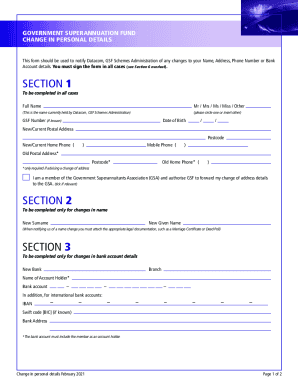
GOVERNMENT SUPERANNUATION FUND CHANGE IN PERSONAL DETAILS This form should be used to notify Data com, GSF Schemes Administration of any changes to your Name, Address, Phone Number or Bank Account.

How it works

  1. Open form

    Open form follow the instructions

  2. Easily sign form

    Easily sign the form with your finger

  3. Share form

    Send filled & signed form or save

How to fill out the NZ GSFA Change In Personal Details online

The NZ GSFA Change In Personal Details form is essential for notifying Datacom, GSF Schemes Administration of any changes regarding your most important personal information. This guide provides clear instructions to assist you in completing the form accurately and efficiently.

Follow the steps to successfully fill out the form online.

  1. Click the ‘Get Form’ button to obtain the form and open it in your document editor.
  2. In Section 1, fill in your full name as held by Datacom. Select a title (e.g., Mr, Mrs, Ms, Miss, Other), and include your GSF number if you know it. Provide your date of birth, new/current postal address, and contact numbers. If you are reporting a change of address, include your old postal address and contact numbers.
  3. If you are changing your name, complete Section 2 with your new surname and given name. Include the appropriate legal documentation, such as a Marriage Certificate or Deed Poll.
  4. For changes to bank account details, fill out Section 3 with the name of your new bank, branch, account holder name, and the bank account number. If you have an international bank account, also provide the IBAN, Swift code, and bank address.
  5. In Section 4, indicate if you wish to receive correspondence by email. Fill in your email address or select the option to stop receiving email correspondence.
  6. For alternative contact details, complete Section 5 with the full name, relationship, phone number, email address, and postal address of your alternative contact.
  7. Finally, in Section 6, ensure that the form is signed by you or an authorized person and indicate the date. The completed form must then be sent via post or as a scanned copy via email to Datacom.

Complete your NZ GSFA Change In Personal Details online today to ensure your information is up to date.

Get form

Experience a faster way to fill out and sign forms on the web. Access the most extensive library of templates available.
Get form

Related content

Federal Register/Vol. 79, No. 114/Friday, June 13...
13-Jun-2014 — The Codex Committee on Food. Additives (CCFA) establishes or endorses...
Learn more
REP14/FA
by T Session · 2014 — modify GSFA Food Category provisions for ... the collection of...
Learn more
HP Analog Fax Accessory 500 Guide SVWW Laser Jet...
User Manual: HP HP LaserJet tillbehör för analog fax 500 - Faxhandbok. Open the PDF...
Learn more

Related links form

Southern Illinois University Request For Travel Support 2013 MT TM/PYD/221 2009 Southern Illinois University Request For Travel Support 2023 BM Nomination Form For Queens Certificate And Badge Of Honour 2017

Get This Form Now!

Use professional pre-built templates to fill in and sign documents online faster. Get access to thousands of forms.
Get form
If you believe that this page should be taken down, please follow our DMCA take down processhere.
Get NZ GSFA Change In Personal Details
Get form
  • Adoption
  • Bankruptcy
  • Contractors
  • Divorce
  • Home Sales
  • Employment
  • Identity Theft
  • Incorporation
  • Landlord Tenant
  • Living Trust
  • Name Change
  • Personal Planning
  • Small Business
  • Wills & Estates
  • Packages A-Z
  • Affidavits
  • Bankruptcy
  • Bill of Sale
  • Corporate - LLC
  • Divorce
  • Employment
  • Identity Theft
  • Internet Technology
  • Landlord Tenant
  • Living Wills
  • Name Change
  • Power of Attorney
  • Real Estate
  • Small Estates
  • Wills
  • All Forms
  • Forms A-Z
  • Other Templates
  • Legal Hub
  • About Us
  • Help Portal
  • Legal Resources
  • Blog
  • Affiliates
  • Contact Us
  • Delete My Account
  • Site Map
  • Industries
  • Forms in Spanish
  • Localized Forms
  • State-specific Forms
  • Forms Kit
  • Real Estate Handbook
  • All Guides
  • Notarize
  • Incorporation services
  • For Consumers
  • For Small Business
  • For Attorneys
  • USLegal
  • FormsPass
  • pdfFiller
  • signNow
  • altaFlow
  • DocHub
  • Instapage
Form Packages
  • Adoption
  • Bankruptcy
  • Contractors
  • Divorce
  • Home Sales
  • Employment
  • Identity Theft
  • Incorporation
  • Landlord Tenant
  • Living Trust
  • Name Change
  • Personal Planning
  • Small Business
  • Wills & Estates
  • Packages A-Z
Form Categories
  • Affidavits
  • Bankruptcy
  • Bill of Sale
  • Corporate - LLC
  • Divorce
  • Employment
  • Identity Theft
  • Internet Technology
  • Landlord Tenant
  • Living Wills
  • Name Change
  • Power of Attorney
  • Real Estate
  • Small Estates
  • Wills
  • All Forms
  • Forms A-Z
  • Other Templates
Customer Service
  • Legal Hub
  • About Us
  • Help Portal
  • Legal Resources
  • Blog
  • Affiliates
  • Contact Us
  • Delete My Account
  • Site Map
  • Industries
  • Forms in Spanish
  • Localized Forms
  • State-specific Forms
  • Forms Kit
Legal Guides
  • Real Estate Handbook
  • All Guides
Prepared for you
  • Notarize
  • Incorporation services
Our Customers
  • For Consumers
  • For Small Business
  • For Attorneys
Our Sites
  • USLegal
  • FormsPass
  • pdfFiller
  • signNow
  • altaFlow
  • DocHub
  • Instapage
Social Media
Call us now toll free:
+1 833 426 79 33
As seen in:
© Copyright 1999-2026 airSlate Legal Forms, Inc. 17 Station Street, Ste. 203, Brookline, MA 02445
  • Your Privacy Choices
  • Terms of Service
  • Privacy Notice
  • Content Takedown Policy
  • Bug Bounty Program