Loading
Form preview
  • US Legal Forms
  • Other Templates
  • More Forms
  • More Multi-State Forms
  • Tx Dme Certification And Receipt Form 2021

Get Tx Dme Certification And Receipt Form 2021-2026

How it works

  1. Open form

    Open form follow the instructions

  2. Easily sign form

    Easily sign the form with your finger

  3. Share form

    Send filled & signed form or save

How to fill out the TX DME Certification And Receipt Form online

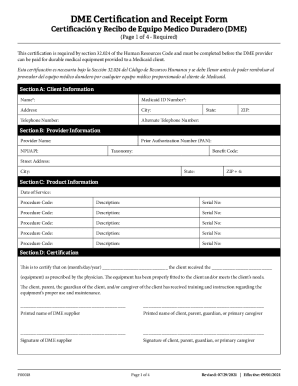
Filling out the TX DME Certification And Receipt Form online is essential for ensuring that the durable medical equipment provider is reimbursed for the services provided to a Medicaid client. This guide will walk you through the process, section by section, to ensure accuracy and compliance.

Follow the steps to successfully complete the form online.

  1. Click ‘Get Form’ button to obtain the form and open it in the editor.
  2. In Section A, provide the client information. Fill in the client's name, Medicaid ID number, address, city, state, ZIP code, and telephone numbers. Make sure all details are accurate.
  3. In Section B, complete the provider information. Enter the provider's name, prior authorization number, NPI/API, taxonomy, benefit code, and the provider’s street address along with city, state, and ZIP code.
  4. Move to Section C to fill in product information. For each piece of equipment, enter the date of service, procedure code, description, and serial number. Ensure that each field is filled out for every item listed.
  5. Proceed to Section D, which is the certification section. Specify the date the client received the equipment and provide a description of the equipment. Ensure the supplier and the client or caregiver sign and print their names correctly.
  6. If applicable, complete Section E for verification by a qualified rehabilitation professional, entering the required details and obtaining the necessary signatures.
  7. Review the entire form for any errors or omissions. Ensure all sections are appropriately filled out, placing 'N/A' for any non-applicable areas.
  8. Once you have completed and verified the form, you can save changes, download it, print it, or share it as needed.

Complete your TX DME Certification And Receipt Form online today to ensure timely reimbursement for durable medical equipment.

Get form

Experience a faster way to fill out and sign forms on the web. Access the most extensive library of templates available.
Get form

Related content

Student Forms - Study in the States - Homeland...
Students · Breadcrumb · Student Forms · Form I-20, “Certificate of Eligibility for...
Learn more
Anderson University: Home
Anderson University provides students with a rigorous and engaging learning experience...
Learn more
Access for Medical Cannabis Patients • MedBud UK
MedBud™ is an independent educational platform/directory researching the emerging...
Learn more

Related links form

AU Form F3520 2023 AU F3058 CFD 2024 Aetna GR-68744 2024 WA Firearms Certificate Application Packet 2020

Get This Form Now!

Use professional pre-built templates to fill in and sign documents online faster. Get access to thousands of forms.
Get form
If you believe that this page should be taken down, please follow our DMCA take down processhere.
Get TX DME Certification And Receipt Form
Get form

Form categories

Real Estate
  • Home Sale
  • Deeds
  • Leases
  • Landlord Tenant
  • First Refusal Agreement
  • Lis Pendens
  • View all Real Estate
Business & Commercial
  • Small Business
  • Contracts
  • Construction
  • Employment
  • Limited Liability Company
  • Partnerships
  • View all Business & Commercial
Estate Planning
  • Personal Planning
  • Last Will and Testament
  • Living Trust
  • Power of Attorney
  • Living Will (Healthcare Directive)
  • Probate
  • Trusts
  • Small Estate
  • View all Estate Planning

Other Legal Areas

  • Civil Actions
  • Civil Procedure
  • Animals
  • Affidavits
  • Bill of Sale
  • Oil Gas and Minerals
  • Name Change
  • Other
Family Law
  • Divorce
  • Annulment
  • Adoption
  • Marriage
  • Child Justice
  • View all Family Law
  • Forms Catalog
  • Other Templates

Company

  • About Us
  • Pricing
  • Legal Hub
  • Affiliate Program

Knowledge Base

  • Help Portal
  • Legal Resources
  • Blog
  • Industries
  • Legal Guides
  • Sitemap

Services

  • Notarize
  • Form Selector

Support

  • Contact Us
  • Delete My Account

Products

  • USLegal
  • FormsPass
  • pdfFiller
  • signNow
  • altaFlow
  • DocHub
  • Instapage
Social Media
Call us now toll free:
+1 833 426 79 33
As seen in:
© 2026 US Legal Forms. All rights reserved.
  • Your Privacy Choices
  • Terms of Service
  • Privacy Notice
  • Content Takedown Policy
  • Bug Bounty Program