Loading
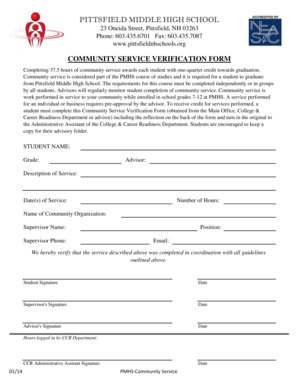
Get Nh Pittsfield Middle High School Community Service Verification Form 2014-2026
How it works
-

Open form follow the instructions
-

Easily sign the form with your finger
-

Send filled & signed form or save
How to fill out the NH Pittsfield Middle High School Community Service Verification Form online
Completing the NH Pittsfield Middle High School Community Service Verification Form is essential for students to receive credit for their community service hours. This guide provides clear instructions on how to successfully fill out the form online, ensuring that all necessary information is accurately recorded.
Follow the steps to effectively complete the community service verification form.
- Click ‘Get Form’ button to obtain the form and open it in the editor.
- In the 'Student Name' field, enter your full name as it appears on your school records. Make sure to check for any spelling errors to ensure your credit is accurately tracked.
- In the 'Grade' section, select your current grade level at Pittsfield Middle High School. This information is crucial for verifying your eligibility.
- Fill in your 'Advisor' name, which is your assigned faculty member who will oversee your community service activities.
- Describe the 'Description of Service.' Provide a concise overview of the nature of the community service you performed, including specific tasks and responsibilities.
- Input the 'Date(s) of Service' in the format of MM/DD/YYYY. If the service was performed over multiple days, be sure to list all applicable dates.
- Enter the total 'Number of Hours' you completed for the community service. Ensure that this figure reflects the actual time spent on service work.
- Complete the 'Name of Community Organization' field with the official name of the organization where you performed the service.
- Provide the 'Supervisor Name' and 'Supervisor Phone' details, including the contact phone number of the person responsible for overseeing your service activities.
- In the 'Position' section, indicate your role within the organization while performing community service, followed by the supervisor's email address.
- Sign the form in the 'Student Signature' section and date it appropriately. This shows that you confirm the accuracy of the information provided.
- The supervisor should complete their part by signing and dating the form to verify that the service was performed.
- Lastly, provide space for your advisor's signature and the date it was signed, confirming your community service involvement.
- After completing all fields, save your changes, and download the form. You should also print a copy to keep for your advisory folder or share it as required.
Complete your NH Pittsfield Middle High School Community Service Verification Form online today.