Loading
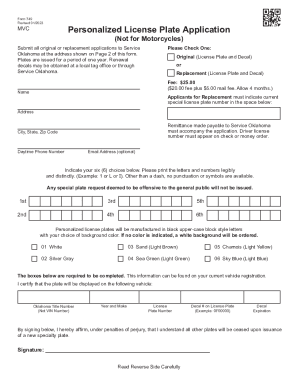
Get Form 749 Personalized License Plate Application (not For Motorcycles)
How it works
-

Open form follow the instructions
-

Easily sign the form with your finger
-

Send filled & signed form or save
How to fill out the Form 749 Personalized License Plate Application (Not For Motorcycles) online
Filling out the Form 749 for a personalized license plate is a straightforward process designed to accommodate your preferences. This guide will provide you with step-by-step instructions to complete the application online with ease.
Follow the steps to complete your application successfully.
- Press the ‘Get Form’ button to obtain the application form and open it in the designated editor.
- Indicate whether you are applying for an original personalized license plate or a replacement license plate by checking the appropriate box.
- Enter your name as the applicant in the designated field.
- If you are applying for a replacement plate, provide your current special license plate number in the specified area.
- Fill in your address, including the city, state, and zip code.
- Provide your daytime phone number and optionally your email address.
- List your six personalized plate choices in the required fields, ensuring that you print letters and numbers clearly without punctuation, except for a dash.
- Select your preferred background color from the available options, or leave it blank for a white background.
- Complete the required vehicle information, including the Oklahoma title number, year and make of the vehicle, current license plate number, decal number, and decal expiration date.
- Sign the application to affirm that you understand all other plates will be ceased upon issuance of the new specialty plate.
- Review all entries for accuracy, then save your changes, and proceed to download, print, or share the completed form.
Get started on your personalized license plate application today, and complete your form online!
Go to the West Virginia Department of Transportation website at .transportation.wv.gov. Click on "See More" under the first column headed "Citizen." Scroll down to the bottom of the page and click on "Special License Plates" under "Vehicle."