Loading
Form preview
  • US Legal Forms
  • Other Templates
  • More Forms
  • More Multi-State Forms
  • Nc On Deck Sports Center Contract Agreement 2008

Get Nc On Deck Sports Center Contract Agreement 2008-2026

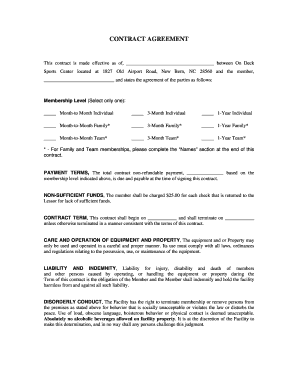
And states the agreement of the parties as follows: Membership Level (Select only one): Month-to Month Individual 3-Month Individual 1-Year Individual Month-to-Month Family* 3-Month Family* 1-Year Family* Month-to-Month Team* 3-Month Team* 1-Year Team* * - For Family and Team memberships, please complete the Names section at the end of this contract. PAYMENT TERMS, The total contract non-refundabl.

How it works

  1. Open form

    Open form follow the instructions

  2. Easily sign form

    Easily sign the form with your finger

  3. Share form

    Send filled & signed form or save

How to fill out the NC On Deck Sports Center Contract Agreement online

Completing the NC On Deck Sports Center Contract Agreement online is a straightforward process. This guide will walk you through each section of the form, ensuring that you provide all necessary information accurately and efficiently.

Follow the steps to complete your contract agreement with ease.

  1. Click ‘Get Form’ button to obtain the contract agreement and open it in your preferred digital editor.
  2. Fill in the effective date of the contract in the designated space. This should reflect the date you are signing the agreement.
  3. Enter your name in the section provided for the member. Ensure that you use your full legal name for clarity.
  4. Select your desired membership level. You can choose from options like month-to-month individual, 3-month individual, 1-year individual, or various family and team memberships. Please remember to only select one option.
  5. If you selected a family or team membership, complete the 'Names' section at the end of the contract with the names of all members included in the membership.
  6. Fill in the total payment amount that will be due at the time of signing this contract based on your selected membership level.
  7. Indicate the start date and termination date of the contract in the provided spaces.
  8. Review the terms regarding care and operation of equipment, liability and indemnity, disorderly conduct, and default clauses to understand your responsibilities as a member.
  9. Sign and print your name in the designated signature area. Include your street address, city, state, ZIP code, phone number, and email address.
  10. Once all fields are completed and checked for accuracy, save your changes. You can then download, print, or share the completed form as needed.

Complete your NC On Deck Sports Center Contract Agreement online today!

Get form

Experience a faster way to fill out and sign forms on the web. Access the most extensive library of templates available.
Get form

Related content

S.L. 2007-323
Effective June 30, 2007, the unencumbered balance of the funds appropriated to the NC...
Learn more
general assembly of north carolina session 2013...
by S BILL — AN ACT TO MAKE BASE BUDGET APPROPRIATIONS FOR CURRENT OPERATIONS. OF STATE...
Learn more
SPIN MASTER CORP. 2020 ANNUAL INFORMATION FORM
Mar 15, 2021 — Spin Master entered into a number of license agreements in 2020. ... own...
Learn more

Related links form

OK BT-129 2021 NY REBNY Sublease Application 2007 GA Special Use Permit Application 2014 PK JPMA Submission Statement 2016

Questions & Answers

Get answers to your most pressing questions about US Legal Forms API.

Contact support

When filing a UCC-3, only make one change at a time. States will most likely reject a UCC-3 that is both an amendment and continuation.

UCC. A UCC3 is a change statement to a UCC1. It's an amendment filing to an original UCC1 financing statement that changes or adds information to the originally filed UCC1. It's a filing tool secured parties use to manage their UCC portfolio to maintain their perfected security interests.

A UCC3 is a change statement to a UCC1. It's an amendment filing to an original UCC1 financing statement that changes or adds information to the originally filed UCC1. It's a filing tool secured parties use to manage their UCC portfolio to maintain their perfected security interests.

A UCC-1 filing is good for five years. After five years, it is considered lapsed and no longer valid. Should your debtor remain in debt to you and encounter financial difficulty or file for bankruptcy, you have no secured interest if your UCC-1 filing has lapsed.

Form UCC3 is used to amend (make changes to) a UCC1 filing. The required information is: An acknowledgement name and address. (Recommended for return copy of the filing.)

To do so you will generally need to make a trip in person down to your secretary of state's office. Once there, you will be able to swear under oath that you've satisfied the debt in full and wish to request for the UCC-1 filing to be removed.

Form UCC3 is used to amend (make changes to) a UCC1 filing. The required information is: An acknowledgement name and address. (Recommended for return copy of the filing.)

A UCC-3 termination statement (a “Termination”) is a required filing that terminates a security interest that has been perfected by a UCC-1 filing. A Termination for personal property is accomplished by completing and filing form UCC-3 with the Secretary of State's office in the appropriate state.

How do I get rid of a UCC filing? You can remove a UCC filing when you've repaid your business loan in full. Once you repay the debt, the lender should remove the lien from your business assets. If not, you may request that the lender files a UCC-3 to terminate the lien.

Get This Form Now!

Use professional pre-built templates to fill in and sign documents online faster. Get access to thousands of forms.
Get form
If you believe that this page should be taken down, please follow our DMCA take down processhere.
Get NC On Deck Sports Center Contract Agreement
Get form
  • Adoption
  • Bankruptcy
  • Contractors
  • Divorce
  • Home Sales
  • Employment
  • Identity Theft
  • Incorporation
  • Landlord Tenant
  • Living Trust
  • Name Change
  • Personal Planning
  • Small Business
  • Wills & Estates
  • Packages A-Z
  • Affidavits
  • Bankruptcy
  • Bill of Sale
  • Corporate - LLC
  • Divorce
  • Employment
  • Identity Theft
  • Internet Technology
  • Landlord Tenant
  • Living Wills
  • Name Change
  • Power of Attorney
  • Real Estate
  • Small Estates
  • Wills
  • All Forms
  • Forms A-Z
  • Other Templates
  • Legal Hub
  • About Us
  • Help Portal
  • Legal Resources
  • Blog
  • Affiliates
  • Contact Us
  • Delete My Account
  • Site Map
  • Industries
  • Forms in Spanish
  • Localized Forms
  • State-specific Forms
  • Forms Kit
  • Real Estate Handbook
  • All Guides
  • Notarize
  • Incorporation services
  • For Consumers
  • For Small Business
  • For Attorneys
  • USLegal
  • FormsPass
  • pdfFiller
  • signNow
  • altaFlow
  • DocHub
  • Instapage
Form Packages
  • Adoption
  • Bankruptcy
  • Contractors
  • Divorce
  • Home Sales
  • Employment
  • Identity Theft
  • Incorporation
  • Landlord Tenant
  • Living Trust
  • Name Change
  • Personal Planning
  • Small Business
  • Wills & Estates
  • Packages A-Z
Form Categories
  • Affidavits
  • Bankruptcy
  • Bill of Sale
  • Corporate - LLC
  • Divorce
  • Employment
  • Identity Theft
  • Internet Technology
  • Landlord Tenant
  • Living Wills
  • Name Change
  • Power of Attorney
  • Real Estate
  • Small Estates
  • Wills
  • All Forms
  • Forms A-Z
  • Other Templates
Customer Service
  • Legal Hub
  • About Us
  • Help Portal
  • Legal Resources
  • Blog
  • Affiliates
  • Contact Us
  • Delete My Account
  • Site Map
  • Industries
  • Forms in Spanish
  • Localized Forms
  • State-specific Forms
  • Forms Kit
Legal Guides
  • Real Estate Handbook
  • All Guides
Prepared for you
  • Notarize
  • Incorporation services
Our Customers
  • For Consumers
  • For Small Business
  • For Attorneys
Our Sites
  • USLegal
  • FormsPass
  • pdfFiller
  • signNow
  • altaFlow
  • DocHub
  • Instapage
Social Media
Call us now toll free:
+1 833 426 79 33
As seen in:
© Copyright 1999-2026 airSlate Legal Forms, Inc. 17 Station Street, Ste. 203, Brookline, MA 02445
  • Your Privacy Choices
  • Terms of Service
  • Privacy Notice
  • Content Takedown Policy
  • Bug Bounty Program