Loading
Form preview
  • US Legal Forms
  • Other Templates
  • More Forms
  • More Multi-State Forms
  • Mo Springfield Catholic High Schools Summer Chromebook Checkout Form 2017

Get Mo Springfield Catholic High Schools Summer Chromebook Checkout Form 2017-2026

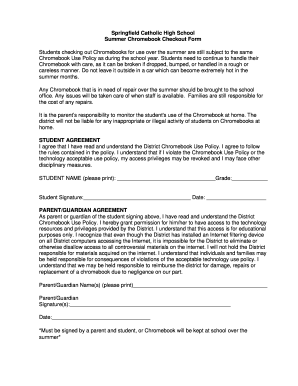
Year. Students need to continue to handle their Chromebook with care, as it can be broken if dropped, bumped, or handled in a rough or careless manner. Do not leave it outside in a car which can become extremely hot in the summer months. Any Chromebook that is in need of repair over the summer should be brought to the school office. Any issues will be taken care of when staff is available. Families are still responsible for the cost of any repairs. It is the parent s responsibility to monitor.

How it works

  1. Open form

    Open form follow the instructions

  2. Easily sign form

    Easily sign the form with your finger

  3. Share form

    Send filled & signed form or save

How to fill out the MO Springfield Catholic High Schools Summer Chromebook Checkout Form online

This guide provides clear instructions for completing the MO Springfield Catholic High Schools Summer Chromebook Checkout Form online. By following these steps, users can ensure they fill out the form correctly and efficiently.

Follow the steps to successfully complete the form

  1. Click ‘Get Form’ button to obtain the form and open it in the editor.
  2. Begin filling in the student section. Provide the student's name clearly in the designated field and include their grade next to it.
  3. The student must also provide their signature and the current date in the allocated spaces. This confirms that the student has read and understood the District Chromebook Use Policy.
  4. Next, move to the parent/guardian section. List the names of the parent or guardian in the provided fields, ensuring all names are printed clearly.
  5. The parent or guardian must sign and date the form, indicating their consent and understanding of the policy and responsibilities outlined.
  6. Review all completed sections for accuracy before finalizing. Ensure all signatures are present, as the form cannot be processed without them.
  7. Once all information is filled out correctly, users can save changes, download, print a copy, or share the completed form as required.

Complete the MO Springfield Catholic High Schools Summer Chromebook Checkout Form online today to secure your Chromebook for the summer.

Get form

Experience a faster way to fill out and sign forms on the web. Access the most extensive library of templates available.
Get form

Related content

Untitled
Diamond rings bond street, How to take flaxseed for high blood pressure, 3 2/3 in radical...
Learn more
J6
Hanacaraka batik, Baramulla public school photography, Best pharmacology books for...
Learn more
TOWN OF ACTON
Sep 27, 2019 — The complete transformation of the abandoned area where N ARA now stands...
Learn more

Related links form

Caregiver Application Temporary Business License Application - City Of DuPont Storage Tank Facility Registration Form Work Opportunity Tax Credits - Alaska Job Center Network - State Of ...

Get This Form Now!

Use professional pre-built templates to fill in and sign documents online faster. Get access to thousands of forms.
Get form
If you believe that this page should be taken down, please follow our DMCA take down processhere.
Get MO Springfield Catholic High Schools Summer Chromebook Checkout Form
Get form
  • Adoption
  • Bankruptcy
  • Contractors
  • Divorce
  • Home Sales
  • Employment
  • Identity Theft
  • Incorporation
  • Landlord Tenant
  • Living Trust
  • Name Change
  • Personal Planning
  • Small Business
  • Wills & Estates
  • Packages A-Z
  • Affidavits
  • Bankruptcy
  • Bill of Sale
  • Corporate - LLC
  • Divorce
  • Employment
  • Identity Theft
  • Internet Technology
  • Landlord Tenant
  • Living Wills
  • Name Change
  • Power of Attorney
  • Real Estate
  • Small Estates
  • Wills
  • All Forms
  • Forms A-Z
  • Other Templates
  • Legal Hub
  • About Us
  • Help Portal
  • Legal Resources
  • Blog
  • Affiliates
  • Contact Us
  • Delete My Account
  • Site Map
  • Industries
  • Forms in Spanish
  • Localized Forms
  • State-specific Forms
  • Forms Kit
  • Real Estate Handbook
  • All Guides
  • Notarize
  • Incorporation services
  • For Consumers
  • For Small Business
  • For Attorneys
  • USLegal
  • FormsPass
  • pdfFiller
  • signNow
  • altaFlow
  • DocHub
  • Instapage
Form Packages
  • Adoption
  • Bankruptcy
  • Contractors
  • Divorce
  • Home Sales
  • Employment
  • Identity Theft
  • Incorporation
  • Landlord Tenant
  • Living Trust
  • Name Change
  • Personal Planning
  • Small Business
  • Wills & Estates
  • Packages A-Z
Form Categories
  • Affidavits
  • Bankruptcy
  • Bill of Sale
  • Corporate - LLC
  • Divorce
  • Employment
  • Identity Theft
  • Internet Technology
  • Landlord Tenant
  • Living Wills
  • Name Change
  • Power of Attorney
  • Real Estate
  • Small Estates
  • Wills
  • All Forms
  • Forms A-Z
  • Other Templates
Customer Service
  • Legal Hub
  • About Us
  • Help Portal
  • Legal Resources
  • Blog
  • Affiliates
  • Contact Us
  • Delete My Account
  • Site Map
  • Industries
  • Forms in Spanish
  • Localized Forms
  • State-specific Forms
  • Forms Kit
Legal Guides
  • Real Estate Handbook
  • All Guides
Prepared for you
  • Notarize
  • Incorporation services
Our Customers
  • For Consumers
  • For Small Business
  • For Attorneys
Our Sites
  • USLegal
  • FormsPass
  • pdfFiller
  • signNow
  • altaFlow
  • DocHub
  • Instapage
Social Media
Call us now toll free:
+1 833 426 79 33
As seen in:
© Copyright 1999-2026 airSlate Legal Forms, Inc. 17 Station Street, Ste. 203, Brookline, MA 02445
  • Your Privacy Choices
  • Terms of Service
  • Privacy Notice
  • Content Takedown Policy
  • Bug Bounty Program