Loading
Get Hi Kaiser Permanente Br Form 002 2017-2026
How it works
-

Open form follow the instructions
-

Easily sign the form with your finger
-

Send filled & signed form or save
How to fill out the HI Kaiser Permanente BR Form 002 online
Filling out the HI Kaiser Permanente BR Form 002 online can streamline your insurance broker designation process. This guide will walk you through each section of the form, making it easier for you to complete it accurately and efficiently.
Follow the steps to complete the form online.
- Click ‘Get Form’ button to obtain the form and open it in the editor.
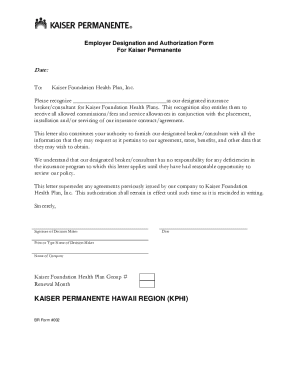
- Begin filling out the form by entering the date in the designated area. Ensure you use the correct format to avoid any delays.
- In the 'To' section, clearly input 'Kaiser Foundation Health Plan, Inc.' to indicate the recipient of the form.
- Designate your insurance broker or consultant by filling in their name completely in the appropriate field to ensure proper recognition.
- Acknowledge that the designated broker/consultant will receive commissions/fees and service allowances by checking or signing the relevant box, if applicable.
- Provide authorization by indicating your agreement for Kaiser Permanente to furnish information to the designated broker/consultant regarding the agreement, rates, and benefits.
- Include the signature of the decision maker to validate the form. Ensure the signature is legible and matches the printed name.
- Fill in and print the name of the decision maker below the signature section to give clear identification of the signer.
- Input your company name so that Kaiser Permanente knows which institution the authorization pertains to.
- Enter your Kaiser Foundation Health Plan Group number in the designated field, as this identifies your group policy.
- Complete any additional fields, such as the renewal month, to finalize your submission.
- Once you have filled out all sections of the form, review for accuracy, and make any necessary corrections before proceeding.
- Save your changes, and download or print the completed form for your records or to share as needed.
Complete your HI Kaiser Permanente BR Form 002 online today for a smoother insurance broker designation experience.